Background check form 2026

Get Form
background check california Preview on Page 1

Here's how it works

01. Edit your background check california online
Type text, add images, blackout confidential details, add comments, highlights and more.
02. Sign it in a few clicks
Draw your signature, type it, upload its image, or use your mobile device as a signature pad.
03. Share your form with others
Send california background check via email, link, or fax. You can also download it, export it or print it out.

How to use or fill out the background check form with our platform

Form edit decoration
9.5
Ease of Setup
DocHub User Ratings on G2
9.0
Ease of Use
DocHub User Ratings on G2
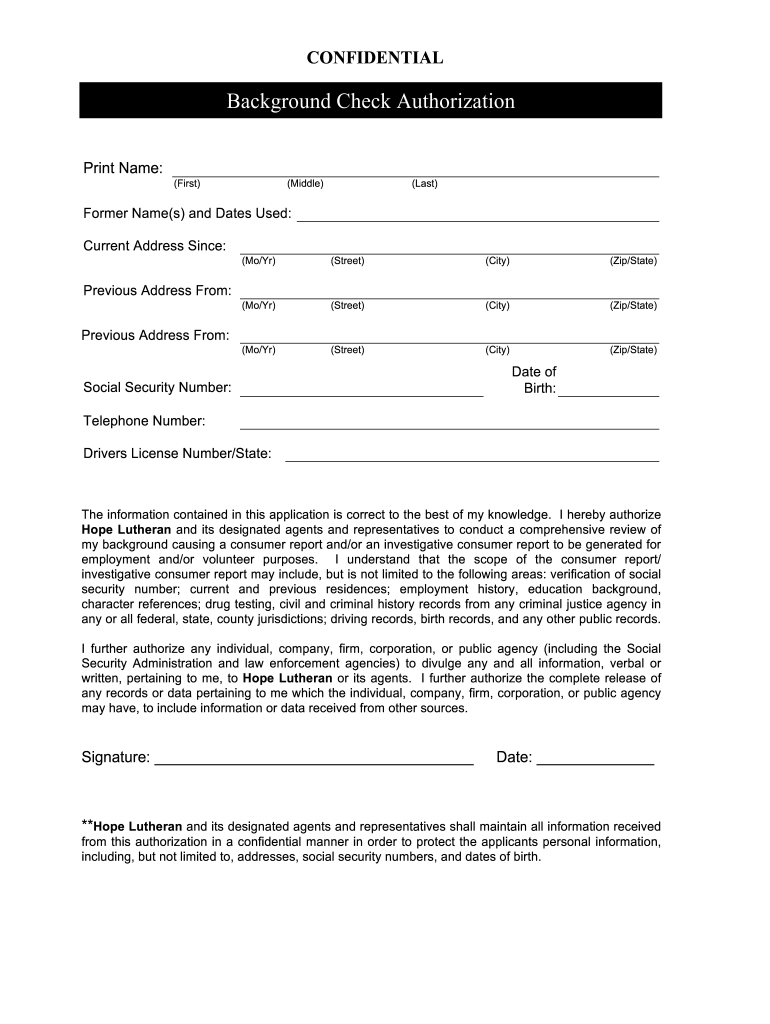
  1. Click ‘Get Form’ to open the background check authorization form in the editor.
  2. Begin by entering your full name in the designated fields: First, Middle, and Last. Ensure accuracy as this information is crucial for identification.
  3. Fill in any former names you have used along with the dates associated with them. This helps in verifying your identity across different records.
  4. Provide your current address, including the street, city, state, and zip code. Include the date you moved in to this address.
  5. If applicable, list previous addresses along with their respective dates. This section may require multiple entries depending on your history.
  6. Enter your Social Security Number and Date of Birth accurately to facilitate background checks.
  7. Complete the contact information section by providing your telephone number and driver's license number/state.
  8. Review all entered information for accuracy before signing and dating the form at the bottom to authorize the background check.

Start using our platform today to easily complete your background check form online for free!

be ready to get more

Complete this form in 5 minutes or less

Get form

Got questions?

We have answers to the most popular questions from our customers. If you can't find an answer to your question, please contact us.
Contact us
Background checks generally cover varying timeframes, such as seven to 10 years for criminal and federal checks, three to seven years for employment verifications, the highest degree earned for education verifications, three to 7 years for MVR checks, and seven years or longer for credit checks based on the position.
It requests information from the applicants director, HR manager, or other supervisor about their employment status, job description, personal information including reasons for leaving previous employment, any disciplinary actions or legal issues, union membership, and an evaluation of their overall performance and
Best for Comprehensive People Searches: TruthFinder. Best for Unlimited Reports: Instant Checkmate. Best for Vehicle Searches: BeenVerified. Best for Budget Searches: Spokeo. Best Background Screening Site Overall: Backgrounds Online. Best for Pre-employment Screenings: Checkr.
Best HR Background Check Software: Pricing Comparison Chart ToolBest For 1 AssureHire Best for compliant background screening for companies of all sizes 2 Deel Best for quickly and compliantly screening international candidates 3 Paycom Best for FCRA-compliant checks 4 Zinc Best for creating a positive candidate experience6 more rows Jun 20, 2025
Individuals can choose to run a personal background check using a screening provider, like GoodHire, or by contacting law enforcement agencies and courts directly to order copies of reports by phone, online, mail, or in person.

People also ask

The most common background checks for employers are criminal record searches. To run a criminal record search on your job applicants, you have several options to choose from: County Criminal History Search:County criminal history searches are the most common form of criminal background check.
A background check form (also called a background check consent form) is a legal document designed to obtain written consent from job applicants before conducting background checks.

employee background check authorization form