Da form 5513 2006-2025

Get Form
da form 5513 Preview on Page 1

Here's how it works

01. Edit your da form 5513 online
Type text, add images, blackout confidential details, add comments, highlights and more.

02. Sign it in a few clicks
Draw your signature, type it, upload its image, or use your mobile device as a signature pad.

03. Share your form with others
Send da 5513 via email, link, or fax. You can also download it, export it or print it out.

How to use or fill out DA Form 5513 2006 with Our Platform

Form edit decoration
9.5
Ease of Setup
DocHub User Ratings on G2
9.0
Ease of Use
DocHub User Ratings on G2
  1. Click ‘Get Form’ to open DA Form 5513 2006 in the editor.
  2. Begin by entering your personal information in Section I. This includes your name, rank, and social security number. Ensure accuracy as this data is crucial for identification.
  3. Proceed to Section II, where you will provide details about the purpose of the form. Clearly state the reason for submission to avoid any confusion.
  4. In Section III, review and complete any additional required fields related to your unit or organization. This section may vary based on specific requirements.
  5. Finally, sign and date the form in Section IV. Use our platform’s signature feature to add your electronic signature easily.

Start using our platform today for free to streamline your document editing and signing process!

See more da form 5513 2006 versions

We've got more versions of the da form 5513 2006 form. Select the right da form 5513 2006 version from the list and start editing it straight away!
Versions Form popularity Fillable & printable
2016 4.8 Satisfied (186 Votes)
2006 4.3 Satisfied (74 Votes)
1993 4.4 Satisfied (547 Votes)
be ready to get more

Complete this form in 5 minutes or less

Get form

Got questions?

We have answers to the most popular questions from our customers. If you can't find an answer to your question, please contact us.
Contact us
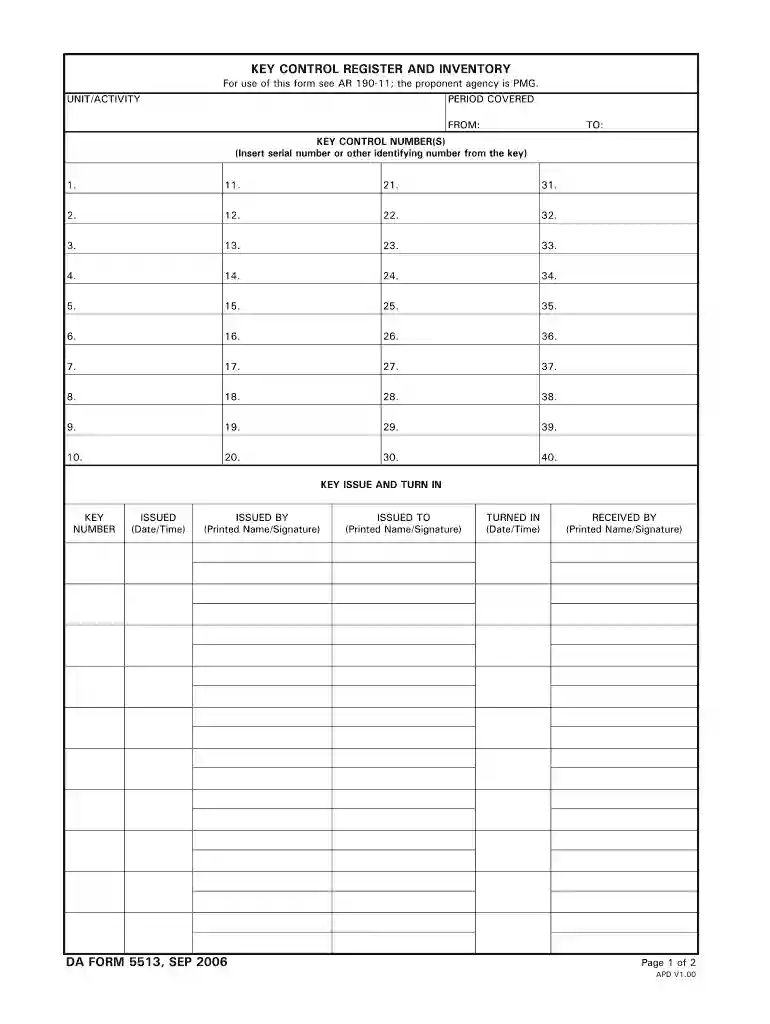
How to fill out DA Form 5513? Start by entering the key number and issue date. Fill in the return date and the name of the person issued to. Record any remarks necessary for accountability. For signatures, verify the type of signature required by checking official guidelines.
DA Form 5515 is used by military personnel to manage ammunition training. Key purposes include: to track ammunition usage. to ensure accountability of training resources.
The DA Form 5513 is known as a Key Control Register and Inventory form. It is used to keep a record of Key Control Numbers in a certain Army unit. These numbers could be serial numbers or another type of identifying number assigned to a piece of equipment.
How long is a DA form 5513 Good For? This DA 5513-R will be used as a receipt to issue keys on a temporary basis (LESS THAN 30 DAYS). It will also be used for the transfer of custody of the keys between the KCC and his alternate. This form will be maintained 90 days after the last entry and then destroyed.
Definition and Purpose of DA Form 5691 DA Form 5691, also known as DA Form 5691-R for Reserve component versions, is a formal document utilized by military personnel to request assignment orders within the U.S. Army Reserve or Army National Guard.