2011Colorado Income Tax Filing Guide - Colorado.gov 2026

Get Form
2011Colorado Income Tax Filing Guide - Colorado.gov Preview on Page 1

Here's how it works

01. Edit your form online
Type text, add images, blackout confidential details, add comments, highlights and more.

02. Sign it in a few clicks
Draw your signature, type it, upload its image, or use your mobile device as a signature pad.

03. Share your form with others
Send it via email, link, or fax. You can also download it, export it or print it out.

How to use or fill out 2011 Colorado Income Tax Filing Guide - Colorado.gov with our platform

Form edit decoration
9.5
Ease of Setup
DocHub User Ratings on G2
9.0
Ease of Use
DocHub User Ratings on G2
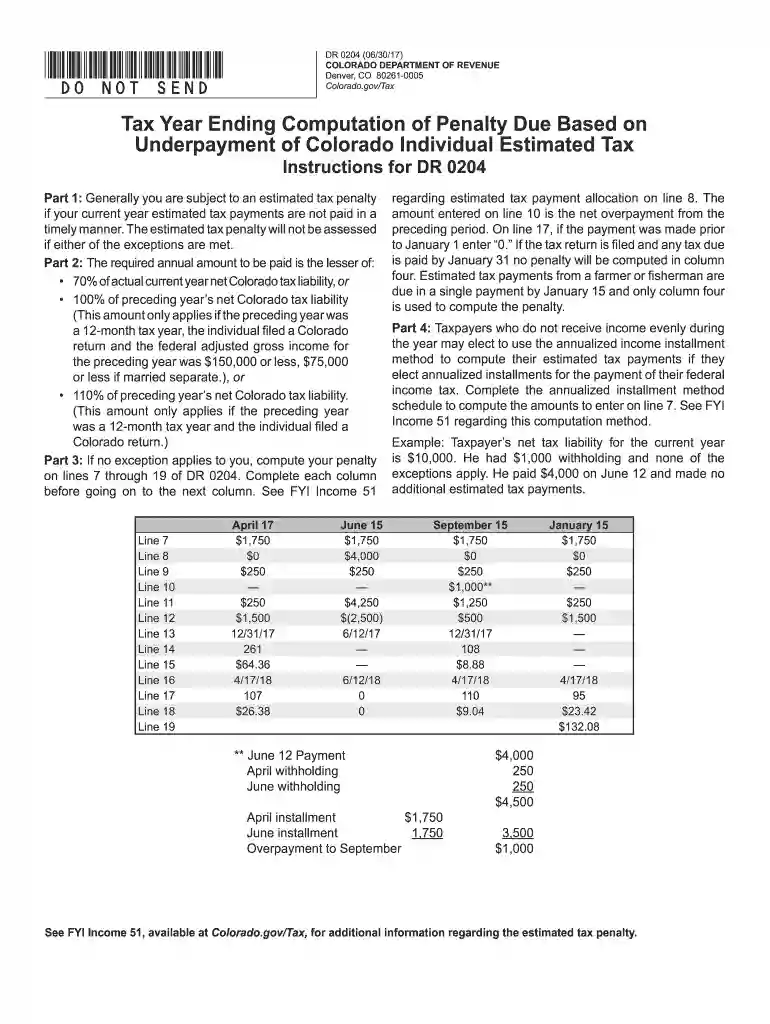
  1. Click ‘Get Form’ to open the 2011 Colorado Income Tax Filing Guide in the editor.
  2. Begin with Part 1, where you will check any applicable exceptions. Fill in your details such as name and Social Security Number.
  3. Move to Part 2 to calculate your required annual payment. Enter your current year tax liability and follow the instructions for lines 4 through 6 carefully.
  4. In Part 3, compute any penalties due by filling out lines 7 through 19. Ensure you complete each column before proceeding to the next.
  5. If applicable, utilize Part 4 for the annualized installment method. Complete the schedule based on your income and tax calculations.

Start using our platform today for free to simplify your tax filing process!

See more 2011Colorado Income Tax Filing Guide - Colorado.gov versions

We've got more versions of the 2011Colorado Income Tax Filing Guide - Colorado.gov form. Select the right 2011Colorado Income Tax Filing Guide - Colorado.gov version from the list and start editing it straight away!
Versions Form popularity Fillable & printable
2023 4.8 Satisfied (45 Votes)
2022 4.9 Satisfied (28 Votes)
2021 4.8 Satisfied (62 Votes)
2020 4.3 Satisfied (206 Votes)
2019 4.2 Satisfied (92 Votes)
2018 4.4 Satisfied (100 Votes)
2017 4.4 Satisfied (102 Votes)
2014 4.3 Satisfied (28 Votes)
be ready to get more

Complete this form in 5 minutes or less

Get form

Got questions?

We have answers to the most popular questions from our customers. If you can't find an answer to your question, please contact us.
Contact us
File online directly with the IRS for free.
Colorado imposes a tax on the income of every Colorado resident individual. Colorado income tax also applies to the Colorado-source income of any nonresident individual.
Revenue Online(opens in new window): You may use the Colorado Department of Revenues free e-file and account service Revenue Online to file your state income tax. You do not need to login to Revenue Online to File a Return.
Yes. Colorado state does not require a copy of the federal return, so filing only a Colorado state return is possible.
Colorado, like many states, applies the 183-day rule. If you spend more than 183 days (approximately six months) in Colorado during a tax year, you may be considered a resident for tax purposes, regardless of where you claim your domicile is located.

Security and compliance

At DocHub, your data security is our priority. We follow HIPAA, SOC2, GDPR, and other standards, so you can work on your documents with confidence.

Learn more
ccpa2
pci-dss
gdpr-compliance
hipaa
soc-compliance

People also ask

Those ages 55 to 64 can deduct up to $20,000 in retirement income, including Social Security. Retirement income above $20,000, including Social Security, is taxed at 4.25 percent, just like regular income.
The state of Colorado isnt ready to start accepting e-filed tax returns. You can e-file your Colorado tax return with TurboTax on January 30, 2025. Well hold your state return until Colorado starts accepting returns the week of February 14, 2025.

Related links