




01. Edit your ohio income tax online
Type text, add images, blackout confidential details, add comments, highlights and more.

Type text, add images, blackout confidential details, add comments, highlights and more.

Draw your signature, type it, upload its image, or use your mobile device as a signature pad.

Send it 1040 via email, link, or fax. You can also download it, export it or print it out.
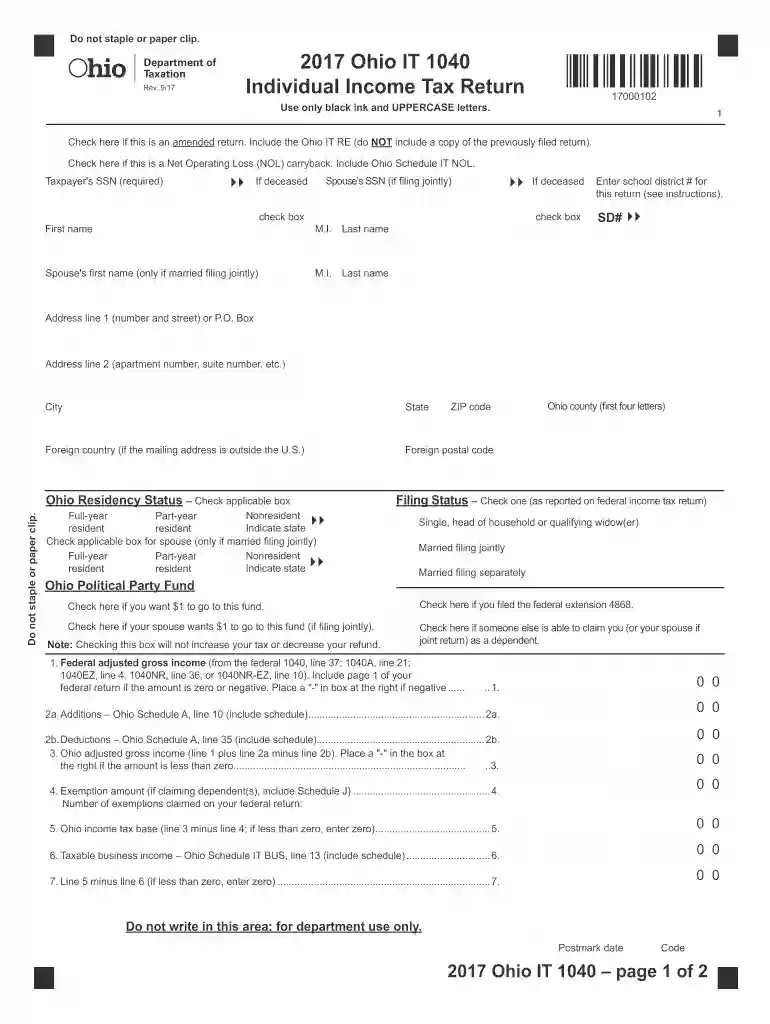
The 2017 Ohio IT 1040 Individual Income Tax Return serves as the annual state tax return form for Ohio residents and part-year residents. It provides the framework for taxpayers to report their state income, calculate tax liabilities, and claim credits or refunds. This form is essential for complying with Ohio's tax regulations and ensuring that individuals accurately account for their income and deductions within the tax year.
Gather Necessary Documents: Before filling out the form, collect all pertinent documents, including W-2 forms, 1099s, and records of other income.
Enter Personal Information: This includes Social Security numbers, names, and filing status. Ensure accuracy to avoid processing delays.
Report Income: Detail all income sources, adhering to the form's structure to ensure comprehensive reporting of taxable income.
Calculate Adjustments: Include adjustments that impact the taxable income, such as retirement contributions, student loan interest, and health savings account deductions.
Claim Exemptions and Credits: Fill in exemption details for dependents and explore available credits like the Earned Income Tax Credit to reduce tax liabilities.
Calculate Tax Due: Use the tax tables and instructions provided within the form to compute the total tax obligation.
Sign and Date: Always remember to sign and date the form before submission; unsigned forms are considered incomplete.
Submit the Form: Follow the instructions for submission either online, via mail, or in person.
The 2017 Ohio IT 1040 form had a standard filing deadline of April 15th, 2018. However, if the date falls on a weekend or holiday, the deadline may shift. Timeliness in submission is crucial to avoid penalties. Extensions, if needed, must also follow established filing guidelines and processes.
Taxpayers should have the following documents ready when completing this form:
Failure to file or pay taxes on time results in penalties:
For those preferring electronic filing, the 2017 Ohio IT 1040 is compatible with various tax software programs, including TurboTax and QuickBooks. These programs guide users through income reporting, deduction calculations, and e-filing procedures, making the process more efficient.
The Ohio Department of Taxation is responsible for issuing the 2017 Ohio IT 1040 form. Ensuring that you always have the most current form and instructions is imperative, as tax rules and regulations may change annually.
At DocHub, your data security is our priority. We follow HIPAA, SOC2, GDPR, and other standards, so you can work on your documents with confidence.


