




Here's how it works



How to use or fill out 90 na18210201744 91 241011 with our platform

- Click ‘Get Form’ to open the document in the editor.
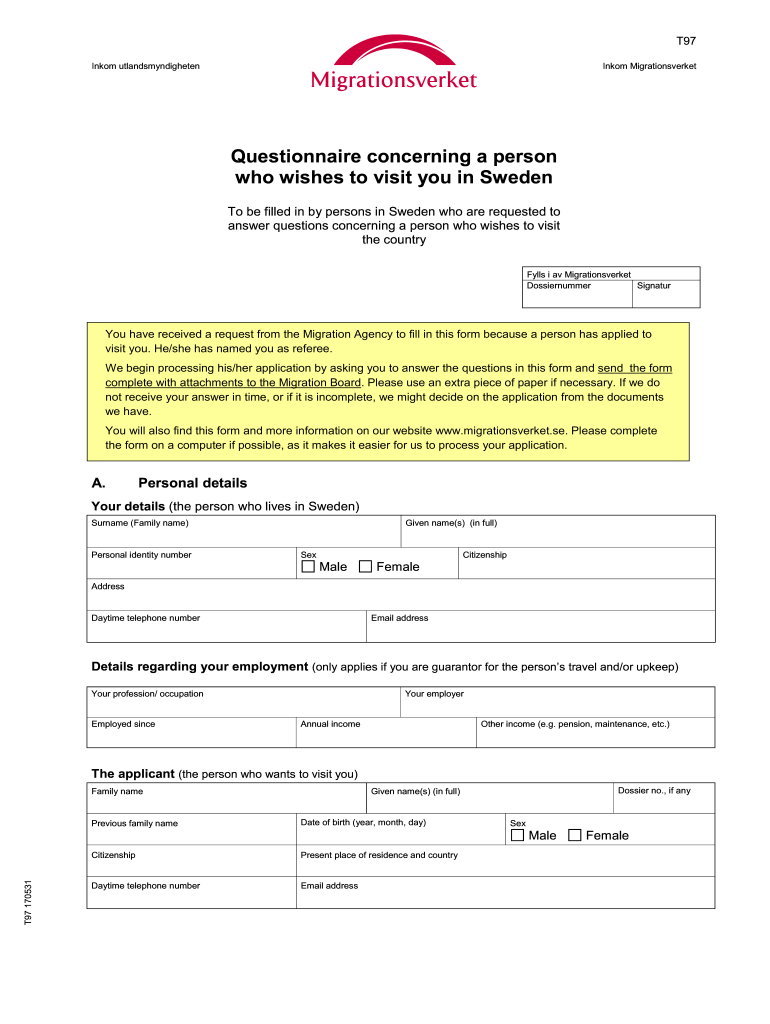
- Begin by filling in your personal details in Section A. Include your full given name, surname, personal identity number, sex, citizenship, address, email address, and daytime telephone number.
- If you are a guarantor for the applicant's travel or upkeep, provide your employment details including profession, employer, annual income, and any other income.
- In Section B, detail the visit by specifying when and for how long the applicant will be visiting you. State the purpose of the visit and where they will be staying.
- Section C requires financial details. Indicate who is covering the journey costs and upkeep during their stay. If someone else is responsible for upkeep, include their name.
- In Section D, describe your relationship with the applicant. Specify if you are related or how you know each other along with how long you've known one another.
- Complete Sections E and F with additional personal details about the applicant and any other relevant information.
- Attach necessary documents as outlined in Section G before signing in Section H to validate your submission.
Start using our platform today to easily complete your form online for free!
It's free
See more 90 na18210201744 91 241011 versions
Got questions?
Can I sign my 90 na18210201744 91 241011 electronically?
Based on eSignature laws, documents signed electronically have the same validity as traditionally approved ones. You can eSign almost any business and private paperwork. Four types of paperwork still require wet signatures only - wills and testamentary trusts, court orders and other court papers, state statutes governing divorce, adoption, or other family law, and notice of cancellation of utility services. If you follow the rules and utilize a trustworthy and compliant software solution, like DocHub, you can eSign your 90 na18210201744 91 241011 without printing it.
How do you get 90 na18210201744 91 241011 for my state?
If you are searching for a state-specific 90 na18210201744 91 241011 sample, you will find it in our DocHub Forms & Templates catalog. Use the search field, key in your form’s name, and search through the results for your state. You can also filter out irrelevant results while browsing our catalog by groups.
Security and compliance
At DocHub, your data security is our priority. We follow HIPAA, SOC2, GDPR, and other standards, so you can work on your documents with confidence.
Learn more




