




01. Edit your 8 25 tax chart texas online
Type text, add images, blackout confidential details, add comments, highlights and more.

Type text, add images, blackout confidential details, add comments, highlights and more.

Draw your signature, type it, upload its image, or use your mobile device as a signature pad.

Send sales tax chart via email, link, or fax. You can also download it, export it or print it out.
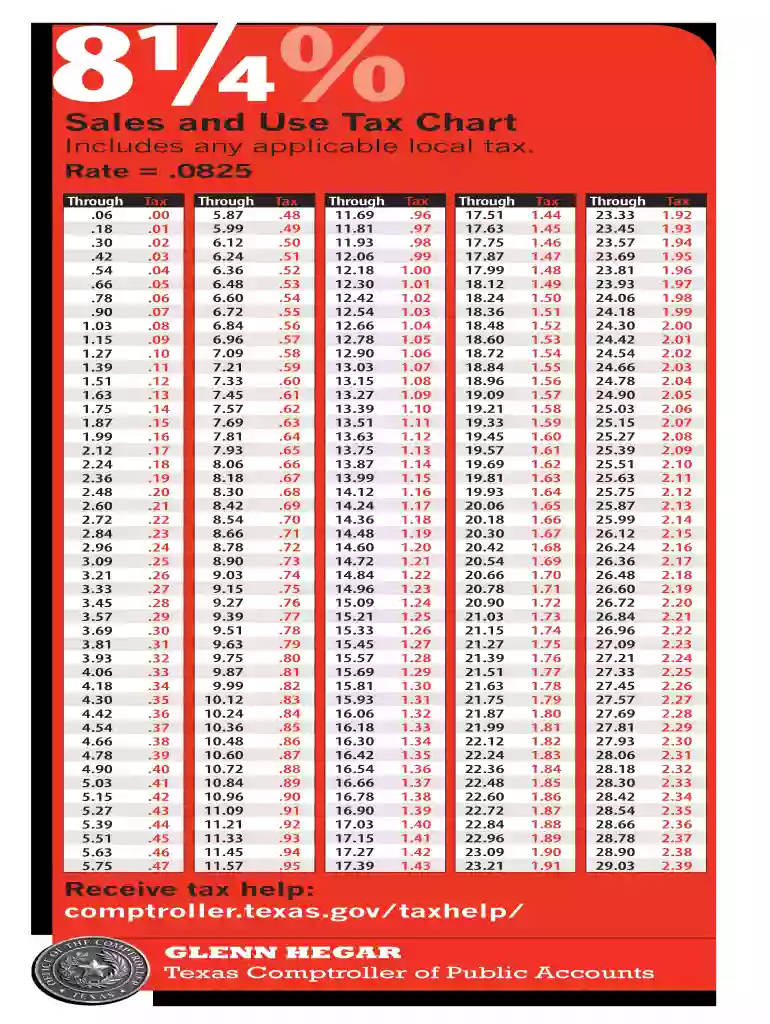
The Texas sales tax chart provides an essential overview of sales and use tax rates applicable throughout the state. This document details the state base rate, local rates, and combined rates that taxpayers need to consider when making purchases or preparing tax documents. The chart typically includes various sales price brackets, along with the corresponding tax amounts, enabling users to calculate taxes effectively for their transactions.
Knowing how to utilize the Texas sales tax chart is crucial for both individuals and businesses. For consumers, it assists in understanding the total cost of purchases, while for businesses, it ensures compliance with state tax regulations. The chart offers clarity on how local jurisdictions may impose additional taxes, which can vary significantly within the state.
Taxpayers need to be aware of the state and local rates that apply to their specific area. For instance, cities like Dallas and Houston have additional local sales taxes on top of the state rate, making the total tax due higher. The Texas sales tax is rated at six and one-quarter percent (6.25%) by the state, but local authorities can add various rates.
The Texas sales tax chart is structured to allow easy calculations of tax based on the sale price. To effectively use the chart, follow these steps:
For example, if an item costs $100 and the total tax rate in your area is eight and one-quarter percent (8.25%), the calculation would be:
The Texas sales tax chart consists of several key elements that users should pay attention to:
The Texas sales tax chart is utilized by a diverse range of individuals and entities, including:
Each jurisdiction within Texas—be it city or county—can impose additional sales tax beyond the base state rate. Here are some points to consider:
Businesses and consumers should continuously monitor any changes in tax legislation that might affect the rates and calculations found in the Texas sales tax chart. This information is crucial for maintaining compliance and ensuring accurate financial planning.
We've got more versions of the 8 25 tax chart texas form. Select the right 8 25 tax chart texas version from the list and start editing it straight away!
At DocHub, your data security is our priority. We follow HIPAA, SOC2, GDPR, and other standards, so you can work on your documents with confidence.
Texas. 6.250%. 13. 1.95%. 8.20%. 14. 2.000%. Utah2. 6.100%. 16. 1.32%. 7.42%. 20. 4.700 Source: The Tax Foundation, State and Local Sales Tax Rates, 2025,Read more
Jan 23, 2018 The Sales Tax Deduction Calculator (IRS.gov/ SalesTax) figures the amount you can claim if you itemize deductions on Schedule A (Form 1040),.Read more
Receive tax help: comptroller.texas.gov/taxhelp/. 81/4%. Sales and Use Tax Chart. Includes any applicable local tax. Rate = .0825. Through Tax .06 .00 .18 .01 .Read more


