Type text, add images, blackout confidential details, add comments, highlights and more.
02. Sign it in a few clicks
Draw your signature, type it, upload its image, or use your mobile device as a signature pad.
03. Share your form with others
Send vtr 125 via email, link, or fax. You can also download it, export it or print it out.
How to use or fill out vtr 125 with our platform
Ease of Setup
DocHub User Ratings on G2
Ease of Use
DocHub User Ratings on G2
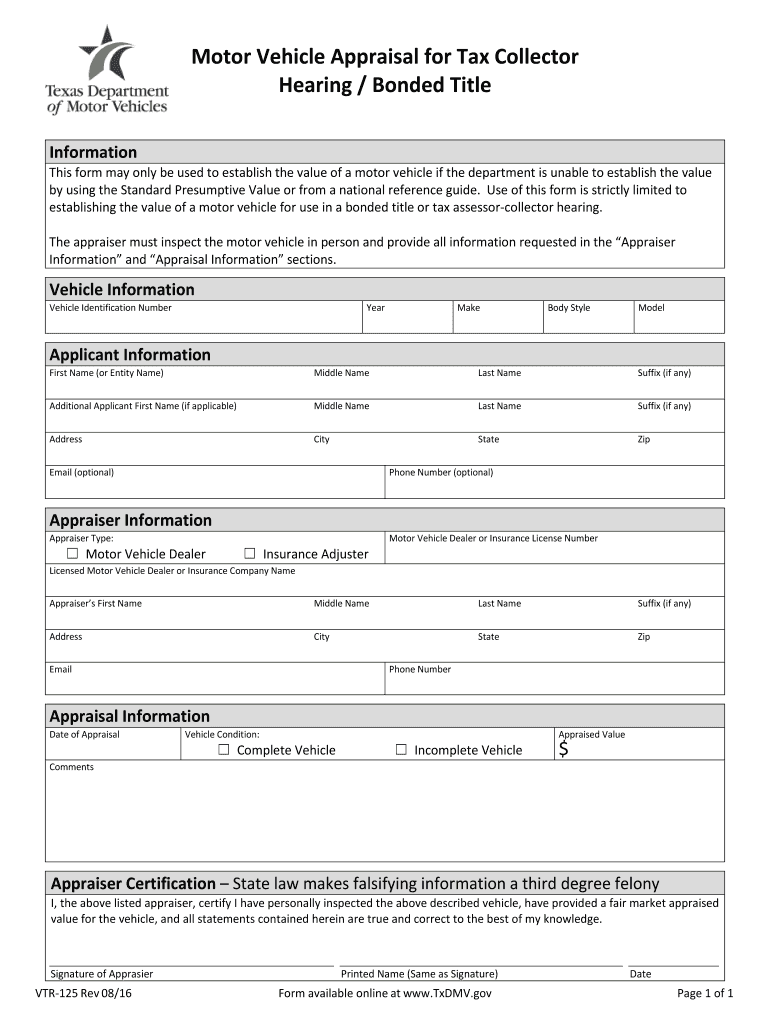
Click ‘Get Form’ to open the vtr 125 in the editor.
Begin by filling out the 'Vehicle Information' section. Enter the Vehicle Identification Number, Year, Make, Body Style, and Model of your vehicle.
Next, complete the 'Applicant Information' section. Provide your first name, middle name, last name, and suffix if applicable. Include additional applicant details if necessary.
In the 'Appraiser Information' section, select your appraiser type and enter the relevant license number. Fill in the appraiser's name and contact information.
Proceed to the 'Appraisal Information' section. Indicate the date of appraisal and select whether the vehicle is complete or incomplete. Add any comments and specify the appraised value.
Finally, ensure you sign in the 'Appraiser Certification' area to confirm that all information is accurate before submitting your form.
Start using our platform today for free to streamline your vtr 125 form completion!
Long-Term Certificate (VTR). Program. Vehicle Technology and Repair (VTR) DEM 125. HEAVY VEHICLE DRIVE TRAINS. 3. DEM 126. ADVANCED ENGINE ANALYSIS. 3. DEMRead more
The HDC4800 is a camera unit, equipped with a newly developed S-35mm 4K CMOS imaging sensor, for a Super. Motion video camera system. When connected with a.Read more
Cookie consent notice
This site uses cookies to enhance site navigation and personalize your experience.
By using this site you agree to our use of cookies as described in our Privacy Notice.
You can modify your selections by visiting our Cookie and Advertising Notice.