
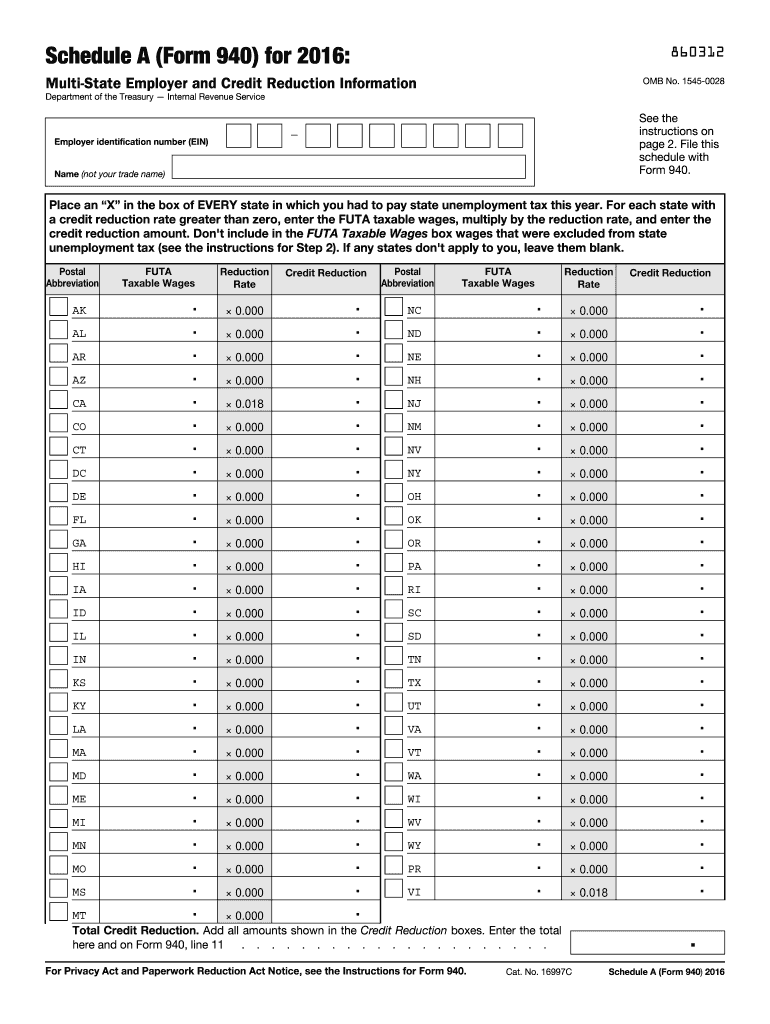







Understanding IRS Form 940 Schedule A for 2016
The IRS Form 940 Schedule A for 2016 is a supplemental form used alongside Form 940 to report multi-state employer information and credit reduction amounts. This document is essential for businesses operating in multiple states, as it helps calculate any credit reductions due to unemployment tax rates.
Steps to Complete IRS Form 940 Schedule A for 2016
-
Gather Required Information: Before starting, collect all necessary data, such as the state unemployment tax payments made throughout the year.
-
Identify Credit Reduction States: Review the list of states subject to credit reductions for 2016 to determine if any states you operated in are included.
-
Calculate Credit Reductions: Use the instructions to calculate the FUTA credit reductions for each affected state. Be thorough to ensure accuracy.
-
Complete the Schedule: Enter the calculated amounts for each state on the form, ensuring all information matches the records.
-
Attach to Form 940: Once complete, attach Schedule A to your Form 940 before submitting it to the IRS.
Who Typically Uses IRS Form 940 Schedule A for 2016
Businesses operating in multiple states that are subject to the Federal Unemployment Tax Act (FUTA) typically use this form. It’s particularly relevant for employers who need to report wages and unemployment taxes across state lines.
Important Terms Related to IRS Form 940 Schedule A for 2016
- FUTA: Federal Unemployment Tax Act, a tax levied on employers to fund state workforce agencies.
- Credit Reduction: A decrease in the FUTA tax credit, resulting in a higher net tax rate for states failing to repay federal unemployment loans.
State-Specific Rules for IRS Form 940 Schedule A for 2016
Each state has unique rules concerning unemployment taxes and credit reductions. Employers should be aware of these variations to accurately report and file taxes.
- Some states might impose additional reporting requirements.
- The credit reduction rates can vary significantly between states, reflecting their specific fiscal situations.
Examples of Using IRS Form 940 Schedule A for 2016
Imagine a company, ABC Corp, operates in three states, two of which are on the credit reduction list. ABC Corp must calculate the credit reductions for these states and report the findings on Schedule A to ensure compliance.
Example: Calculating Credit Reductions
- Identify Credit Reduction Rates: Find rates for each state on the IRS website.
- Apply These Rates to Wages: Multiply state wages by their respective rates to find the reduction amount.
- Total the Reductions: Sum the reduction amounts for all states to complete the form.
IRS Guidelines for IRS Form 940 Schedule A for 2016
The IRS provides specific guidelines on how to complete this form, with detailed instructions available in the Form 940 and Schedule A instructions. These guidelines ensure consistency and accuracy in reporting.
Key Points from IRS Guidelines
- Employers must follow exact instructions to avoid penalties.
- The latest guidelines reflect changes in state credit reduction statuses.
Penalties for Non-Compliance with IRS Form 940 Schedule A for 2016
Failing to accurately complete and submit the form can result in penalties. These can include fines and interest on additional taxes owed due to misreported credit reductions. It is crucial for businesses to adhere strictly to federal regulations.
Filing Deadlines and Important Dates for IRS Form 940 Schedule A for 2016
The completed Schedule A, along with Form 940, must be filed with the IRS by January 31 of the following year. Employers must ensure timely submission to avoid late-filing penalties.
Form Submission Methods for IRS Form 940 Schedule A for 2016
Employers have several options for submitting the completed forms:
- Electronic Filing: Using IRS-approved software or tax professionals.
- Mail: Send paper forms to the appropriate IRS address based on your location.
- In-Person: Though less common, some businesses may submit directly to an IRS office.
Digital vs. Paper Version of IRS Form 940 Schedule A for 2016
Both digital and paper versions are available. While the paper version might suit traditionalists, the digital form offers efficiency, especially when dealing with multiple states.
Benefits of Digital Filing
- Faster processing and acknowledgment by the IRS.
- Reduced risk of misplacement or mail delays.
- Easier correction of errors.
Software Compatibility for IRS Form 940 Schedule A for 2016
Various tax software packages, such as TurboTax and QuickBooks, support the completion and filing of this form. These programs can automate calculations and reduce errors.
Benefits of Using Compatible Software
- Streamlined data entry.
- Automatic updates for state-specific rules.
- Integrated error checks.


