







Definition & Meaning
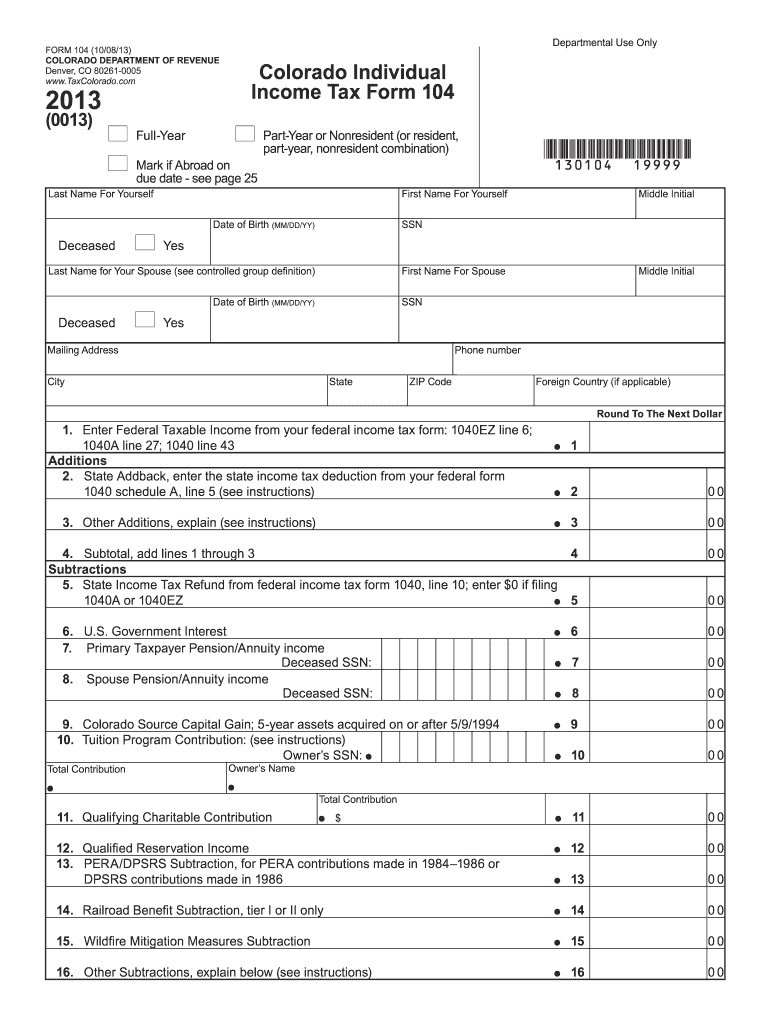
The "2013 104 Colorado Form" is a tax form used by residents and non-residents to report their income for the year 2013 to the Colorado Department of Revenue. It is essential for calculating state taxes owed or potential refunds. The form includes sections dedicated to entering personal information, calculating total income, adjustments, deductions, and credits. This form helps in determining the taxable income for Colorado, catering to both full-time residents and those who have part-year residency or other ties to the state during the tax year of 2013.
Steps to Complete the 2013 104 Colorado Form
-
Personal Information: Begin by filling in your personal details, including name, address, and Social Security Number. Ensure accuracy to avoid processing delays.
-
Income Calculation: Enter all sources of income for 2013. This includes wages, rental income, interest, and dividends. Consult your W-2 and 1099 forms to ensure all income is reported.
-
Adjustments and Deductions: List any applicable adjustments to income such as student loan interest, educator expenses, or retirement contributions. Identify eligible deductions, including mortgage interest and medical expenses, to reduce taxable income.
-
Tax Credits: Add any Colorado-specific tax credits that you qualify for, such as the child tax credit or the earned income tax credit. These credits can directly reduce the amount of tax owed.
-
Calculate Tax Owed or Refund: Use the tax tables provided in the form instructions to calculate your tax liability. Subtract any payments already made or overpaid from previous tax years to determine whether you owe additional taxes or are entitled to a refund.
-
Payment or Refund Method: Indicate how you plan to pay any taxes owed or receive your refund, whether through direct deposit or by mailing a check.
Important Terms Related to the 2013 104 Colorado Form
- Taxable Income: The portion of your total income that is subject to Colorado state taxes after deductions and exemptions.
- W-2: A form that reports wages paid and taxes withheld during the year. Essential for completing the income section of the form.
- 1099 Forms: Various forms (e.g., 1099-DIV, 1099-INT) that report other income types, such as dividends or interest, critical for accurate income reporting.
Required Documents
To accurately complete the 2013 104 Colorado Form, you must have the following documents:
- W-2 Forms: For income from employers.
- 1099 Forms: For additional income sources like freelance work, dividends, or interest.
- Previous Year Tax Return: Useful for reference and understanding prior adjustments.
- Receipts for Deductions: Includes mortgage interest, medical expenses, and charitable donations.
- Social Security Numbers: For yourself, your spouse, and dependents.
Form Submission Methods
Colorado offers multiple submission options for the 2013 104 form:
- Online Filing: The most efficient method, allowing for quicker processing and direct deposit refunds.
- Mail: Suitable for those preferring paper submissions. Ensure that it is postmarked by the tax deadline to avoid penalties.
- In-Person: You can submit at a local Colorado Department of Revenue office for immediate assistance and acknowledgment of receipt.
Filing Deadlines / Important Dates
For the 2013 tax year, the deadline to submit your 104 Colorado Form was typically April 15, 2014. It's crucial to note any extensions granted for filing your taxes and to adhere to these deadlines to avoid penalties. Check with the Colorado Department of Revenue for any changes specific to 2013.
Penalties for Non-Compliance
Failure to file the 104 Colorado Form or pay owed taxes by the deadline can result in fines and interest on unpaid taxes. The penalties increase the longer the taxes remain unpaid. It is strongly advised to file on time or apply for an extension if necessary.
Who Typically Uses the 2013 104 Colorado Form
- Colorado Residents: Persons who lived in Colorado for the entirety of 2013.
- Part-Year Residents: Individuals who moved into or out of Colorado during the year.
- Non-Residents with Colorado Income: Those earning income from Colorado sources like rental properties or local businesses.


Software Compatibility
The 2013 104 Colorado Form is compatible with most tax software, such as TurboTax and QuickBooks. These platforms allow you to import relevant data, complete the form, and file it electronically. By using tax software, taxpayers can leverage error-checking tools and ensure compliance with state regulations seamlessly.




