Type text, add images, blackout confidential details, add comments, highlights and more.
02. Sign it in a few clicks
Draw your signature, type it, upload its image, or use your mobile device as a signature pad.
03. Share your form with others
Send tsp 75 via email, link, or fax. You can also download it, export it or print it out.
How to use or fill out tsp 75 form 2021 pdf with our platform
Ease of Setup
DocHub User Ratings on G2
Ease of Use
DocHub User Ratings on G2
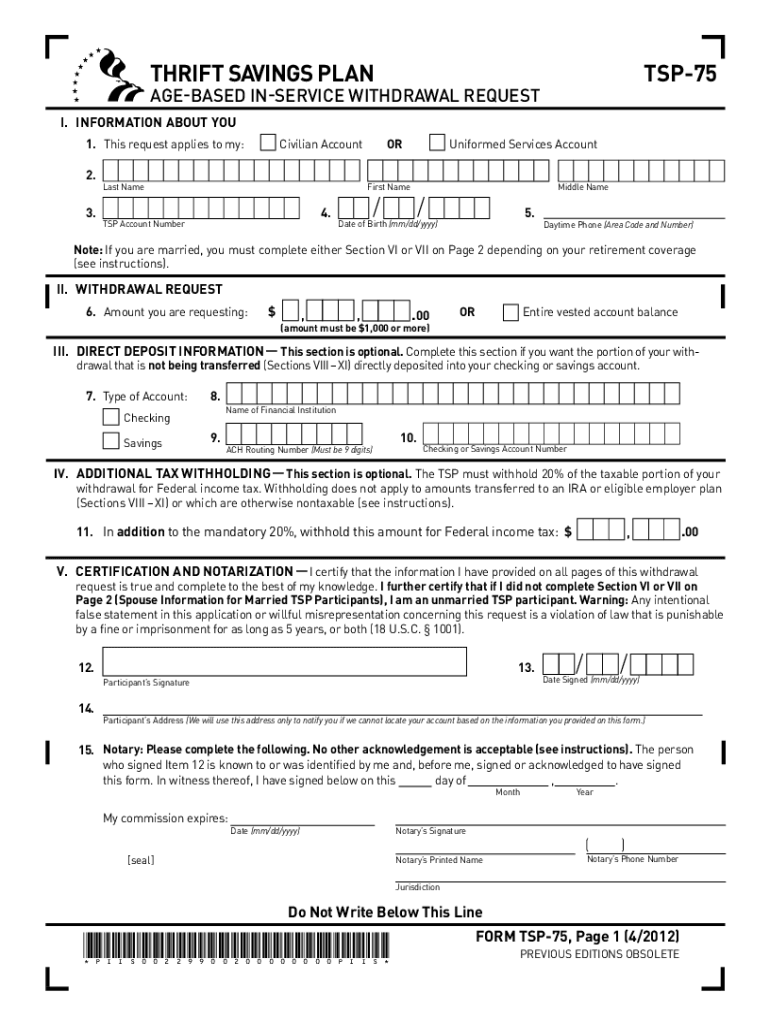
Click ‘Get Form’ to open the TSP-75 form in the editor.
In Section I, provide your personal information including your last name, first name, TSP account number, and date of birth. Ensure you select either 'Civilian Account' or 'Uniformed Services Account'.
Move to Section II to specify the amount you are requesting for withdrawal. You can choose a specific dollar amount (minimum $1,000) or request your entire vested account balance.
If you wish to have your funds directly deposited, complete Section III with your bank details. This section is optional but recommended for convenience.
In Section IV, indicate any additional tax withholding preferences. This section is also optional but important for tax planning.
Complete Section V by signing and notarizing the form. This step is mandatory for processing your request.
If applicable, fill out Sections VI and VII regarding spousal information and ensure that any required signatures are notarized.
For transfers of traditional or Roth balances, complete Sections VIII and IX as needed before submitting the form.
Start using our platform today to easily fill out and submit your TSP-75 form for free!
Tsp 75 form 2021 pdf printableTsp 75 form 2021 pdf pdf downloadTsp 75 form 2021 pdf freeTsp 75 form 2021 pdf downloadTSP-70 form PDFTSP-73 form pdfTSP Beneficiary form pdfTSP-77 form pdf
Security and compliance
At DocHub, your data security is our priority. We follow HIPAA, SOC2, GDPR, and other standards, so you can work on your documents with confidence.
The Indiana Traffic Safety Office is established by Indiana Code 9-27-2 and housed within the Traffic. Safety Division (TSD) of the Indiana Criminal JusticeRead more
Cookie consent notice
This site uses cookies to enhance site navigation and personalize your experience.
By using this site you agree to our use of cookies as described in our Privacy Notice.
You can modify your selections by visiting our Cookie and Advertising Notice.