Louisiana change child school residency form notary 2026

Get Form
residency affidavit for school Preview on Page 1

Here's how it works

01. Edit your residency affidavit for school online
Type text, add images, blackout confidential details, add comments, highlights and more.

02. Sign it in a few clicks
Draw your signature, type it, upload its image, or use your mobile device as a signature pad.

03. Share your form with others
Send proof of residency for school via email, link, or fax. You can also download it, export it or print it out.

How to use or fill out Louisiana Change Child School Residency Form Notary with our platform

Form edit decoration
9.5
Ease of Setup
DocHub User Ratings on G2
9.0
Ease of Use
DocHub User Ratings on G2
  1. Click ‘Get Form’ to open it in the editor.
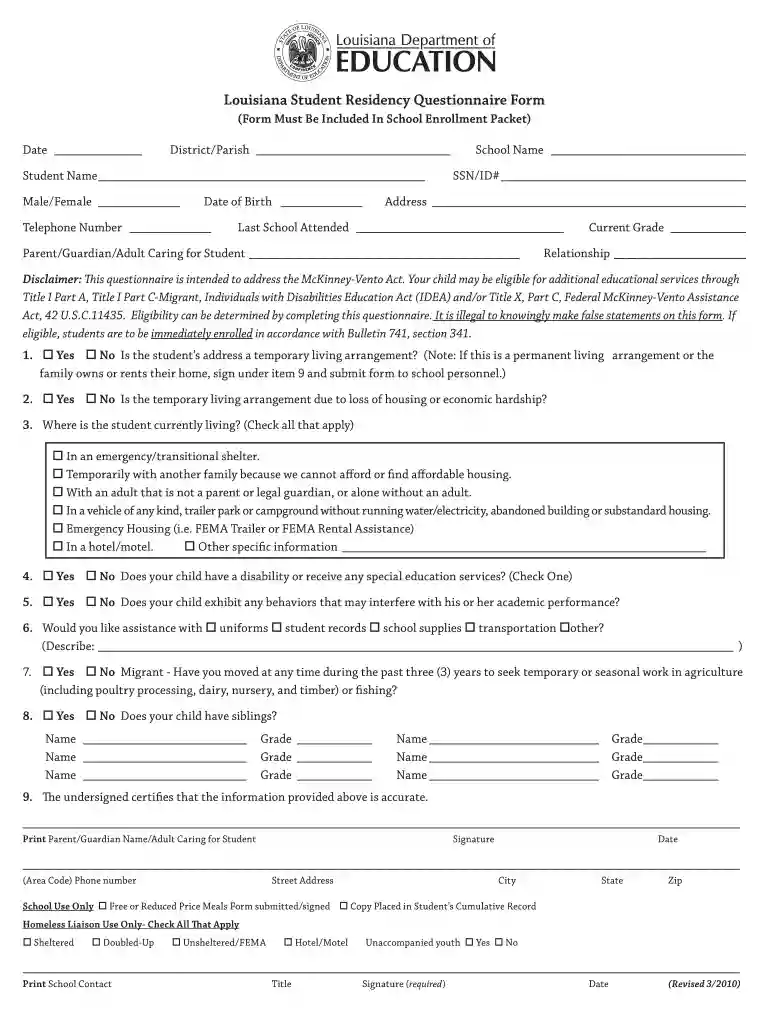
  2. Begin by entering the date and district/parish at the top of the form. This sets the context for your submission.
  3. Fill in the student’s name, gender, date of birth, and telephone number. Accurate information is crucial for school records.
  4. Specify the school name and provide the student’s SSN/ID number. This helps in identifying the student within school systems.
  5. Complete the address section carefully, ensuring it reflects your current living situation.
  6. Indicate the last school attended and provide details about the parent/guardian or adult caring for the student.
  7. Answer questions regarding temporary living arrangements and any disabilities or special education services required by your child.
  8. Finally, certify that all information is accurate by signing and dating at the bottom of the form before submitting it to school personnel.

Start using our platform today to fill out your Louisiana Change Child School Residency Form Notary easily and for free!

See more louisiana change child school residency form notary versions

We've got more versions of the louisiana change child school residency form notary form. Select the right louisiana change child school residency form notary version from the list and start editing it straight away!
Versions Form popularity Fillable & printable
2017 4.8 Satisfied (249 Votes)
2012 4 Satisfied (28 Votes)
2010 4.4 Satisfied (305 Votes)
be ready to get more

Complete this form in 5 minutes or less

Get form

Got questions?

We have answers to the most popular questions from our customers. If you can't find an answer to your question, please contact us.
Contact us
An affidavit of residency is a formal statement acknowledging that an individual occupies a specified address. Once signed and docHubd, it can be presented to agencies and institutions along with supporting documents to prove that the affiant lives at the stated address.
How to get a docHubd affidavit of residency? To get a docHubd affidavit of residency, you need to complete the official form and have it signed by a notary. Notarization is practically the last step. You may fill in all the data and docHub your affidavit of residency form online at the docHub website.
A lease or utility bill in your name would work. If you live with relatives, a copy of a lease or utility bill in their name, with an additional document proving that relationship between you and that relative, should be fine.
A proof of address is a document that confirms where you live. It typically includes your full name and residential address and can come in various forms, such as utility bills, bank statements, rental agreements, or official government correspondence.
School Residency Affidavit: A school residency affidavit is usually required to enrol a child in school. The parent or legal guardian of the child completes this affidavit to verify that the child lives within the school district.

Security and compliance

At DocHub, your data security is our priority. We follow HIPAA, SOC2, GDPR, and other standards, so you can work on your documents with confidence.

Learn more
ccpa2
pci-dss
gdpr-compliance
hipaa
soc-compliance

People also ask

To make a docHubd letter, begin with your contact details, create a clear message explaining the purpose of the letter. Include any legal language if necessary. Conclude with a formal closing and leave space for your signature. And thats how you write a statement that needs to be docHubd.
The notarization serves as proof that the person signing the document is who they claim to be and that theyre signing of their own free will. This helps prevent fraud and ensures that the agreement will hold up in court if necessary.
Two Current Proofs of Residency Two (2) Current Bills (light, cable/internet, water, lease, agreement, or mortgage statement).

sample affidavit of residency for school