01. Edit your esrd medicare application form online
Type text, add images, blackout confidential details, add comments, highlights and more.

02. Sign it in a few clicks
Draw your signature, type it, upload its image, or use your mobile device as a signature pad.

03. Share your form with others
Send 3427 via email, link, or fax. You can also download it, export it or print it out.

How to use or fill out 3427 with our platform
Ease of Setup
DocHub User Ratings on G2
Ease of Use
DocHub User Ratings on G2
Click ‘Get Form’ to open it in the editor.
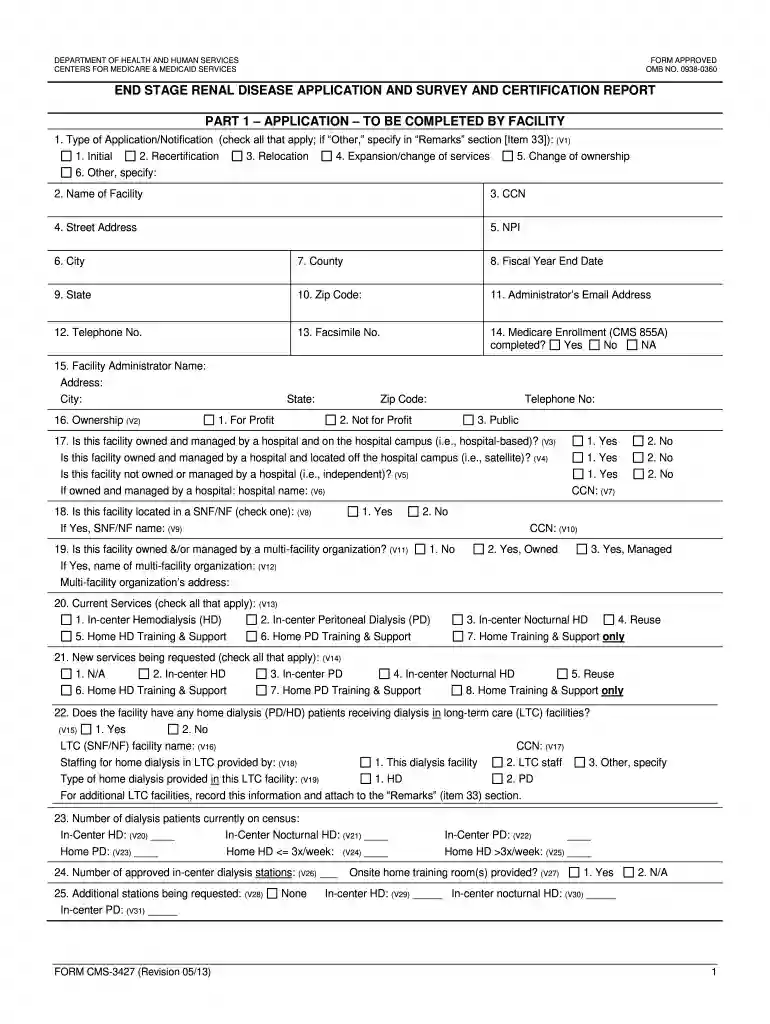
Begin by selecting the type of application you are submitting in Item 1. Check all that apply, including Initial, Recertification, or any other relevant options.
Fill in the identifying information for your facility in Items 2 through 10. Ensure accuracy in the name, address, and contact details.
In Item 20, indicate the current services your facility offers by checking all applicable boxes. For new services requested, complete Item 21 accordingly.
Complete staffing details in Item 30 by listing full-time equivalents for each role. Use the provided guidelines to calculate FTEs accurately.
Finally, review all entries for accuracy and completeness before signing off on the form in Item 34. If necessary, use the Remarks section (Item 33) for additional comments.
Start using our platform today to streamline your form completion process for free!
22 U.S. Code 3427 - Definitions - Cornell Law School
22 U.S. Code 3427 - Definitions the term Treaty of Peace means the Treaty of Peace between the Arab Republic of Egypt and the State of Israel signed onRead more
Cookie consent notice
This site uses cookies to enhance site navigation and personalize your experience.
By using this site you agree to our use of cookies as described in our Privacy Notice.
You can modify your selections by visiting our Cookie and Advertising Notice.