Statement of employer payments 2026

Get Form
statement of employer payments Preview on Page 1

Here's how it works

01. Edit your statement of employer payments online
Type text, add images, blackout confidential details, add comments, highlights and more.
02. Sign it in a few clicks
Draw your signature, type it, upload its image, or use your mobile device as a signature pad.
03. Share your form with others
Send pw 26 via email, link, or fax. You can also download it, export it or print it out.

How to use or fill out statement of employer payments with our platform

Form edit decoration
9.5
Ease of Setup
DocHub User Ratings on G2
9.0
Ease of Use
DocHub User Ratings on G2
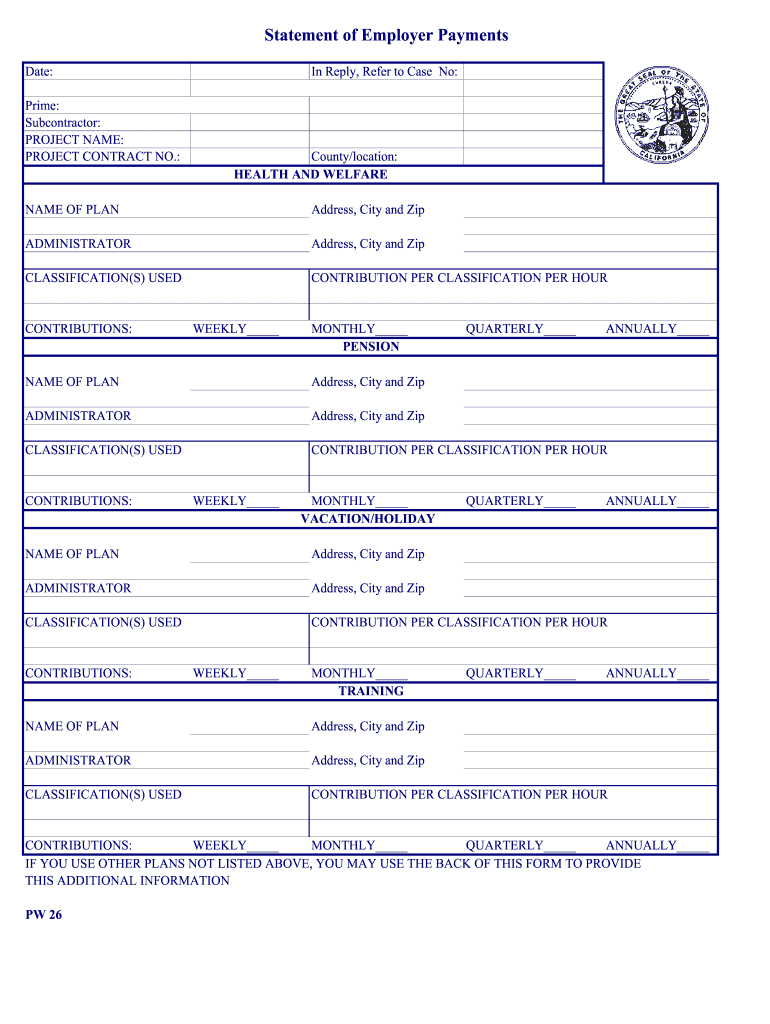
  1. Click ‘Get Form’ to open the statement of employer payments in the editor.
  2. Begin by entering the date at the top of the form. This is essential for record-keeping.
  3. Fill in the 'Prime' and 'Subcontractor' fields with the relevant company names.
  4. Specify the 'PROJECT NAME' and 'PROJECT CONTRACT NO.' to identify the project associated with these payments.
  5. In the 'County/location' section, provide details about where the project is located.
  6. For each plan (Health and Welfare, Pension, Vacation/Holiday, Training), enter the name of the plan and its administrator's address. Include contributions per classification per hour as applicable.
  7. Indicate contributions on a weekly, monthly, quarterly, or annual basis as required for each plan.
  8. If there are additional plans not listed, utilize the back of this form to provide that information.

Start using our platform today to streamline your document editing and form completion for free!

be ready to get more

Complete this form in 5 minutes or less

Get form

Got questions?

We have answers to the most popular questions from our customers. If you can't find an answer to your question, please contact us.
Contact us
Employers must pay payroll taxes every pay period. These include: Social Security, taxed at 6.2% for employees and 6.2% for the employer up to the taxable earnings cap. Medicare, taxed at 1.45% for employees and 1.45% for the employer. State unemployment taxes (varies by state)
An employer can submit an Employer Payment Summary (EPS) to advise HMRC that: no payments have been made to employees in a tax month (no FPS is due) they will not be making payments to employees for a future period (period of inactivity) they have ceased employing staff.
The benefit statement can include specific information about an employees compensation and benefits such as: Base salary or regular earnings. Specific additional earnings, such as bonuses. Employee and employer contributions to specific insurance benefits.
Employers pay Class 1A and 1B National Insurance on expenses and benefits they give to their employees. The rate from 6 April 2025 to 5 April 2026 on expenses and benefits is 15%. They must also pay Class 1A on some other lump sum payments, for example redundancy payments.
The Basic Formula for Estimating Employee Cost A commonly used formula estimates that the total cost of an employee is 1.25 to 1.4 times their base salary. This figure considers the additional expenses employers incur, such as benefits, payroll taxes and even recruitment costs.

Security and compliance

At DocHub, your data security is our priority. We follow HIPAA, SOC2, GDPR, and other standards, so you can work on your documents with confidence.

Learn more
ccpa2
pci-dss
gdpr-compliance
hipaa
soc-compliance

People also ask

Employers must deposit and report federal employment taxes. Some of these taxes are paid by both the employer and the employee, while others are paid by the employer. Examples include federal income tax, Social Security tax, Medicare tax and federal unemployment tax.
A salary is a form of periodic payment from an employer to an employee, which may be specified in an employment contract.

Related links