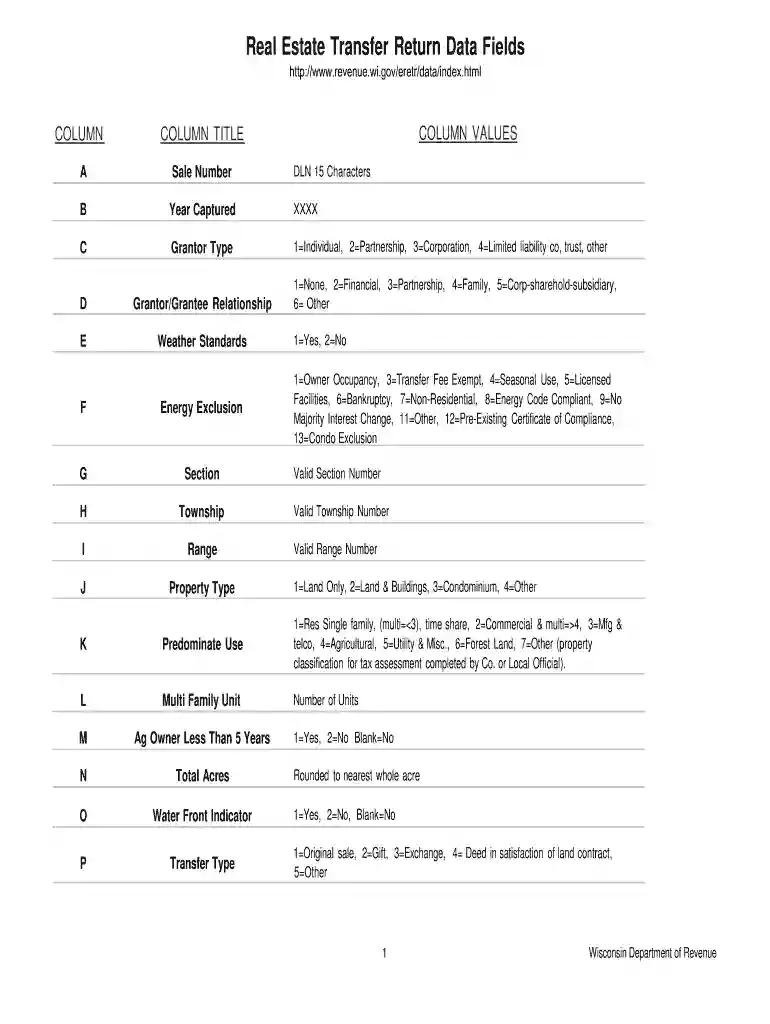
wisconsin real estate transfer return form Preview on Page 1

Wisconsin real estate transfer return form 2026

Here's how it works

  • 01. Edit your wisconsin real estate transfer return form online

    Type text, add images, blackout confidential details, add comments, highlights and more.

  • 02. Sign it in a few clicks

    Draw your signature, type it, upload its image, or use your mobile device as a signature pad.

  • 03. Share your form with others

    Send electronic real estate transfer return via email, link, or fax. You can also download it, export it or print it out.

How to use or fill out Wisconsin Real Estate Transfer Return Form with our platform

Form edit decoration
9.5
Ease of Setup
DocHub User Ratings on G2
9.0
Ease of Use
DocHub User Ratings on G2
  1. Click ‘Get Form’ to open the Wisconsin Real Estate Transfer Return Form in the editor.
  2. Begin by filling in the 'Sale Number' and 'Year Captured' fields at the top of the form. This information is essential for tracking the transaction.
  3. Next, specify the 'Grantor Type' by selecting from options such as Individual, Partnership, or Corporation. This helps identify who is transferring the property.
  4. Complete the 'Grantor/Grantee Relationship' section to clarify the relationship between parties involved in the transfer.
  5. Proceed to fill out property details including 'Township', 'Range', and 'Property Type'. Ensure accuracy as these affect tax assessments.
  6. In sections like 'Total Real Estate Value' and 'Transfer Fee', input rounded dollar amounts as required. This ensures compliance with state regulations.
  7. Finally, review all entries for accuracy before saving or submitting your completed form through our platform.

Start using our platform today to effortlessly complete your Wisconsin Real Estate Transfer Return Form for free!

be ready to get more

Complete this form in 5 minutes or less

Security and compliance

At DocHub, your data security is our priority. We follow HIPAA, SOC2, GDPR, and other standards, so you can work on your documents with confidence.

wisconsin electronic real estate transfer return form

DOR Real Estate Transfer Return (RETR)

File a RETR Change/amend a RETR​ View a RETR Make a payment Search Wisconsin property data Download historical RETR data

Learn more
Wisc Dept Of Revenue Forms

Wisc Dept Of Revenue Forms - Web wisconsin department of revenues real estate transfer return data site. Web find wisconsin income tax forms, tax brackets andRead more

Learn more
2017 Publication 554

Jan 23, 2018 Dont include any social security benefits unless (a) you are married filing separately and you lived with your spouse at any time in 2017 or (b)Read more

Learn more
If you believe that this page should be taken down, please follow our DMCA take down process here