




01. Edit your form online
Type text, add images, blackout confidential details, add comments, highlights and more.

Type text, add images, blackout confidential details, add comments, highlights and more.

Draw your signature, type it, upload its image, or use your mobile device as a signature pad.

Send it via email, link, or fax. You can also download it, export it or print it out.
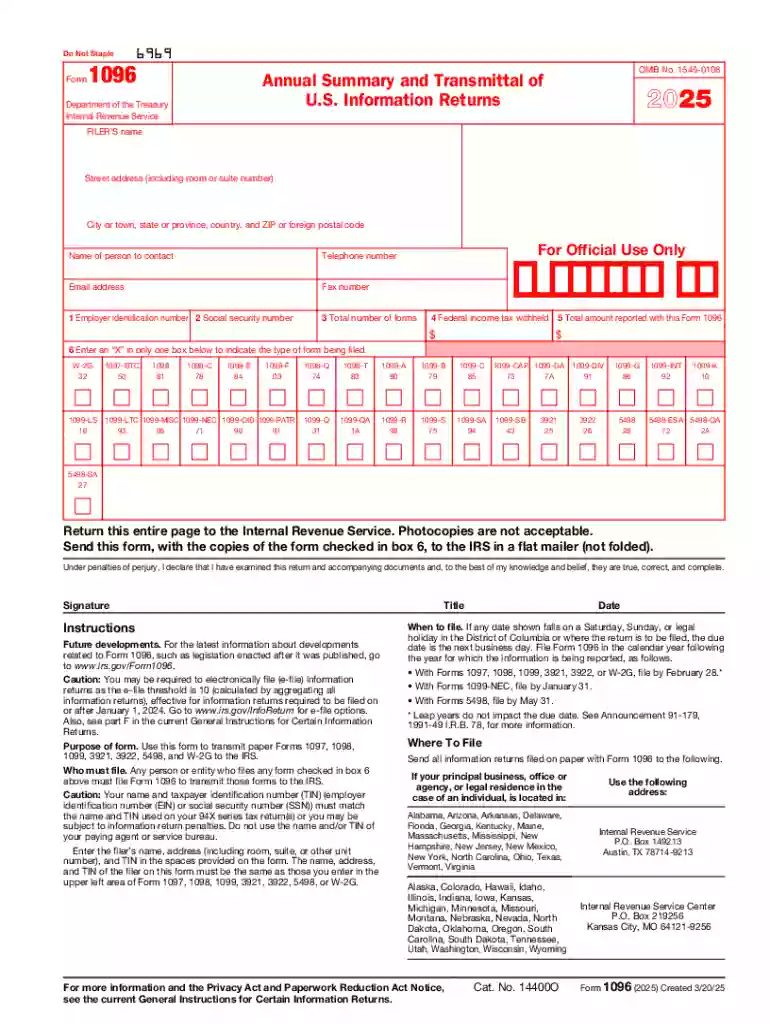
Form 1096, also known as the "Annual Summary and Transmittal of U.S. Information Returns," is a summary form used by businesses in the United States to transmit paper copies of various IRS forms, such as the 1099 series. It acts as a cover sheet for the bundle of forms being submitted to the IRS and is crucial for the accurate reporting of miscellaneous income paid to independent contractors, as well as other types of informational returns. The IRS requires this form to accompany each submission of paper information returns, ensuring that businesses provide a summarized account of reported payments and withheld taxes.
Small businesses, freelancers, and corporations often use Form 1096 when submitting multiple paper information returns to the IRS. Entities that pay non-employees, such as independent contractors, rents, royalties, or other types of miscellaneous income, typically file a Form 1096 alongside their batch of 1099 forms. This form is also used when submitting forms like 1098, 1097, and others covered under the regulations for information reporting. While electronic filing is prevalent, entities submitting fewer than 250 forms can choose to file using paper forms.
Form 1096 captures vital data necessary for IRS processing and includes elements such as:
These elements ensure a comprehensive summary of the forms submitted, which facilitates the IRS's processing of tax documentation.
Form 1096 can be obtained directly from the IRS by ordering it through the IRS website or by calling the designated IRS phone number to request mailed copies. It is important to note that you cannot download a printable PDF of Form 1096 from the IRS website, as it requires a machine-readable version for processing. Tax software providers or third-party vendors may also offer Form 1096 as an option when filing taxes electronically.
Each step requires attention to detail to ensure accuracy and compliance with IRS filing guidelines.
Form 1096 must be filed with the IRS by February 28th for paper submissions, provided the forms it accompanies are due to recipients by January 31st. If filing electronically, the deadline extends to March 31st. Timely filing ensures compliance with IRS regulations and helps avoid potential penalties.
Failing to file Form 1096 or submitting it incorrectly can result in penalties from the IRS. These penalties vary based on the delay in filing or correcting errors after submission deadlines have passed. Penalties can range from $50 to $290 per form, increasing with the degree of lateness. In severe cases, intentional disregard can lead to a penalty of up to $580 per form. It's essential to file the form accurately and on time to avoid these financial penalties.
Although Form 1096 is a federal document, some states have additional requirements for submitting similar forms to state tax departments. Businesses should check rules specific to their state, as procedures, deadlines, and required documentation may differ. Understanding state-specific mandates ensures comprehensive compliance with both federal and state tax obligations.
Form 1096 is compatible with widely-used accounting and tax preparation software like TurboTax, QuickBooks, and other IRS-approved e-filing solutions. These platforms simplify the integration of digital filing methods with compliance workflows, ensuring accuracy and efficiency in submitting both Form 1096 and its associated information returns. Software compatibility allows for seamless electronic submissions, which can be particularly advantageous for businesses looking to streamline their tax reporting processes.
The IRS provides specific instructions for completing Form 1096, which are updated periodically. Taxpayers should always refer to the latest IRS guidelines and instructions to ensure compliance with current procedures. Changes in tax law or IRS processing rules may impact filing requirements, making it imperative for businesses to stay informed about any updates related to the submission of Form 1096 and its associated documents.
At DocHub, your data security is our priority. We follow HIPAA, SOC2, GDPR, and other standards, so you can work on your documents with confidence.



-Use this form to transmit Forms 1099 and. 5498 to the Internal Revenue Service. However, use Form W-3G to transmit Form 1099R. Enter your name, address, andRead more
Jun 6, 2025 Use Form 1096 to transmit paper Forms 1097, 1098, 1099, 3921, 3922, 5498, and W-2G to the Internal Revenue Service.Read more
List the organizations five current highest compensated employees (other than an officer, director, trustee, or key employee) who received reportableRead more


