






Understanding Form 1099-R
Form 1099-R is a critical document used in the United States to report distributions from pensions, annuities, retirement plans, and Individual Retirement Arrangements (IRAs). These distributions can include rollover contributions to a qualified plan, values from life insurance contracts, and untaxed amounts from traditional IRAs. This form is pivotal for ensuring that both the IRS and the recipient are aware of any taxable income from these accounts.
Obtaining Form 1099-R
Employers or plan administrators typically issue Form 1099-R. It can usually be obtained by current or former account holders when there is a distribution from their retirement account. If the form is misplaced, recipients can request a copy from the issuer, or possibly download it from their retirement plan provider’s online portal. Additionally, for tax filing, the IRS website provides downloadable versions of the form for personal record-keeping.
Completing the Form 1099-R
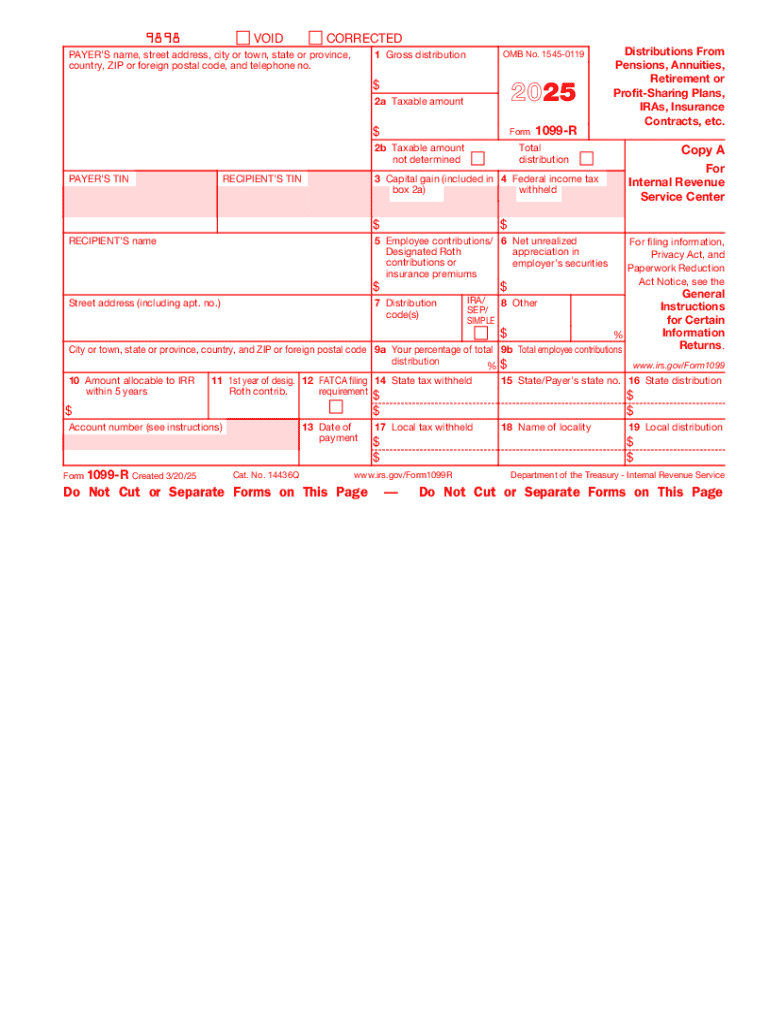
Filling out Form 1099-R requires attention to detail as it involves various boxes that capture different aspects of the retirement distribution. Below is a step-by-step guide on completing the form:
-
Contact Information: Fill in the issuer's and recipient's contact details. This ensures the IRS can contact both parties if there are any questions.
-
Account Numbers: Provide both the recipient's tax identification number and the issuer's federal identification number.
-
Gross Distribution: Indicate the total amount of the distribution in Box 1.
-
Taxable Amount: Specify the taxable portion in Box 2a, adhering to IRS guidelines on what portion of the distribution is taxable.
-
Distribution Codes: Use Box 7 to enter the appropriate code to describe the type of distribution, such as a distribution due to retirement or disability.
-
State Information: If applicable, fill in state-specific tax information, including state tax withheld, for recipients residing in states with income tax.
Key Elements and Terms
When dealing with Form 1099-R, several terms and elements are crucial:
-
Gross Distribution: Total retirement distribution amount before any deductions.
-
Taxable Amount: The portion of the distribution subject to income tax.
-
Distribution Code: A two-digit code that provides information about the nature of the distribution.
-
Federal and State Tax Withheld: Taxes deducted from the distribution before the recipient receives it.
It's important to understand these elements to ensure accurate reporting and to avoid mistakes that could lead to penalties.
IRS Guidelines and Filing Deadlines
According to IRS guidelines, recipients need to receive Form 1099-R by January 31 following the tax year of the distribution, while issuers must file the form with the IRS by February 28 if filing on paper, or March 31 if filing electronically. Familiarity with these dates ensures compliance, helping both taxpayers and entities avoid late filing penalties.
Penalties for Non-Compliance
Failure to properly report distributions using Form 1099-R can result in penalties. Issuers who do not comply with guidelines and deadlines may incur fines. Taxpayers receiving distributions should also ensure these distributions are accurately reported on their income tax returns, as failure to do so can lead to inaccurate tax withholdings and possible penalties.
Form 1099-R Submission Methods
Form 1099-R can be submitted in several ways:
-
Online Submission: Use the FIRE (Filing Information Returns Electronically) system for electronic submissions to the IRS.
-
Mail: Paper forms can be sent to the appropriate IRS address as specified in the form instructions.
Utilizing electronic submission is encouraged for its speed and traceability, minimizing delays and errors common with paper submissions.
Advantages of Digital Over Paper Versions
Using a digital version of Form 1099-R facilitates easier editing, error correction, and submission. It allows users to fill out, submit, and store the form electronically, reducing paper clutter and enhancing record retrieval. Digital storage also provides an easy track of submission confirmations and notifications from the IRS, leading to an efficient handling of tax matters.
Software Compatibility with Form 1099-R
Several tax software applications, including TurboTax and QuickBooks, support Form 1099-R, offering integration that simplifies data importation, reducing manual entry errors. These applications provide guided instructions, ensuring that the form is completed according to IRS standards, and they also support electronic filing, streamlining the process further.
These blocks offer a comprehensive insight into Form 1099-R, providing individuals and organizations with the necessary knowledge to accurately handle distributions from retirement and related accounts. With careful attention to instructions and timely submissions, this form assists in maintaining transparent and compliant financial reporting.