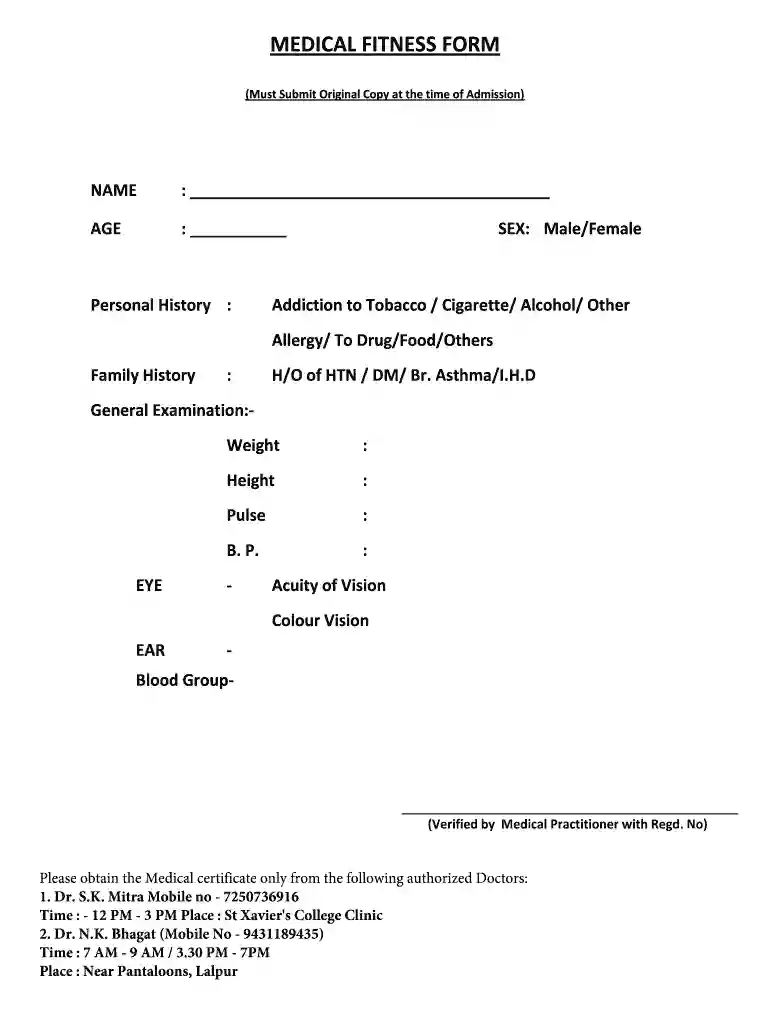
Medical fitness certificate for nursery admission 2026

Get Form
medical fitness certificate format Preview on Page 1

Here's how it works

01. Edit your medical fitness certificate format online
Type text, add images, blackout confidential details, add comments, highlights and more.

02. Sign it in a few clicks
Draw your signature, type it, upload its image, or use your mobile device as a signature pad.

03. Share your form with others
Send medical certificate for college admission via email, link, or fax. You can also download it, export it or print it out.

Overview of the Medical Fitness Certificate for Nursery Admission

A medical fitness certificate for nursery admission is a crucial document required for young children seeking enrollment in nursery or preschool programs. This certificate attests to a child's physical and health status, ensuring that they are fit to participate in the activities and environment of a nursery.

Essential Elements of the Medical Fitness Certificate

A comprehensive medical fitness certificate should include the following key components:

  • Child’s Identification Information: This includes the child's full name, date of birth, and any identification number if applicable.
  • Parent or Guardian Details: Contact information for the parent or guardian should be included to ensure that officials can reach them if necessary.
  • Medical History Overview: A summary of the child's medical history, including allergies, chronic conditions, and past significant illnesses, helps assess their fit for nursery activities.
  • Physical Examination Results: This involves a description of the outcomes from the physical check-up, covering vital signs, height, weight, and any observed physical abnormalities.
  • Immunization Records: Verification that the child has received all necessary vaccinations according to the state and local health regulations is typically a requirement. This includes information on vaccines like MMR (measles, mumps, rubella) and DTaP (diphtheria, tetanus, pertussis).

Steps to Obtain a Medical Fitness Certificate

Acquiring a medical fitness certificate involves a clear set of steps:

  1. Schedule an Appointment: Parents should arrange a visit to a qualified healthcare provider, such as a pediatrician, for a health assessment.
  2. Complete Necessary Paperwork: Prior to the appointment, families may need to fill out forms detailing the child's medical history and any specific concerns.
  3. Undergo a Comprehensive Physical Exam: The healthcare provider will conduct a thorough assessment of the child’s health during the visit. This may also include vision and hearing tests to ensure comprehensive fitness.
  4. Receive the Certificate: Upon successful evaluation, the healthcare provider will issue the medical fitness certificate. This document should be signed, dated, and possibly stamped by the medical professional.

Formatting the Medical Fitness Certificate

Employing a standardized format for the medical fitness certificate can ensure clarity and uniformity. Key formats often include:

  • Official Letterhead: The certificate should be printed on the healthcare provider’s letterhead to validate authenticity.
  • Clear Sections: Sectioning the document into easily readable parts—such as the child's details, medical evaluation, and provider’s signature—allows for quick reference.
  • Compliance with State Requirements: Ensure the certificate meets any specific requirements released by local educational institutions or state health departments to avoid complications during the admission process.

Compliance and Considerations

When preparing the medical fitness certificate for nursery admission, several compliance issues should be considered:

  • State Regulations: Different states in the U.S. may have distinct requirements regarding the medical examinations and immunizations required for nursery admissions. It is essential to be versed in local laws.
  • Timeliness: Certificates are often only valid for a specific period; thus, parents should confirm the timing of the examination to align with application deadlines.
  • Updates for Ongoing Health Issues: Should a child develop new health conditions after the initial examination, an updated certificate may be required before admission.

Importance of the Medical Fitness Certificate for Admission

The medical fitness certificate serves several important functions in nursery admissions:

  • Child Safety: It ensures that children attending nursery are in good health, thus minimizing the risk of illness spread and promoting a healthy environment.
  • Preparedness for Emergencies: Having a comprehensive medical history readily available enables nursery staff to respond effectively in case of health emergencies.
  • Parental Awareness: The process of obtaining a medical fitness certificate encourages parents to remain informed about their children's health status, fostering better long-term health management.

This detailed coverage highlights the significance and intricacies of acquiring a medical fitness certificate for nursery admission, shedding light on necessary steps, essential elements, and compliance factors involved in this essential document.

See more medical fitness certificate for nursery admission versions

We've got more versions of the medical fitness certificate for nursery admission form. Select the right medical fitness certificate for nursery admission version from the list and start editing it straight away!
Versions Form popularity Fillable & printable
2012 4.5 Satisfied (30 Votes)
be ready to get more

Complete this form in 5 minutes or less

Get form

Got questions?

We have answers to the most popular questions from our customers. If you can't find an answer to your question, please contact us.
Contact us

Yes, you’ll find many different apps for this on the web. However, if you need to eSign your medical fitness certificate for students without installing extra software, DocHub is the optimum choice you can make. This powerful editor works on mobile devices just as on desktops. Open our editor in any internet browser, register or sign in to your account, and start managing your forms.

If you choose analog methods of completing your fitness certificate format, it is simple to download your file for printing. Search DocHub’s Forms & Templates catalog to find the exact document template you need and open it for editing or download it on your device in the format of your choice. It is easy to complete your form electronically and put your handwritten signature on it after printing or eSign your document with DocHub.

Security and compliance

At DocHub, your data security is our priority. We follow HIPAA, SOC2, GDPR, and other standards, so you can work on your documents with confidence.

Learn more
ccpa2
pci-dss
gdpr-compliance
hipaa
soc-compliance
be ready to get more

Complete this form in 5 minutes or less

Get form