Dme insurance verification template 2026

Get Form
dme insurance verification Preview on Page 1

Here's how it works

01. Edit your dme insurance verification online
Type text, add images, blackout confidential details, add comments, highlights and more.

02. Sign it in a few clicks
Draw your signature, type it, upload its image, or use your mobile device as a signature pad.

03. Share your form with others
Send insurance verification form template via email, link, or fax. You can also download it, export it or print it out.

How to use or fill out dme insurance verification template with our platform

Form edit decoration
9.5
Ease of Setup
DocHub User Ratings on G2
9.0
Ease of Use
DocHub User Ratings on G2
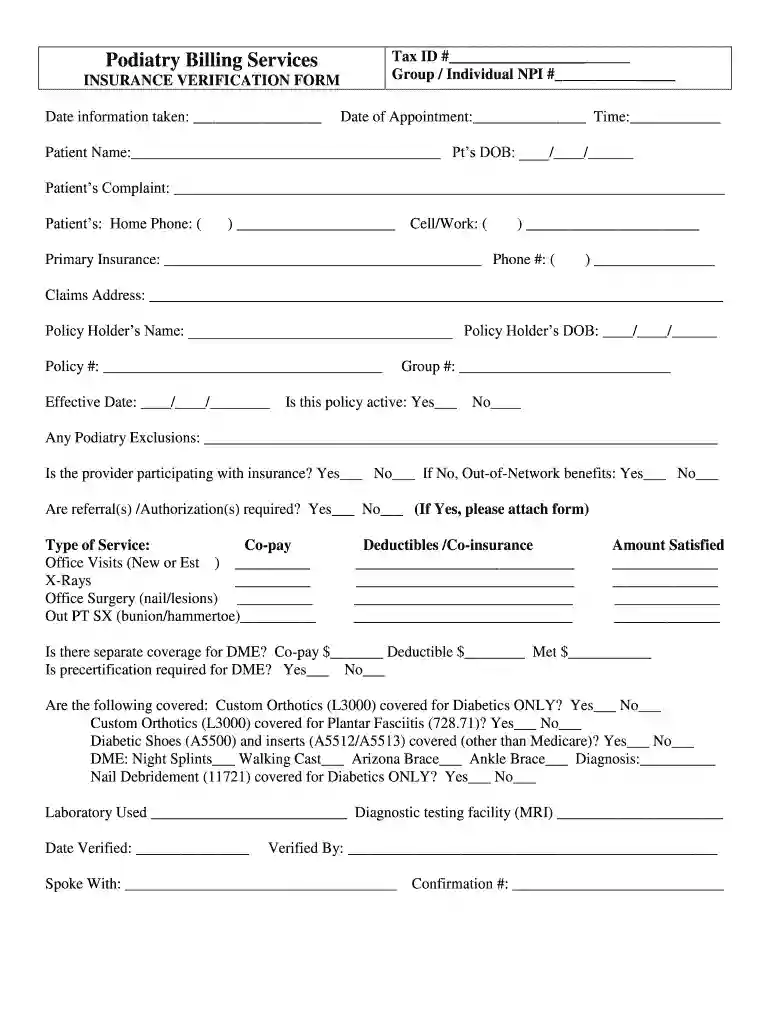
  1. Click ‘Get Form’ to open the dme insurance verification template in the editor.
  2. Begin by entering the Tax ID and Group/Individual NPI numbers at the top of the form. This information is essential for identifying your practice.
  3. Fill in the date information was taken, along with the date and time of the appointment. Accurate dates help maintain clear records.
  4. Complete patient details including their name, date of birth, and contact numbers. Ensure all fields are filled out correctly for effective communication.
  5. Input primary insurance details, including phone number and claims address. This section is crucial for verifying coverage.
  6. Indicate whether the policy is active and note any exclusions related to podiatry services.
  7. Specify if referrals or authorizations are required, attaching any necessary forms as indicated.
  8. Detail type of service needed and associated costs such as co-pays, deductibles, and co-insurance amounts.
  9. Answer questions regarding DME coverage, including whether precertification is required and specific items covered under the policy.
  10. Finally, provide verification details including who verified the information and confirmation number before saving or sharing your completed form.

Start using our platform today to streamline your document editing process for free!

See more dme insurance verification template versions

We've got more versions of the dme insurance verification template form. Select the right dme insurance verification template version from the list and start editing it straight away!
Versions Form popularity Fillable & printable
2011 4 Satisfied (59 Votes)
be ready to get more

Complete this form in 5 minutes or less

Get form

Got questions?

We have answers to the most popular questions from our customers. If you can't find an answer to your question, please contact us.
Contact us
How to fill out the Insurance Verification Form Guidelines and Tips? Enter the patients name and date of birth. Fill in the primary insureds information and insurance details. Complete all necessary fields regarding coverage and co-payments. Review the form for any missing information.
This involves collecting the insurance ID, policy number, group number (if applicable), and the policyholders details. Confirming eligibility is easiest using the insurance ID, which includes a contact number for confirmation. All gathered data should be recorded with the patients full name and date of birth.
This includes their full name, date of birth, address, contact details, insurance provider details, policy number and group number. It is possible that employer details and the patients social security number may be asked in some cases. Accuracy is essential too.
Insurance eligibility verification ensures that a patients insurance coverage and insurance benefits are active before services are provided. Prior authorization secures approval from insurance payors for specific procedures or treatments.
An insurance verification system integrated with Electronic Health Record (EHR) software allows healthcare providers to automatically verify a patients insurance coverage for medical procedures, medications, and surgeries directly from their EHR.

Security and compliance

At DocHub, your data security is our priority. We follow HIPAA, SOC2, GDPR, and other standards, so you can work on your documents with confidence.

Learn more
ccpa2
pci-dss
gdpr-compliance
hipaa
soc-compliance

People also ask

This can be done through various means including a phone call to the insurance company, using an online portal, or through electronic health record (EHR) systems that may have integrated insurance verification features. 3. Verify Policy Status: Check if the insurance policy is active at the time of the service.
In any context in which an insurance plan must be verified by an employer, regulatory body, legal representative, a business associate, or a client, a COI is the final proof. A COI is not a contract, but it is evidence that an insurance contract exists, between the named insured and the insurance carrier.

medical insurance verification form template