Definition and Purpose of the Phlebotomy Consent Form
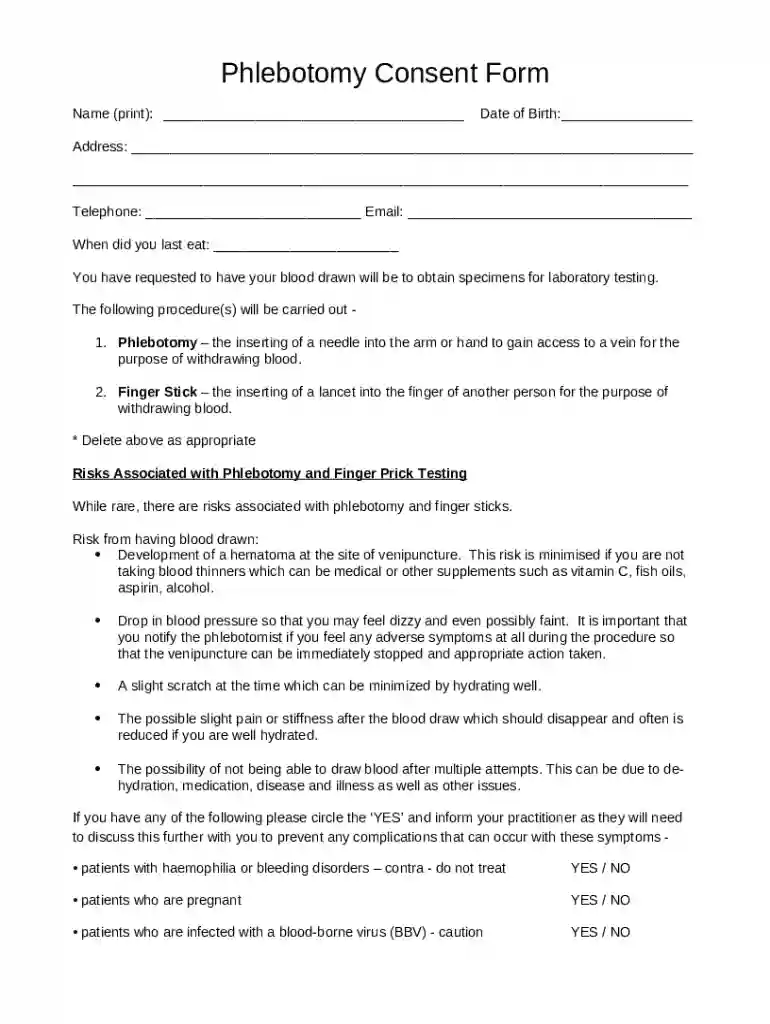
A Phlebotomy Consent Form is a critical document used in the healthcare field to inform patients and obtain their agreement to proceed with blood drawing procedures. The form outlines the procedure, potential risks, and any other essential information that patients need to be aware of before consenting to phlebotomy or finger stick testing. It serves as a legal safeguard for both the healthcare provider and the patient, ensuring all parties clearly understand the procedure and its associated risks. This consent form is particularly important in maintaining a transparent communication channel between healthcare practitioners and patients.
Key Elements of the Phlebotomy Consent Form
The Phlebotomy Consent Form typically includes several crucial sections:
- Procedure Description: This section provides a detailed description of the blood drawing process, including the methods and instruments used.
- Risks and Complications: It outlines possible risks, such as bruising, infection, or fainting, that can occur during or after the procedure.
- Pre-existing Conditions: Patients are encouraged to disclose any health conditions that could impact the blood drawing process, like bleeding disorders or allergies.
- Patient Consent and Acknowledgment: This part is where patients sign to confirm their understanding of the procedure and the associated risks, as well as their right to withdraw consent at any time.
Steps to Complete the Phlebotomy Consent Form
Completing the Phlebotomy Consent Form involves several steps to ensure accuracy and compliance:
- Personal Information Section: Fill in personal details such as full name, date of birth, and contact information.
- Disclosure of Pre-existing Conditions: Clearly state any medical conditions, allergies, or medications that may influence the procedure.
- Review Procedure Details: Carefully read the description of the phlebotomy procedure and related risks.
- Consent Acknowledgment: Sign the form to indicate understanding and agreement to proceed. Some forms may allow electronic signatures for convenience.
How to Obtain the Phlebotomy Consent Form
A Phlebotomy Consent Form can be obtained from various sources, usually accessible through healthcare facilities, clinics, or online platforms:
- Healthcare Providers: Medical facilities and clinics often provide this form as part of patient intake paperwork.
- Online Platforms: Some digital document management platforms offer templates of this form for download and completion online.
- Direct Request: In some cases, patients can request the consent form directly from their healthcare provider prior to their appointment.
Importance of the Phlebotomy Consent Form
Using a Phlebotomy Consent Form is crucial for several reasons:
- Legal Protection: It legally protects healthcare providers by documenting informed consent from patients.
- Patient Education: It ensures patients are properly informed about what to expect, reducing anxiety and increasing cooperation.
- Risk Management: It helps manage potential risks by encouraging patients to disclose relevant medical history or concerns.
Legal Use of the Phlebotomy Consent Form
The Phlebotomy Consent Form is a legally binding document that serves multiple purposes:
- Informed Consent: It fulfills the legal requirement for obtaining informed consent before conducting medical procedures.
- Liability Reduction: By signing the form, patients acknowledge understanding of the risks, which can protect healthcare providers from liability in case of complications.
- Compliance with Regulations: It ensures compliance with healthcare regulatory standards in the United States, particularly under laws governing patient rights and privacy.
Examples of Using the Phlebotomy Consent Form
In practice, the Phlebotomy Consent Form is used in various scenarios:
- Routine Blood Tests: Prior to conducting routine blood tests during medical check-ups or treatments.
- Research Studies: In clinical trials or research requiring blood samples, where informed consent is a vital ethical requirement.
- Specialized Medical Procedures: When blood drawing is part of a larger medical procedure or treatment plan, requiring detailed patient information.
State-Specific Rules for the Phlebotomy Consent Form
There might be variations in the Phlebotomy Consent Form depending on state regulations:
- State Regulations: Certain states may have specific laws governing the format or content of the consent form, such as requiring additional information on patient rights.
- Language Requirements: Some states mandate the availability of consent forms in multiple languages to accommodate non-English-speaking patients.
- Age of Consent: The age at which a person can legally give consent might vary, necessitating parental consent for minors in certain jurisdictions.
Versions or Alternatives to the Phlebotomy Consent Form
Different versions or alternatives to the standard form may exist depending on specific needs:
- Specialized Forms: Forms tailored for particular procedures, populations, or research studies in phlebotomy.
- Interactive Digital Forms: Digital versions that allow for easier updates and interactions, facilitating more precise data collection and storage.
- Simplified Versions: For use with patients who require less detailed information or in settings where extensive documentation may not be feasible.