01. Edit your form online
Type text, add images, blackout confidential details, add comments, highlights and more.

Type text, add images, blackout confidential details, add comments, highlights and more.

Draw your signature, type it, upload its image, or use your mobile device as a signature pad.

Send it via email, link, or fax. You can also download it, export it or print it out.
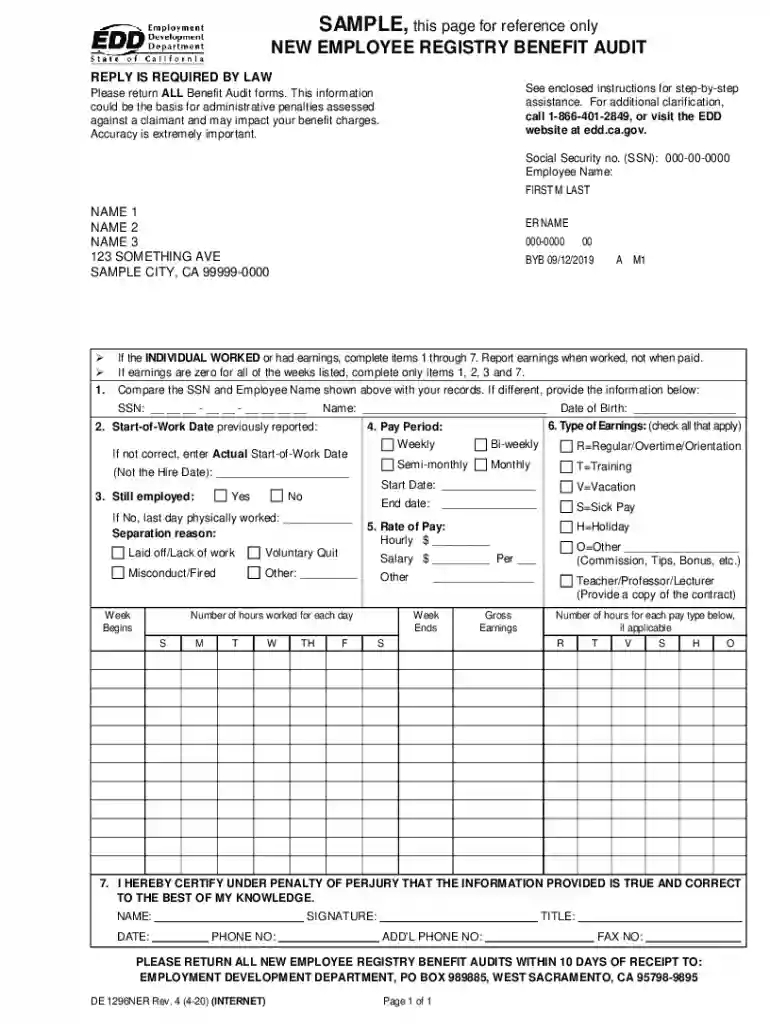
Benefit Audit Forms from the Employment Development Department (EDD) are essential documents used in the process of verifying employment information. These forms require employers to provide data regarding employee earnings, work dates, and other relevant employment information, which may affect benefit charges and administrative penalties. The primary purpose of these forms is to ensure the accuracy of unemployment insurance claims and to detect any discrepancies that might lead to incorrect benefit payments.
Employers are mandated by law to respond to these notices, making accuracy a top priority to avoid potential penalties. These forms play a critical role in the administration of unemployment insurance, ensuring that only eligible recipients receive benefits.
The process of using the EDD Benefit Audit Forms involves several key steps:
Review the Instructions: Each Benefit Audit Form comes with a set of instructions that detail how to complete various sections. Carefully read these instructions to ensure compliance with EDD requirements.
Gather Required Information: Before filling out the form, compile all necessary employee information, including earning records, employment dates, and job positions. This will streamline the completion process.
Complete the Form: Input the required data into the appropriate sections of the form. Ensure that all information is accurate and reflects true employment records.
Verify Details: Double-check all entries for accuracy. Errors can lead to incorrect benefit charges and potential penalties, so scrutinizing the form is crucial.
Submit the Form: Refer to the guidelines provided by the EDD for submission methods. The form may be submitted online, via mail, or through the EDD's specific submission channels.
Retain a Copy: Keep a copy of the completed form for your records. This documentation can be useful in case of future queries from the EDD.
Employers can obtain Benefit Audit Forms through the following channels:
The accessibility of these forms ensures that employers can comply with audit requests in a timely manner.
Filling out the Benefit Audit Forms requires a systematic approach for thoroughness and accuracy:
Identify Form Sections: Familiarize yourself with the sections of the form. Understanding what each section requires helps in efficient data entry.
Accurate Data Collection: Use payroll records and HR data for precise entries. Ensure that employee names, ID numbers, and earnings are correctly listed.
Use Clear Formatting: Write legibly and use clear formats for dates and numbers. If completing a digital version, make sure the data is typed accurately.
Check Against Payroll Records: Align all information with payroll records to verify consistency and correctness.
Follow Deadlines: Each form comes with a submission deadline. Make sure the form is completed and submitted before this date to avoid penalties.
Seek Clarification if Needed: If any part of the form is unclear, contact EDD for clarification. They provide resources and support to assist with form completion.
Completing the Benefit Audit Forms is a statutory obligation for employers. It is crucial for the following reasons:
The primary users of the Benefit Audit Forms include:
These stakeholders ensure that the forms are processed correctly and efficiently.


Understanding key terms related to Benefit Audit Forms can enhance comprehension and accuracy:
Having a grasp of these terms helps stakeholders complete and manage the forms effectively.
Failing to comply with EDD's policies on Benefit Audit Forms can result in several consequences:
Understanding and adhering to the compliance requirements protects employers from these risks.
Both digital and paper versions of Benefit Audit Forms are available, each with distinct advantages:
Employers should select the version that best suits their operational processes and technological capabilities.
At DocHub, your data security is our priority. We follow HIPAA, SOC2, GDPR, and other standards, so you can work on your documents with confidence.