



Here's how it works



How to use or fill out chicago apartment lease with our platform

- Click ‘Get Form’ to open the Chicago apartment lease in the editor.
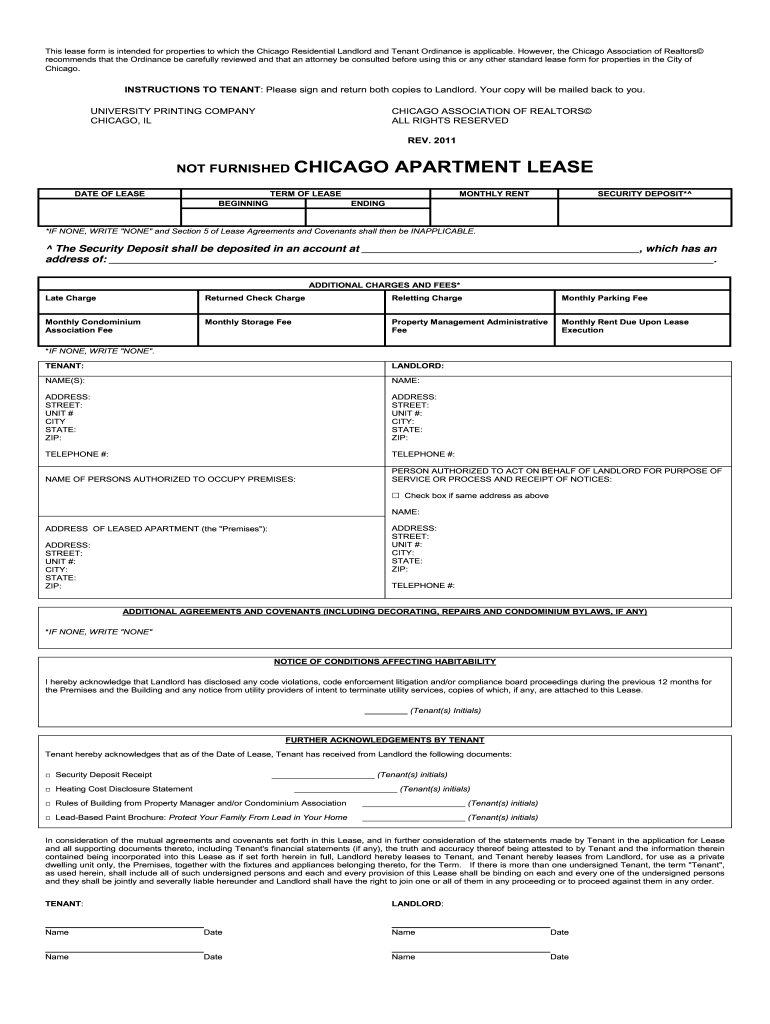
- Begin by entering the date of the lease at the top of the form. This is crucial for establishing the timeline of your agreement.
- Fill in the term of the lease, specifying both the beginning and ending dates. Ensure these dates align with your intended occupancy.
- Input the monthly rent amount and any applicable security deposit details. If there is no security deposit, write 'NONE' as instructed.
- Complete tenant and landlord information sections, including names, addresses, and contact numbers. This ensures clear communication between parties.
- Review additional charges and fees such as late charges or parking fees. Fill these out if applicable to your situation.
- Sign and date where indicated at the bottom of the form. Ensure all tenants sign if there are multiple parties involved.
Start filling out your Chicago apartment lease today for free using our platform!
It's free
See more chicago apartment lease versions
| Versions | Form popularity | Fillable & printable |
|---|---|---|
| 2011 | 4.9 Satisfied (57 Votes) |
Got questions?
How can I send my chicago apartment lease 2024 pdf for eSignature?
Upload your chicago apartment lease 2024 pdf to DocHub (after you’ve created an account for this). If you need to fill out fields in it, use appropriate tools from the top pane. For example, drop Signature Fields, assign each to a particular party, and click on Sign → Request signatures from others. Change your message for your recipients and click Send Request. You can also send your paperwork by fax or as a Signing link instead of using email (you’ll locate these options by navigating to the Menu → Send)
How to complete and sign 2024 chicago residential lease online?
You may quickly complete, modify, and even eSign your 2024 chicago residential lease using DocHub. Create a new account and begin your free trial. After that, you can add the file with the form and simply make all the necessary edits. No need to print on paper or use a third-party application to sign it, as you can place your electronic signature on your document quicker through DocHub.
Can you terminate a lease early?
How much can a Chicago landlord raise rent?
What a landlord Cannot do in Illinois?
Security and compliance
At DocHub, your data security is our priority. We follow HIPAA, SOC2, GDPR, and other standards, so you can work on your documents with confidence.
Learn more