






Definition and Meaning
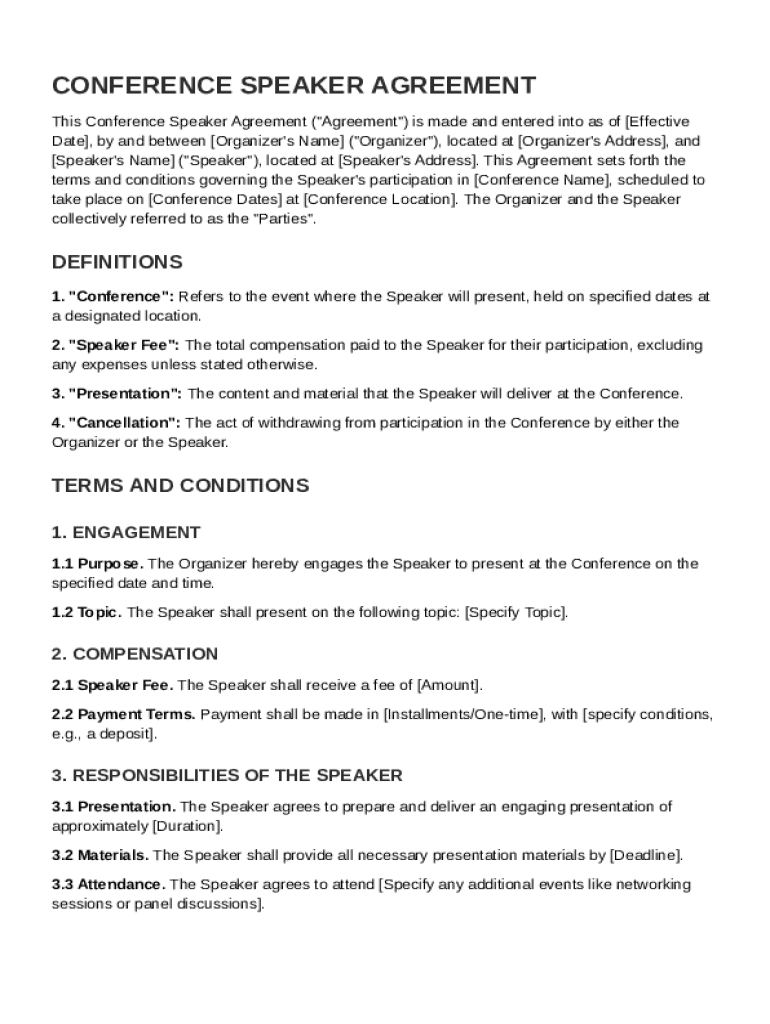
A "Conference Speaker Contract Template" is a formal document that outlines the agreement between a conference organizer and a speaker. It details the terms and conditions of the speaker's participation in the event. The template addresses important areas such as engagement details, compensation, responsibilities of both the speaker and the organizer, intellectual property rights, cancellation policies, confidentiality requirements, and indemnification. This contract acts as a legally binding agreement to ensure that both parties understand their obligations and rights.
Key Elements of the Conference Speaker Contract Template
The "Conference Speaker Contract Template" includes several essential components:
- Engagement Details: Defines the specifics of when and where the speaker will present, including the duration and format of the presentation.
- Compensation: Details the payment terms, such as fee amount, payment method, and timeline for payment.
- Speaker Responsibilities: Outlines the speaker's duties in delivering the presentation, including any preparation and material submission requirements.
- Organizer Obligations: Specifies what the conference organizer will provide, including technical support, equipment, and any necessary accommodations.
- Intellectual Property Rights: Clarifies ownership of the presentation materials and any consent needed for recording or distributing the content.
- Cancellation Policies: Details the terms under which either party can cancel the agreement and any financial implications associated with such cancellations.
Steps to Complete the Conference Speaker Contract Template
- Download the Template: Obtain the template in a compatible format such as PDF or DOC.
- Fill in Event Details: Complete the sections regarding the conference name, dates, and location.
- Specify Speaker and Organizer Information: Input the full names, contact details, and roles of both parties.
- Define Presentation Details: Clearly outline the topic, date, time, and length of the presentation.
- Agree on Compensation: Specify the fee, reimbursement policy, and any other financial terms.
- Include Additional Clauses: Add any extra sections necessary for confidentiality, data privacy, and indemnity.
- Review and Sign: Ensure that both parties read through the document thoroughly before signing.
Legal Use of the Conference Speaker Contract Template
The "Conference Speaker Contract Template" serves as a legal document to protect both the speaker and the organizer:
- Compliance: Ensures adherence to legal standards, such as the ESIGN Act for electronic signatures.
- Binding Agreement: The terms specified in the contract are enforceable by law, providing a legal basis in case of disputes.
- Confidentiality and Indemnity: Protects sensitive information shared during the event and addresses potential liabilities.
- Documentation: Provides a clear record of agreed terms, serving as evidence if conflicts arise.
Who Typically Uses the Conference Speaker Contract Template
This template is used by a variety of individuals and organizations:
- Conference Organizers: To standardize agreements with multiple speakers.
- Speakers: To ensure terms are transparent and legally documented.
- Event Managers: For managing logistics and expectations of all parties involved.
- Legal Teams: To draft customized contracts when necessary.


How to Use the Conference Speaker Contract Template
Using the "Conference Speaker Contract Template" requires careful attention to detail:
- Customization: Tailor the template to fit the specific requirements of your event and speaker.
- Collaboration: Work with the speaker to ensure all terms are mutually agreed upon.
- Digital Management: Utilize platforms like DocHub for editing, sharing, and signing the contract electronically.
- Secure Storage: Store the final signed contract securely for future reference.
Important Terms Related to Conference Speaker Contracts
Understanding key terminology within the contract is crucial:
- Force Majeure: Circumstances beyond control (e.g., natural disasters) that may impact the event.
- Non-Compete Clause: Restrictions on the speaker’s ability to engage in similar events within a specified period.
- Termination Clause: Terms under which the contract can be legally terminated before its conclusion.
- Breach of Contract: Failure to meet the terms agreed upon, resulting in potential legal consequences.
State-Specific Rules for the Conference Speaker Contract Template
In the United States, state-specific laws can affect contract terms:
- Jurisdiction: Determine which state's law governs the agreement, typically the location of the conference.
- State Labor Laws: Consider state-specific regulations regarding compensation and work hours.
- Tax Implications: Address any state-specific tax obligations for both the speaker and organizer.
Understanding these varying requirements is vital to ensure the contract's enforceability across different regions.