
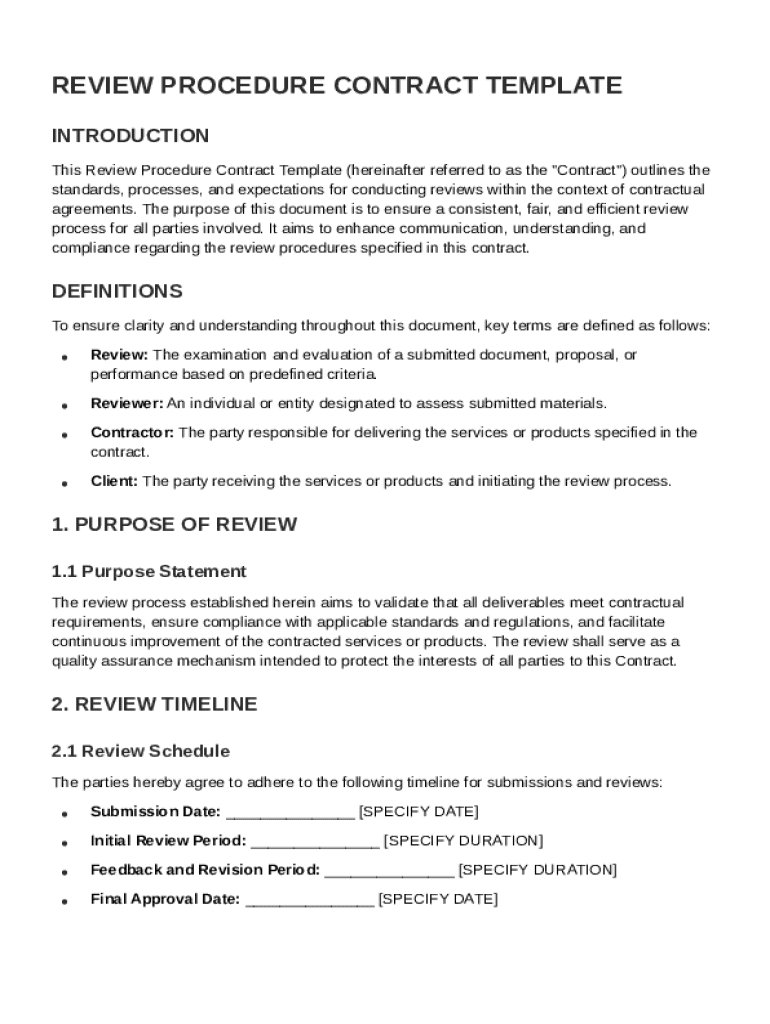







Definition and Meaning
The Review Procedure Contract Template is a structured document that outlines the standards and processes for conducting formal reviews within contractual agreements. It serves as a comprehensive guide to ensure quality assurance by defining key terms, establishing the purpose of reviews, and outlining timelines and criteria. This template is crucial in ensuring a consistent and fair review process, which helps protect the interests of all parties involved in a contract. It specifies submission procedures, feedback mechanisms, and conflict resolution methods, offering detailed guidelines for how reviews should be carried out.
Key Components
- Purpose of the Review: Clearly defined to ensure all parties understand the objective.
- Quality Assurance Standards: Outline of criteria and benchmarks for assessing contractual obligations.
- Timelines and Deadlines: Specific time frames for review stages to ensure timely completion.
- Existing Rights and Obligations: Clarification of pre-existing terms impacted by the review process.
Steps to Complete the Review Procedure Contract Template
Completing the Review Procedure Contract Template requires a thorough understanding of its components and their relationships. Here is a step-by-step guide:
- Define the Objective: Clearly state the purpose of the review within the contract framework.
- Detail the Criteria: Identify the standards and metrics used to assess contractual performance.
- Establish a Timeline: Set precise dates for the initiation and completion of the review process.
- Outline Submission Procedures: Explain how and where review materials should be submitted.
- Specify Feedback Mechanisms: Establish channels for providing and receiving feedback.
- Clarify Revision Guidelines: Offer guidance for making necessary contract adjustments.
- Include Conflict Resolution Methods: Detail steps for addressing disputes arising during the review.
Considerations for Completion
- Accuracy: Ensure information is accurate to avoid misinterpretations.
- Clarity: Use clear, concise language to facilitate understanding.
- Consistency: Maintain consistency with the overall contract.
Important Terms Related to Review Procedure Contract Template
Familiarity with key terms related to the Review Procedure Contract Template can enhance comprehension and execution.
Common Terms
- Review Cycle: The recurring interval at which reviews are conducted.
- Performance Metrics: Criteria used to evaluate contract fulfillment.
- Stakeholders: All parties involved in the contract and review process.
- Non-Compliance Penalties: Consequences for failing to adhere to review standards.
Legal Terminology
- Confidentiality Clauses: Provisions to safeguard sensitive information during the review.
- Amendment Provisions: Terms allowing for modifications post-review if needed.
Who Typically Uses the Review Procedure Contract Template
The Review Procedure Contract Template is primarily utilized by a variety of professionals and entities to ensure that reviews align with contractual expectations.


Common Users
- Legal Teams: Use the template to align reviews with legal requirements.
- Project Managers: Implement it to evaluate project deliverables and adherence to agreement terms.
- Business Consultants: Apply the template to audit business operations and contract compliance.
- Corporate Executives: Utilize it to oversee high-level contractual engagements.

Key Elements of the Review Procedure Contract Template
Understanding the key elements of this template is crucial for effective implementation.
Core Elements
- Scope of the Review: What parts of the contract will the review cover.
- Roles and Responsibilities: Who is responsible for what during the review process.
- Documentation Requirements: Specific documents needed to facilitate the review.
- Data Protection Measures: Security protocols to protect the information being reviewed.
Implementation Tools
- Checklists: Ensure all components are addressed thoroughly.
- Templates: Provide consistency in implementation across different agreements.
State-Specific Rules for the Review Procedure Contract Template
Regulations concerning contractual reviews can vary based on state-specific laws. It is necessary to adapt the template to comply with local regulations.
Examples of State Variations
- California: Specific privacy laws may influence how data is handled within the review.
- New York: Unique regulations may dictate timelines and notification requirements.
- Texas: Additional provisions may exist for resolving contractual disputes.
Ensuring Compliance
- Consult Local Legal Experts: Collaborate with attorneys familiar with state laws to ensure full compliance.
- Review Local Guidelines: Ensure all procedural aspects align with state-specific rules.
Legal Use of the Review Procedure Contract Template
Using this template legally ensures all contractual reviews are valid and enforceable under law.
Legal Considerations
- Compliance with ESIGN Act: Ensures electronic signatures used within the process are legally recognized.
- Inclusion of Audit Trails: Provides a record of all review-related activities which can be critical during disputes.
- Adherence to Confidentiality Norms: Ensures sensitive data is handled in compliance with applicable privacy laws.
Examples of Using the Review Procedure Contract Template
Illustrating real-world scenarios can demonstrate how the Review Procedure Contract Template is implemented effectively.
Case Studies
- Corporate Merger Evaluation: Used to assess compliance with merger terms, ensuring all aspects align with the initial agreement.
- Vendor Performance Review: Facilitates a thorough review of service delivery against contractual promises.
- Project Milestone Assessment: Enables systematic evaluation of project phases to ensure goals are met on time and within budget.
Practical Applications
- Routine Business Audits: Regular audits can maintain contract compliance and identify areas for improvement.
- Internal Evaluations: Internal policy compliance can be ensured through periodic reviews guided by the template.
By adhering strictly to the structured guidelines, this content endeavors to explore the Review Procedure Contract Template comprehensively, providing extensive utility to its users within various professional settings.




