






Definition and Meaning
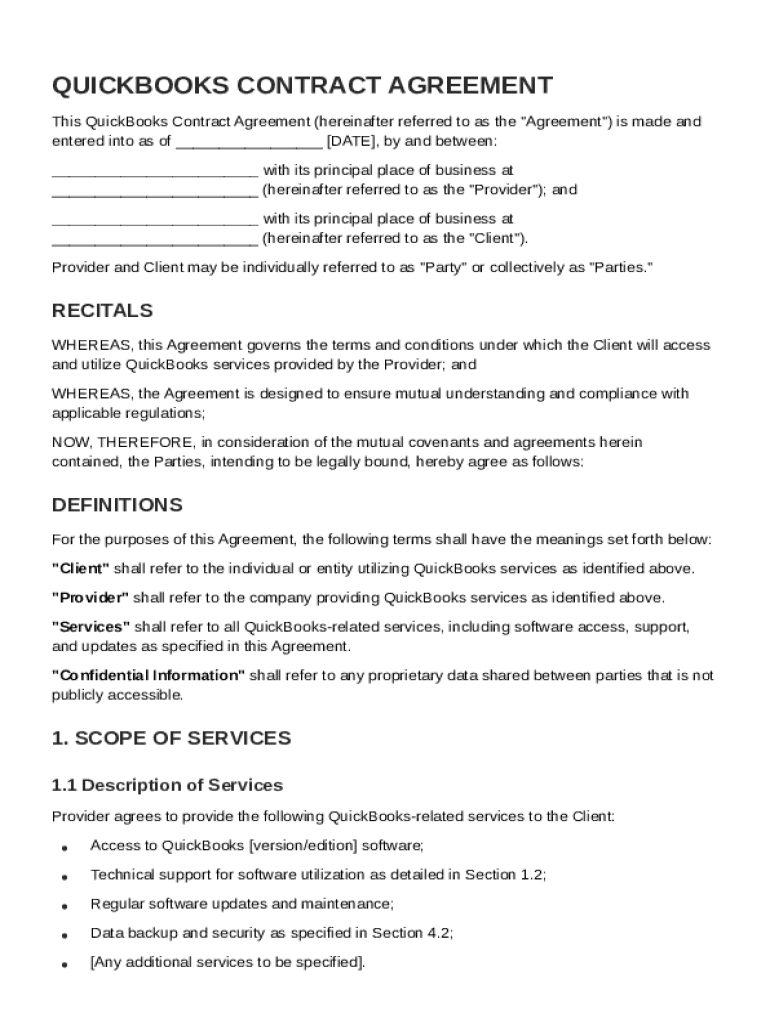
The QuickBooks Contract Template is a standardized document used to outline the specifics of an agreement between a client and a service provider concerning the use of QuickBooks services. It serves as a formal agreement that specifies the terms and conditions applicable to both parties involved in the transaction. The primary purpose of this template is to ensure that there is mutual understanding and adherence to the established terms of service, payment structures, confidentiality requirements, dispute resolution mechanisms, and other legal obligations. It acts as both a guiding framework and a legal safeguard, protecting the interests of every party engaged in the agreement.
Key Elements of the QuickBooks Contract Template
The template is designed to cover several crucial areas that are foundational to any effective contract. Key components include:
- Definitions of Key Terms: This section clarifies any specific terminology used throughout the contract, ensuring both parties have a consistent understanding of critical terms.
- Scope of Services: It specifies what services will be provided under the agreement, detailing the responsibilities of the provider regarding QuickBooks offerings.
- Payment Terms: This outlines the financial obligations, including payment amounts, schedules, methods, and any conditions under which payments may be adjusted or disputed.
- Obligations of Both Parties: Details what each party is required to do and maintain throughout the duration of the contract to uphold the agreement.
- Confidentiality and Data Protection: Stipulates the measures in place to protect sensitive information, ensuring compliance with data protection laws such as the California Consumer Privacy Act (CCPA) and General Data Protection Regulation (GDPR).
Steps to Complete the QuickBooks Contract Template
Completing a QuickBooks Contract Template involves several systematic steps to ensure accuracy and compliance with the intended scope:
- Review the Template: Begin with a thorough review of the template to ensure you understand each section and its implications.
- Customize for Specific Needs: Modify sections to fit the specific requirements of your agreement. This may include adding specialized terms or clauses that apply to your situation.
- Input Detailed Information: Fill in all necessary details, such as the names of the parties involved, the description of services, payment schedules, and any personalized terms.
- Include Additional Clauses: Insert any additional clauses essential for covering particular concerns not addressed within the template.
- Legal Review: It is advisable to have a legal professional review the finalized document to ensure all legal standards are met.
- Signing: Once finalized, both parties should review the document one last time before signing to indicate their acceptance of the terms.
Important Terms Related to QuickBooks Contract Template
Understanding the specialized terms used within the QuickBooks Contract Template is crucial for correctly drafting and interpreting the agreement. Key terms often include:
- Indemnification: A provision that protects one party from legal responsibility for the actions of another.
- Termination Conditions: Defines the circumstances under which the contract can be ended by either party.
- Force Majeure: A clause that covers unforeseen events that prevent either party from fulfilling their contract obligations.
- Dispute Resolution: Outlines the process for handling disagreements that may arise during the contract's execution.
Legal Use of the QuickBooks Contract Template
This template is designed to ensure compliance with all applicable U.S. laws, including federal regulations such as the ESIGN Act, which governs electronic signatures. Legal considerations include:
- Compliance with State Laws: Varies by location, as different states may have specific requirements regarding digital contracts and data protection.
- E-Signature Legality: As e-signatures are governed by federal law, ensuring that they meet legal standards is critical for the enforceability of the contract.
- Data Protection Laws: Compliance with data protection legislation is crucial, especially when the contract involves sensitive client information.
Who Typically Uses the QuickBooks Contract Template
This template is widely applicable across various business sectors. Common users include:
- Small to Medium Enterprises (SMEs): Who need a reliable platform for managing their financial transactions and service agreements.
- Freelancers and Independent Contractors: Looking to formalize their service offerings and guarantee payment.
- Accounting Firms: Providing QuickBooks-based services who require a formal agreement to outline their service scope and payment terms.


How to Obtain the QuickBooks Contract Template
There are several ways to acquire a QuickBooks Contract Template, ensuring you have options that meet your specific needs:
- Official Channels: Directly from QuickBooks or Intuit via a certified partner portal or their official website.
- Legal Document Services: Provided by online platforms that specialize in legal templates and offer customizable contracts tailored to your requirements.
- Professional Advisors: Working with legal professionals who can provide a template as part of their consultation services, ensuring it is suited to your business needs.
Digital vs. Paper Version
With evolving business practices, understanding the differences between digital and paper versions of the contract is pivotal:
- Digital Version: Offers flexibility and ease of use, allowing for electronic signatures and storage, reducing the need for physical paperwork.
- Paper Version: May still be preferred for those unfamiliar with digital platforms, though it requires manual handling of signatures and filing.
- Integration with QuickBooks: The template can often be integrated within QuickBooks software itself, enhancing efficiency through direct data synchronization.
Software Compatibility
The QuickBooks Contract Template is designed to be compatible with multiple software platforms, ensuring flexibility and adaptability. It is particularly suited for:
- QuickBooks Application: Where the documents can be easily loaded, managed, and stored within the platform itself.
- Document Management Software: Like DocHub, which allows the contract to be edited, signed, and stored in a user-friendly environment supporting various formats such as PDF or DOCX.
Understanding these software compatibility features ensures that users can maintain efficiency without the need for redundant conversion processes or lost data integrity.