




Here's how it works

01. Edit your event request form template online
Type text, add images, blackout confidential details, add comments, highlights and more.

02. Sign it in a few clicks
Draw your signature, type it, upload its image, or use your mobile device as a signature pad.

03. Share your form with others
Send event request form via email, link, or fax. You can also download it, export it or print it out.
How to use or fill out event request form template with DocHub

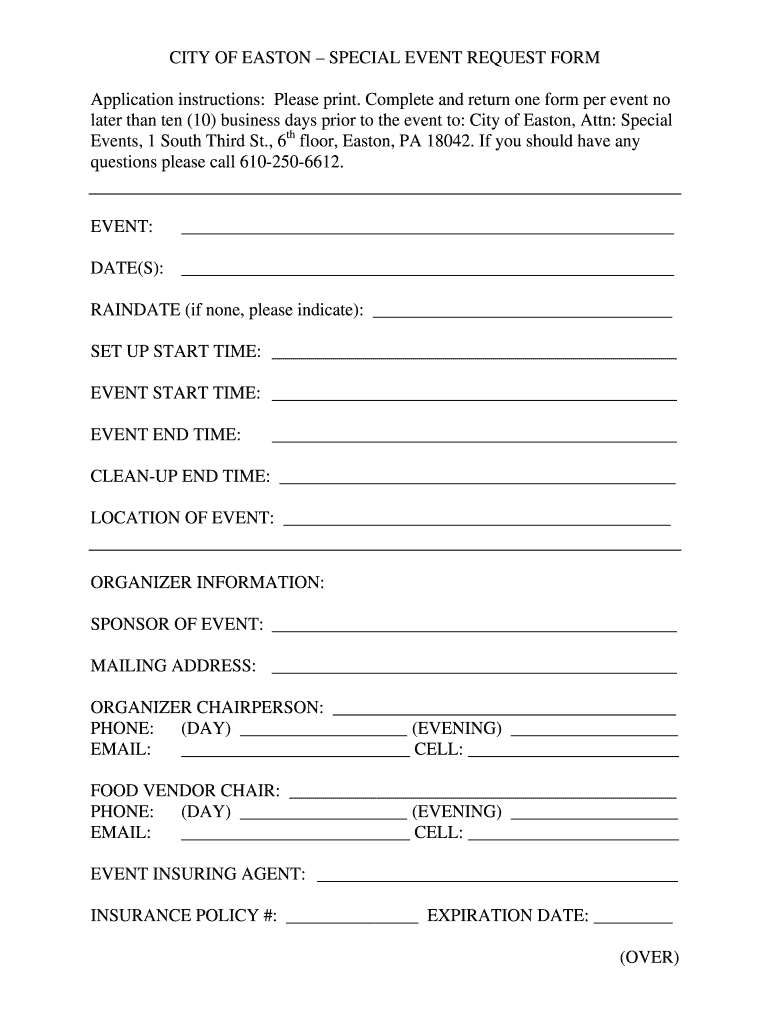
- Click ‘Get Form’ to open the event request form template in our platform's editor.
- Begin by filling in the 'EVENT' section with the name of your event, followed by the 'DATE(S)' and 'RAINDATE' fields. Ensure you provide accurate dates to avoid scheduling conflicts.
- Next, specify the 'SET UP START TIME', 'EVENT START TIME', 'EVENT END TIME', and 'CLEAN-UP END TIME'. This information is crucial for proper planning and coordination.
- In the 'LOCATION OF EVENT' field, enter the venue where your event will take place. This helps city officials assess logistics.
- Complete the 'ORGANIZER INFORMATION' section with details about the sponsor, mailing address, chairperson contact information, and food vendor chair if applicable.
- Provide a brief description of your event in the designated area. If applicable, attach additional documents like a detailed narrative or route map for parades or runs.
- Finally, check off any requested city provisions from the checklist provided at the end of the form to ensure all necessary resources are accounted for.
Start using our platform today to streamline your event request process for free!
Fill out event request form template online
It's free
It's free
Security and compliance
At DocHub, your data security is our priority. We follow HIPAA, SOC2, GDPR, and other standards, so you can work on your documents with confidence.
Learn more


