Alarm permit league city 2026

Get Form
alarm permits Preview on Page 1

Here's how it works

01. Edit your alarm permits online
Type text, add images, blackout confidential details, add comments, highlights and more.

02. Sign it in a few clicks
Draw your signature, type it, upload its image, or use your mobile device as a signature pad.

03. Share your form with others
Send building permits via email, link, or fax. You can also download it, export it or print it out.

How to use or fill out alarm permit league city with our platform

Form edit decoration
9.5
Ease of Setup
DocHub User Ratings on G2
9.0
Ease of Use
DocHub User Ratings on G2
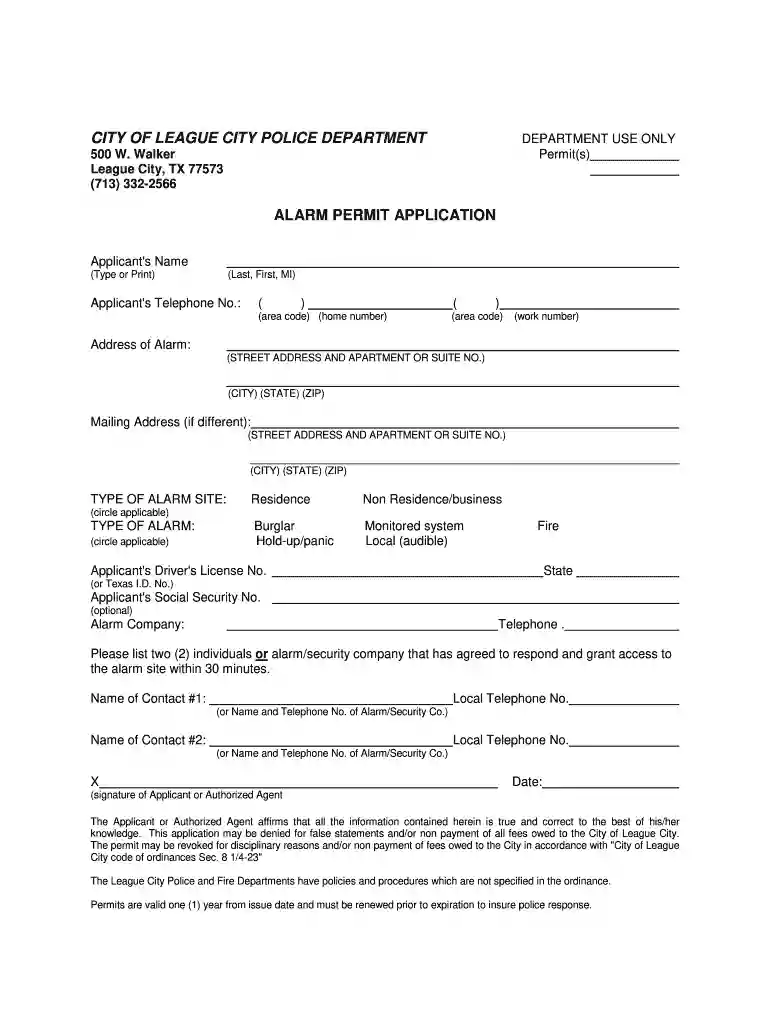
  1. Click ‘Get Form’ to open the alarm permit application in the editor.
  2. Begin by entering your name in the 'Applicant's Name' field. Ensure you include your last name, first name, and middle initial if applicable.
  3. Provide your telephone numbers in the designated fields, including area codes for both home and work numbers.
  4. Fill in the address of the alarm system, including street address, apartment or suite number, city, state, and ZIP code.
  5. If your mailing address differs from your alarm address, complete that section as well.
  6. Select the type of alarm site by circling either 'Residence' or 'Non Residence/business', and specify the type of alarm by circling applicable options such as 'Burglar', 'Hold-up/panic', or 'Fire'.
  7. Enter your driver's license number or Texas I.D. number and optionally provide your Social Security number.
  8. List your alarm company’s name and telephone number for reference.
  9. Identify two contacts who can respond to the alarm within 30 minutes by filling out their names and local telephone numbers.
  10. Finally, sign and date the application to affirm that all information is accurate before submitting it through our platform.

Start filling out your alarm permit application today for free using our editor!

be ready to get more

Complete this form in 5 minutes or less

Get form

Got questions?

We have answers to the most popular questions from our customers. If you can't find an answer to your question, please contact us.
Contact us

Sure, you’ll find many different applications for this on the web. Nevertheless, if you need to eSign your city of league city building department without installing extra software, DocHub is the best choice you can make. This robust editor works on mobile devices just as on desktops. Open our editor in any internet browser, register or log in to your account, and start processing your documents.

If you are looking for a state-specific city of league city permit portal sample, you will find it in our DocHub Forms & Templates catalog. Use the search field, enter your form’s name, and search through the results for your state. You can also filter out irrelevant results while exploring our catalog by categories.

How do I create my Account? Click on Create Account and enter your first name, last name, and the same email address you used to place your order. Validate your email address, create a password, and set your location. Make sure Bluetooth is enabled on your smart device. Plug in your ADT Smart Home Hub.
Our system provides you with the basics, starting at just $269.00 with ADT Pro Monitoring starting at $24.99/mo: Then, you can add smart cameras and sensors to fit your space. In this section, well break down home security costs so you can figure out what works for your budget.
OPERATING AN ALARM SYSTEM WITHOUT A PERMIT: ANY PERSON OR ENTITY OPERATING AN ALARM SYSTEM WITHOUT A PERMIT IS SUBJECT TO A FEE OF $75.00 FOR EACH FALSE ALARM. In addition to the fee, a citation may be issued and a fine imposed by the Justice of the Peace Court for operating an alarm system without a permit.

Security and compliance

At DocHub, your data security is our priority. We follow HIPAA, SOC2, GDPR, and other standards, so you can work on your documents with confidence.

Learn more
ccpa2
pci-dss
gdpr-compliance
hipaa
soc-compliance
be ready to get more

Complete this form in 5 minutes or less

Get form

People also ask

If you need assistance with cancelling your alarm permit, please call the Burglar Alarm Administration at 713-581-7410.
To obtain a certificate of monitoring, go to Account Account Documents Select Alarm Monitoring Certificate under Insurance Discount as shown below.
You own the security equipment, even after you end your contract. If you cancel a plan, your home security system will still work, and you will still receive Blue by ADT app alerts and notifications, though you wont have the benefit of professional monitoring.
Select a chart to view: Burden RankStateFees 6 Nevada $1,608 7 California $579 8 Hawaii $694 9 Arizona $59629 more rows
ADT has a Jurisdictions Department that is dedicated to researching permit requirements. You will receive an email from permit@adt.com only if you require a permit. You should also check with your local municipality via phone or website to determine if you need a permit for your security system.

commercial building permits