Hdfc dispute email id 2026

Get Form
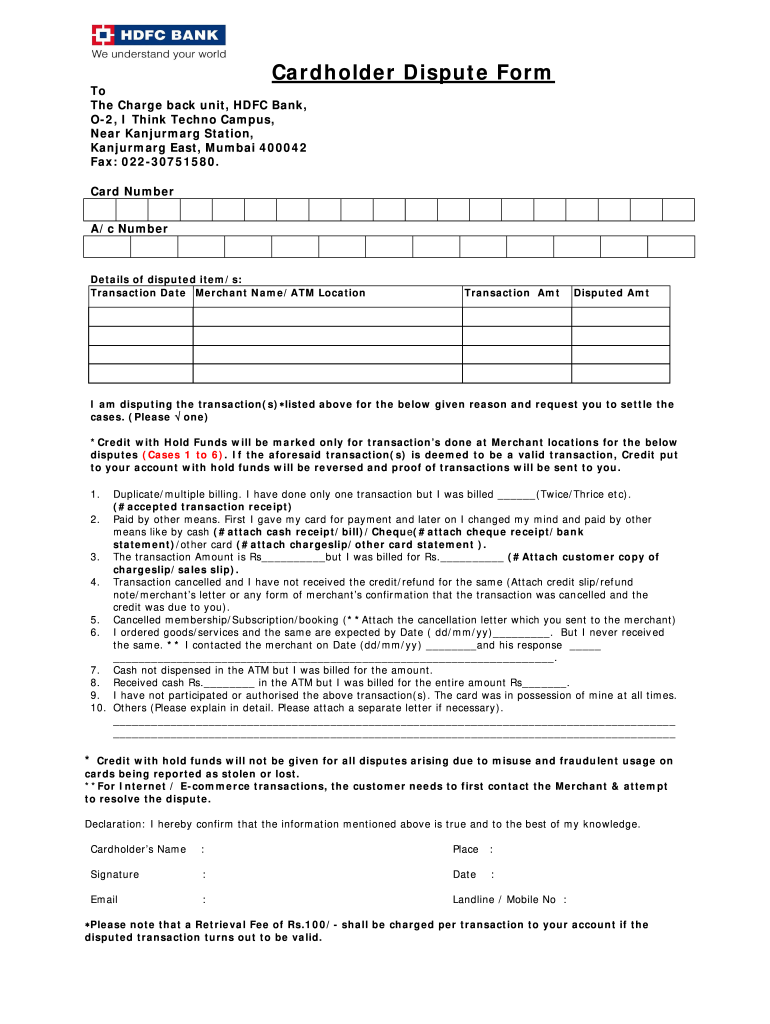
hdfc complaint form Preview on Page 1

Here's how it works

01. Edit your hdfc complaint form online
Type text, add images, blackout confidential details, add comments, highlights and more.
02. Sign it in a few clicks
Draw your signature, type it, upload its image, or use your mobile device as a signature pad.
03. Share your form with others
Send hdfc dispute form online via email, link, or fax. You can also download it, export it or print it out.

How to use or fill out hdfc dispute email id with our platform

Form edit decoration
9.5
Ease of Setup
DocHub User Ratings on G2
9.0
Ease of Use
DocHub User Ratings on G2
  1. Click ‘Get Form’ to open it in the editor.
  2. Begin by entering your Card Number and A/c Number at the top of the form. This information is crucial for identifying your account.
  3. In the 'Details of disputed item/s' section, fill in the Transaction Date, Merchant Name/ATM Location, Transaction Amount, and Disputed Amount accurately.
  4. Select the reason for your dispute by checking one of the options provided. Ensure you attach any necessary documentation as indicated for each reason.
  5. Complete the Declaration section by providing your name, place, signature, date, email, and contact number. This confirms that all information is accurate.

Start using our platform today to streamline your document editing and submission process for free!

See more hdfc dispute email id versions

We've got more versions of the hdfc dispute email id form. Select the right hdfc dispute email id version from the list and start editing it straight away!
Versions Form popularity Fillable & printable
2019 4.5 Satisfied (46 Votes)
2010 3.9 Satisfied (30 Votes)
be ready to get more

Complete this form in 5 minutes or less

Get form

Got questions?

We have answers to the most popular questions from our customers. If you can't find an answer to your question, please contact us.
Contact us
However for your security, we will be unable to process any account related Transaction, (change of address, balance inquiry, cheque book request) as your identity cannot be established over e-mail. If you have any queries please send an email to our online customer service cell at support@hdfcbank.com.
Contact Us Call us on 1800 2600 / 1800 1600 (accessible across India) Customer travelling overseas can docHub us on 022-61606160. Connect with Eva for quick solutions to common queries. Contact Nearest Branch. Loan status tracker.
Information To Include in Your Letter Give the basics. Tell your story. Explain how you want to resolve the problem. Describe your next steps. Send your complaint letter. [Your Mailing Address] [Your City, State, Zip Code] [Your email address]
The email ID: dphelp@hdfcbank.com is available exclusively for addressing Complaints / Grievances. For the benefit of Demat customers an email ID: infodp@hdfcbank.com has also been made available for the purpose of addressing Queries, Feedback, Information, Suggestions etc.
If you have any queries please send an email to our online customer service cell at support@hdfcbank.com.

Security and compliance

At DocHub, your data security is our priority. We follow HIPAA, SOC2, GDPR, and other standards, so you can work on your documents with confidence.

Learn more
ccpa2
pci-dss
gdpr-compliance
hipaa
soc-compliance

People also ask

How to report a dispute? To report a dispute please call us on 1800 202 6161 / 1860 267 6161 (accessible across India). Customer travelling overseas can docHub us on 022-61606160. Your dispute will be successfully reported.
For lack of a response or if the response provided does not meet your expectation, you can write to: grievance@hdfcergo.com or click on Submit your grievance.
6. Designated Email ID: The email ID: dphelp@hdfcbank.com is available exclusively for addressing Complaints / Grievances. For the benefit of Demat customers an email ID: infodp@hdfcbank.com has also been made available for the purpose of addressing Queries, Feedback, Information, Suggestions etc.

hdfc credit card dispute form