Type text, add images, blackout confidential details, add comments, highlights and more.
02. Sign it in a few clicks
Draw your signature, type it, upload its image, or use your mobile device as a signature pad.
03. Share your form with others
Send it via email, link, or fax. You can also download it, export it or print it out.
How to use or fill out 2017 ohip tax form sd 141 with our platform
Ease of Setup
DocHub User Ratings on G2
Ease of Use
DocHub User Ratings on G2
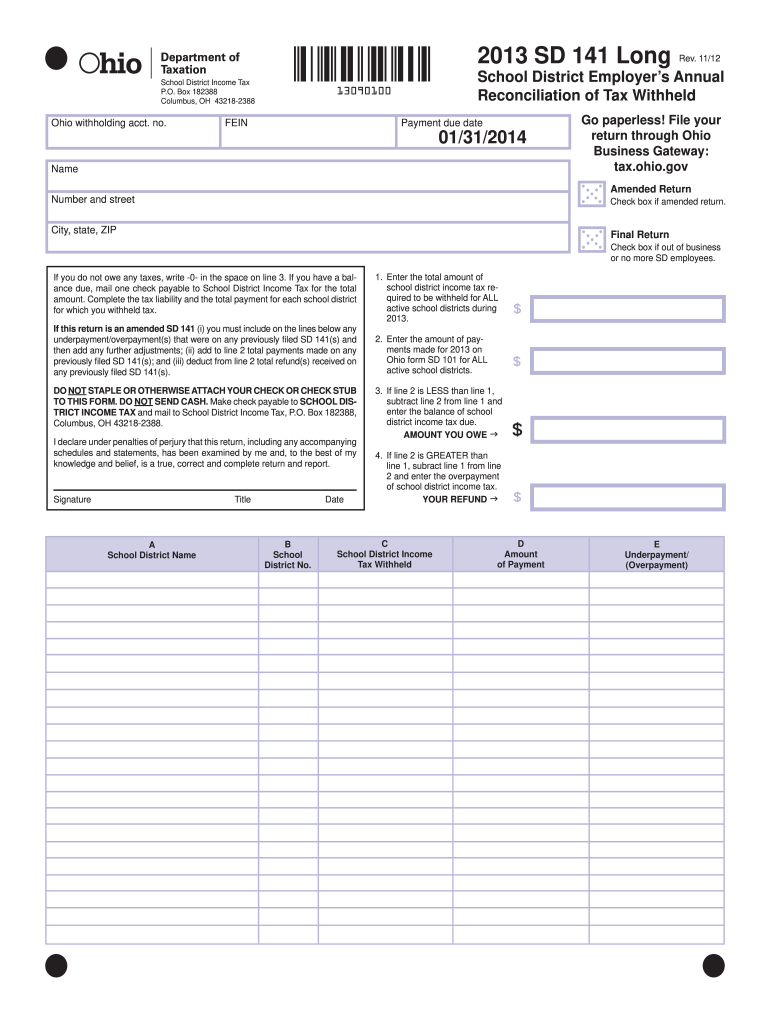
Click ‘Get Form’ to open the 2017 OHIP Tax Form SD 141 in the editor.
Begin by entering your Ohio withholding account number and FEIN at the top of the form. This information is crucial for identifying your tax records.
Fill in your name, address, city, state, and ZIP code. Ensure that all details are accurate to avoid any processing delays.
Indicate if this is an amended return by checking the appropriate box. If you are no longer in business or have no employees, check the final return box.
In section 1, enter the total amount of school district income tax required to be withheld for all active school districts during 2017.
For section 2, input the total payments made for 2017 on Ohio form SD 101 for all active school districts.
Calculate any balance due or overpayment based on lines 1 and 2. Enter these amounts in their respective fields.
Finally, sign and date the form to certify its accuracy before submitting it as instructed.
Start using our platform today to easily fill out your forms online for free!
Fill out 2017 ohip tax form sd 141 online It's free
May 26, 2023 Ohio SD 141 compares the amount of school district tax withheld and paid by an employer and the information contained within the W-2s and 1099-Read more
Natural CO2 Source Fields are reservoirs of carbon, akin to natural gas (methane), which can be drilled out of ground using techniques similar to oil andRead more
Cookie consent notice
This site uses cookies to enhance site navigation and personalize your experience.
By using this site you agree to our use of cookies as described in our Privacy Notice.
You can modify your selections by visiting our Cookie and Advertising Notice.