






Definition & Structure of a Vendor Agreement
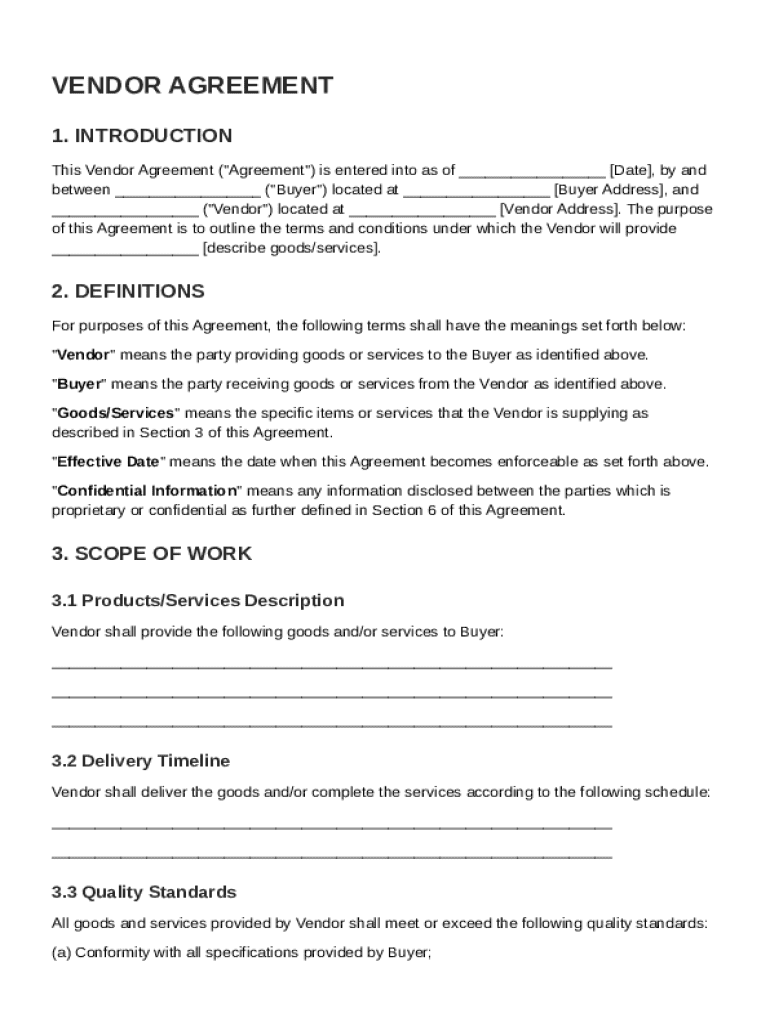
A Vendor Agreement is a legal document that outlines the terms and conditions governing the relationship between a Buyer and a Vendor for the provision of goods and/or services. It is essential for establishing the rights and responsibilities of each party involved. Key components often include:
- Definitions: Clarifies key terms used throughout the agreement to ensure both parties have a mutual understanding.
- Scope of Work: Details what services or products will be provided, including specifications and delivery timelines.
- Payment Terms: Outlines the pricing, payment methods, schedules, and any penalties for late payment.
- Confidentiality: Ensures that sensitive information exchanged is protected and not disclosed to unauthorized parties.
- Legal Compliance: Requires both parties to adhere to relevant laws and regulations.
Key Elements of the Vendor Agreement Template
Each Vendor Agreement Template can be customized, but some elements are universally crucial:
- Responsibilities: Specifies the duties of each party, ensuring all obligations are clear.
- Quality Standards: Sets the benchmarks for service or product quality to be maintained by the Vendor.
- Dispute Resolution: Details the process for resolving any disagreements or breaches, often including mediation or arbitration.
- Termination Conditions: Explains how the agreement can be ended prematurely by either party.
Steps to Complete the Vendor Agreement Template
Completing a Vendor Agreement Template involves several careful steps to ensure legal and operational clarity:
- Review All Sections: Start by reading each section carefully to understand the commitment required.
- Define the Scope: Clearly describe the work or products being provided and any relevant deadlines.
- Set Payment Terms: Agree on the payment structure, including deadlines, amounts, and penalties for non-payment.
- Legal Compliance Check: Ensure the agreement complies with relevant laws and industry regulations.
- Mutual Review: Have both parties review the completed agreement, making adjustments if necessary.
- Sign the Agreement: Once satisfied, both parties should sign to indicate mutual acceptance.
Why Use a Vendor Agreement Template
Vendor Agreement Templates are beneficial for multiple reasons:
- Standardization: Uses a consistent format, ensuring all necessary elements are included.
- Time-Saving: Speeds up the contract drafting process by providing a ready framework.
- Clarity: Improves understanding between parties by outlining expectations clearly.
- Risk Mitigation: Reduces the possibility of misunderstandings and disputes in the future.
Who Typically Uses the Vendor Agreement Template
Vendor Agreements are commonly used by:
- Businesses: From small startups to large corporations, businesses need standardized agreements with vendors.
- Freelancers and Consultants: These professionals use agreements to outline the scope and terms of their services to clients.
- Procurement Departments: Use Vendor Agreements to streamline supplier relationships and ensure compliance.


Legal Use and Compliance
Ensuring legal compliance with Vendor Agreements involves:
- Adhering to Laws: Meeting federal, state, and local laws governing business practices and contracts.
- Intellectual Property Rights: Protecting proprietary information and respecting the IP of both parties.
- Confidentiality Clauses: Ensuring any shared data remains protected per agreed terms.
Important Terms Related to Vendor Agreements
Terms and clauses that frequently appear in Vendor Agreements include:
- Force Majeure: Covers events beyond control preventing parties from fulfilling obligations, like natural disasters.
- Indemnity: Specifies conditions under which one party will compensate the other for certain losses.
- Warranties: Details the guarantee of product/service standards or the conditions under which issues will be rectified.
Examples of Using a Vendor Agreement Template
Different scenarios in which a Vendor Agreement might be adapted include:
- Service Contracts: Where consultants agree to provide expertise over a specified period.
- Supply Agreements: Covering the delivery of goods to retail businesses.
- Event Hosting: Where venues and organizers set terms for an event’s execution.
By understanding these aspects of the Vendor Agreement Template, businesses can safeguard their interests while fostering productive partnerships through clear, legally compliant documents.