




01. Edit your 2019 schedule k 1 form online
Type text, add images, blackout confidential details, add comments, highlights and more.

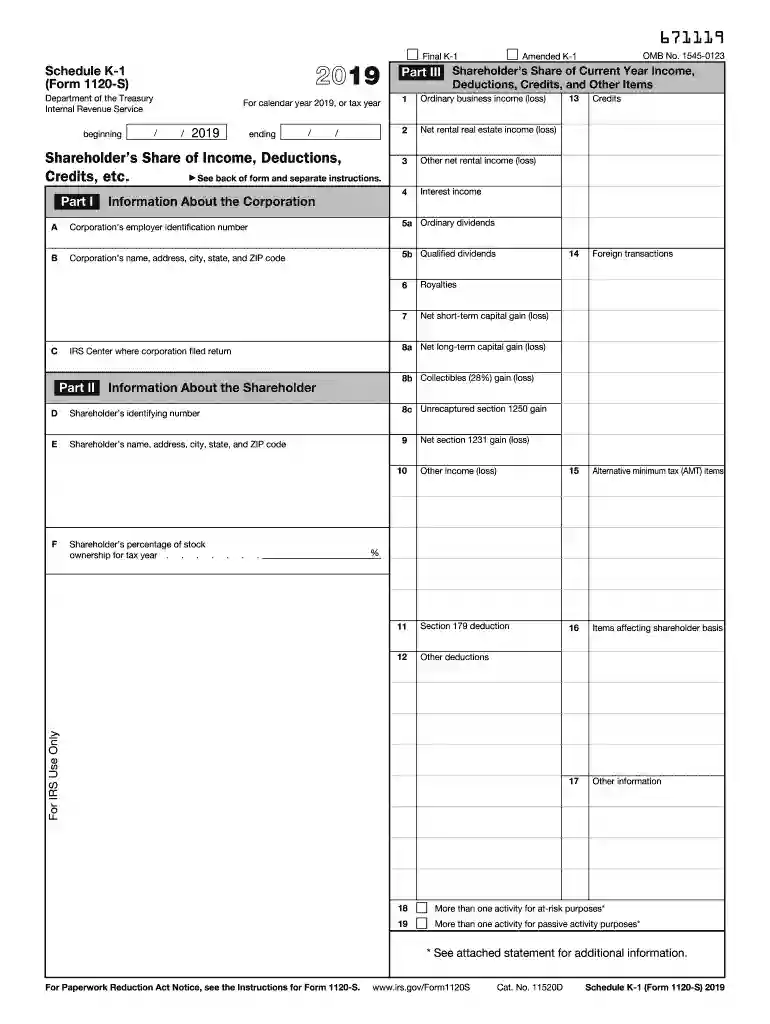
Type text, add images, blackout confidential details, add comments, highlights and more.

Draw your signature, type it, upload its image, or use your mobile device as a signature pad.

Send k1 form 2019 via email, link, or fax. You can also download it, export it or print it out.
The Schedule K-1 (Form 1120-S) is a crucial document for S corporation shareholders in the United States. It details a shareholder's share of the corporation's income, deductions, credits, and other pertinent financial information. This form informs shareholders of their taxable income from the S corporation, which is typically reported on their individual tax returns. By ensuring compliance with federal tax regulations, the Schedule K-1 1120-S plays an essential role in a shareholder's tax obligations. This form helps distinguish the flow-through income that avoids being taxed at the corporate level.
Completing the Schedule K-1 Form 1120-S involves several detailed steps:
Collect Necessary Documents:
Identify Shareholder Allocations:
Complete Income and Deductions Sections:
Transfer Information to Individual Tax Returns:
Review and Submit:
The Schedule K-1 Form 1120-S is primarily used by shareholders of S corporations. It is essential for:


Several key components form the backbone of the Schedule K-1 Form 1120-S:
The IRS provides specific guidelines regarding the preparation and filing of Schedule K-1 Form 1120-S:
Adhering to critical deadlines and dates ensures compliance with IRS regulations:
Understanding these timelines and planning accordingly can significantly reduce the risk of penalties.
Several documents are necessary to complete Schedule K-1 Form 1120-S effectively:
Failure to file or inaccuracies in the Schedule K-1 Form 1120-S can result in major penalties:
Corporations and shareholders must strive for precision to avoid these penalties.
The Schedule K-1 Form 1120-S is particularly advantageous for:
Understanding the benefits and utilizing the Schedule K-1 Form 1120-S can optimize tax liabilities for these entities, ensuring both compliance and financial efficiency.
We've got more versions of the 2019 schedule k 1 form form. Select the right 2019 schedule k 1 form version from the list and start editing it straight away!
| Versions | Form popularity | Fillable & printable |
|---|---|---|
| 2025 | 4.1 Satisfied (37 Votes) | |
| 2024 | 4.3 Satisfied (24 Votes) | |
| 2023 | 4.1 Satisfied (28 Votes) | |
| 2022 | 4.5 Satisfied (32 Votes) | |
| 2021 | 4.8 Satisfied (80 Votes) | |
| 2020 | 4.3 Satisfied (86 Votes) | |
| 2019 | 4.3 Satisfied (67 Votes) | |
| 2018 | 4.3 Satisfied (118 Votes) | |
| 2017 | 4.2 Satisfied (97 Votes) | |
| 2016 | 4.4 Satisfied (267 Votes) | |
| 2015 | 4.2 Satisfied (76 Votes) | |
| 2014 | 4.3 Satisfied (67 Votes) | |
| 2013 | 4 Satisfied (36 Votes) | |
| 2012 | 4 Satisfied (48 Votes) | |
| 2011 | 4.4 Satisfied (26 Votes) |
At DocHub, your data security is our priority. We follow HIPAA, SOC2, GDPR, and other standards, so you can work on your documents with confidence.




Jan 31, 2012 on Schedule K-1 (Form 1065) or. Intangible drilling costs for oil, gas, computations by the shareholders. Schedule K-1 (Form 1041), or other.Read more
Ordinary business income (loss). Determine whether the income (loss) is passive or nonpassive and enter on your return as follows: Report on. Passive loss.Read more
Apr 9, 2025 F2. If the shareholder is a disregarded entity, a trust, an estate, or a nominee or similar person, enter the individual or entityRead more


