Definition and Meaning
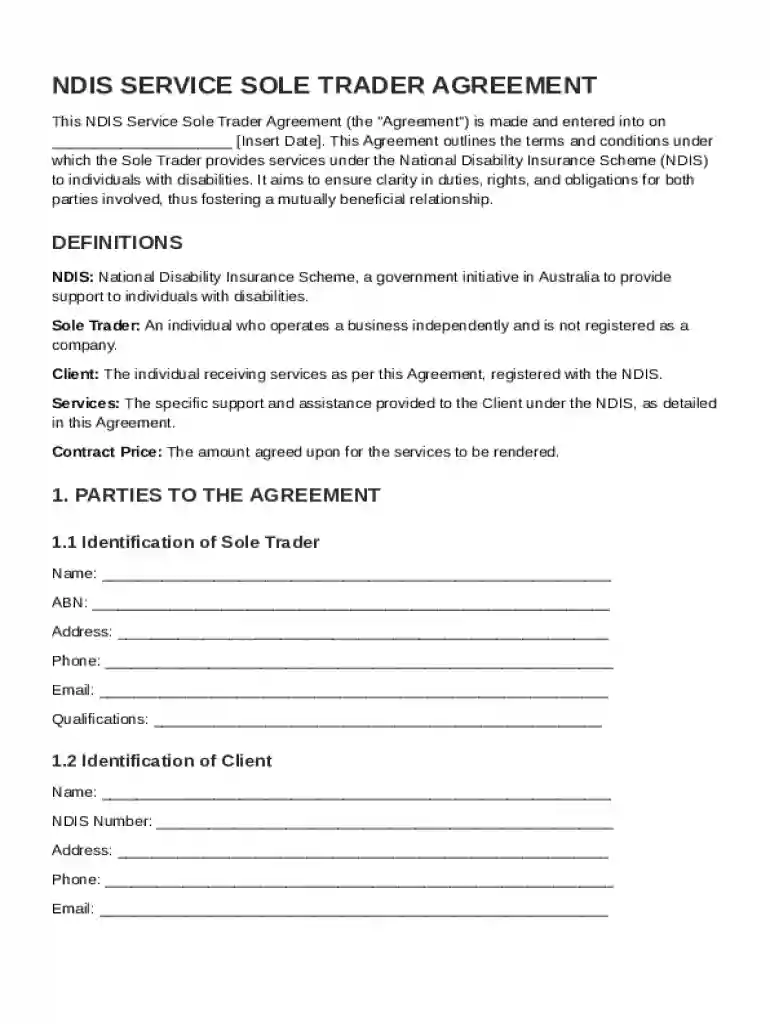
The NDIS Service Sole Trader Agreement Template is specifically designed to formalize the arrangement between a sole trader and a client within the framework of the National Disability Insurance Scheme (NDIS) in Australia. This agreement outlines crucial terms, responsibilities, and obligations from both parties. It is essential for ensuring clarity around service delivery, payment terms, compliance with NDIS guidelines, and other key aspects. By defining these areas explicitly, the agreement facilitates a mutual understanding that supports effective and compliant service provision.
Key Elements of the NDIS Service Sole Trader Agreement Template
- Service Delivery Details: Clearly outlines the specific services to be provided by the sole trader, including frequency, duration, and location of the services.
- Payment Terms: Specifies how and when the sole trader will be compensated for services rendered, including details on payment schedules and methods.
- Compliance Requirements: Ensures that both parties comply with NDIS policies and procedures, which may include adherence to privacy regulations and operational standards.
- Confidentiality and Privacy: Details how personal and sensitive information will be protected, in accordance with applicable privacy laws.
- Dispute Resolution Mechanisms: Establishes a process for resolving disagreements or disputes that may arise during the course of service delivery, minimizing disruption.
Steps to Complete the NDIS Service Sole Trader Agreement Template
- Gather Required Information: Collect all necessary details related to the services, including descriptions, timelines, and payment structures.
- Fill in the Template: Input all gathered information into the relevant sections of the agreement template, ensuring accuracy and completeness.
- Review Legal Terms: Carefully review the legal language used in the agreement to ensure it aligns with NDIS standards and other legal requirements.
- Consult Stakeholders: Involve any necessary stakeholders, such as legal advisors or NDIS coordinators, to review and make any needed adjustments.
- Sign and Execute: Once all parties agree on the terms, have both the sole trader and the client sign the document to formalize the agreement.
Why You Should Use the NDIS Service Sole Trader Agreement Template
- Clarity and Understanding: Establishes a clear framework for service delivery, reducing misunderstandings and ensuring all parties have a mutual understanding.
- Legal Protection: Provides a legally binding document that protects the interests of both the sole trader and the client.
- Compliance Assurance: Helps ensure that services are delivered in line with NDIS policies and standards.
- Professional Credibility: Demonstrates professionalism and commitment to quality service delivery, which can enhance reputation and foster trust with clients.
Legal Use of the NDIS Service Sole Trader Agreement Template
The agreement is legally binding and must comply with NDIS regulations and general contractual laws in Australia. It is important for both parties to understand their rights and obligations under the agreement to avoid legal disputes. Consulting with a legal professional to review the agreement may be beneficial to ensure its enforceability and alignment with current legal standards.
Examples of Using the NDIS Service Sole Trader Agreement Template
- Therapy Services: A sole trader providing physiotherapy services under the NDIS can specify details such as session frequency, location, and payment terms within this agreement.
- Support Coordination: An individual offering support coordination services could use the template to outline goals, service expectations, and communication protocols.
- Home Modification Services: A contractor providing home modification services can itemize provided services, timelines for completion, and cost details.
Required Documents for Completing the NDIS Service Sole Trader Agreement Template
- Service Details: Comprehensive descriptions of the services offered, including how they align with NDIS support categories.
- Identification Documents: Verification for both parties involved to ensure contractual capacity and legitimacy.
- NDIS Registration: Proof of NDIS registration or certification, if applicable, to confirm the sole trader’s eligibility and compliance.
Digital vs. Paper Version
While the NDIS Service Sole Trader Agreement Template can be completed in both digital and paper formats, using a digital platform like DocHub enhances efficiency. Digital completion allows for easy storage, access, and sharing of the document, as well as electronic signature capabilities, facilitating a streamlined and modern approach to contract management. Digital formats also support the seamless integration of updates and collaboration, essential for maintaining accurate and up-to-date documentation in dynamic service environments.