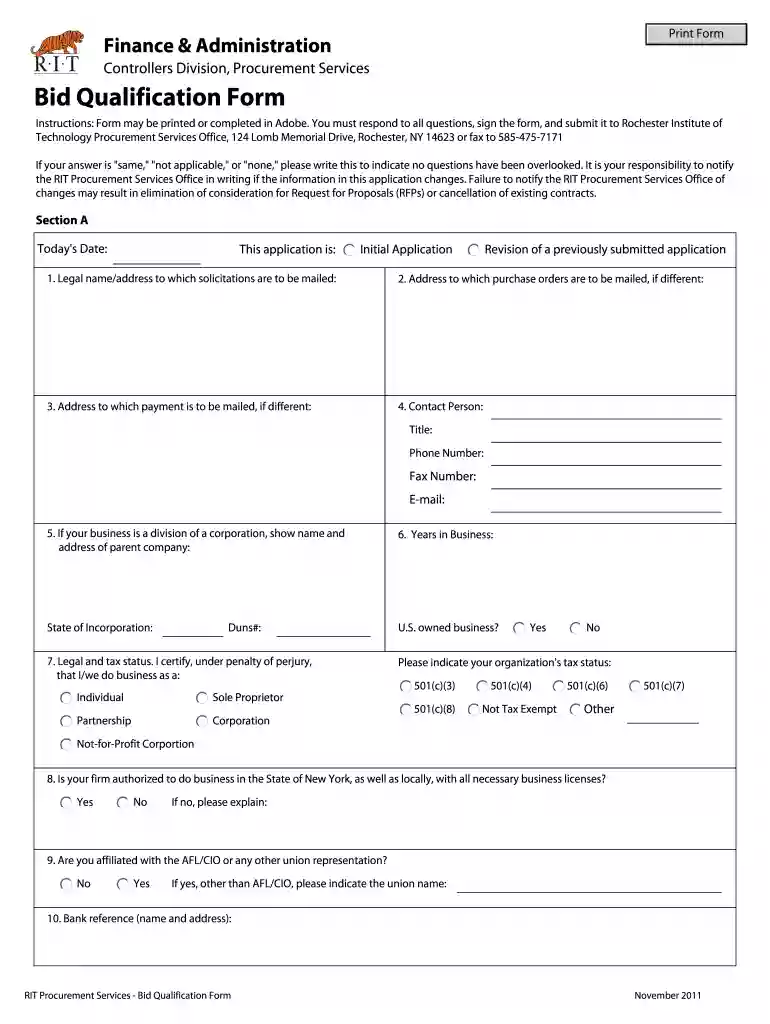
human resources form Preview on Page 1

Bid qualification form 2026

Here's how it works

  • 01. Edit your human resources form online

    Type text, add images, blackout confidential details, add comments, highlights and more.

  • 02. Sign it in a few clicks

    Draw your signature, type it, upload its image, or use your mobile device as a signature pad.

  • 03. Share your form with others

    Send forms contact via email, link, or fax. You can also download it, export it or print it out.

How to use or fill out bid qualification form with our platform

Form edit decoration
9.5
Ease of Setup
DocHub User Ratings on G2
9.0
Ease of Use
DocHub User Ratings on G2
  1. Click ‘Get Form’ to open the bid qualification form in the editor.
  2. Begin by entering today's date and selecting whether this is an initial application or a revision of a previously submitted application.
  3. Fill in your legal name and address where solicitations should be mailed. If there are different addresses for purchase orders or payments, provide those as well.
  4. Complete the contact information section, including the contact person's title, phone number, fax number, and email address.
  5. Indicate your business's legal and tax status by selecting the appropriate options. Ensure you certify your status under penalty of perjury.
  6. Answer questions regarding your business's authorization to operate in New York and affiliations with unions. Provide any necessary explanations if applicable.
  7. For minority-owned businesses, check the relevant classifications and provide details about corporate officers and directors if applicable.
  8. Review all sections carefully, ensuring that all required fields are completed accurately before submitting the form.

Start filling out your bid qualification form today for free using our platform!

See more human resources form versions

We've got more versions of the human resources form form. Select the right human resources form version from the list and start editing it straight away!

VersionsForm popularityFillable & printable
20114.8 Satisfied (105 Votes)

be ready to get more

Complete this form in 5 minutes or less

Security and compliance

At DocHub, your data security is our priority. We follow HIPAA, SOC2, GDPR, and other standards, so you can work on your documents with confidence.

qualification form example

Bidder Qualification Form Construction

The undersigned bidder certifies that the information herein is true, correct, complete and accurate. (Elaboration on the following information.Read more

Learn more
RFP vs RFI vs RFQ: Differences and When to Use Each

Aug 20, 2025 Differences from RFP: An RFQ focuses on price and commercial terms. It does not ask for project plans, methodologies, or detailed proposals.Read more

Learn more
If you believe that this page should be taken down, please follow our DMCA take down process here