






Definition and Meaning
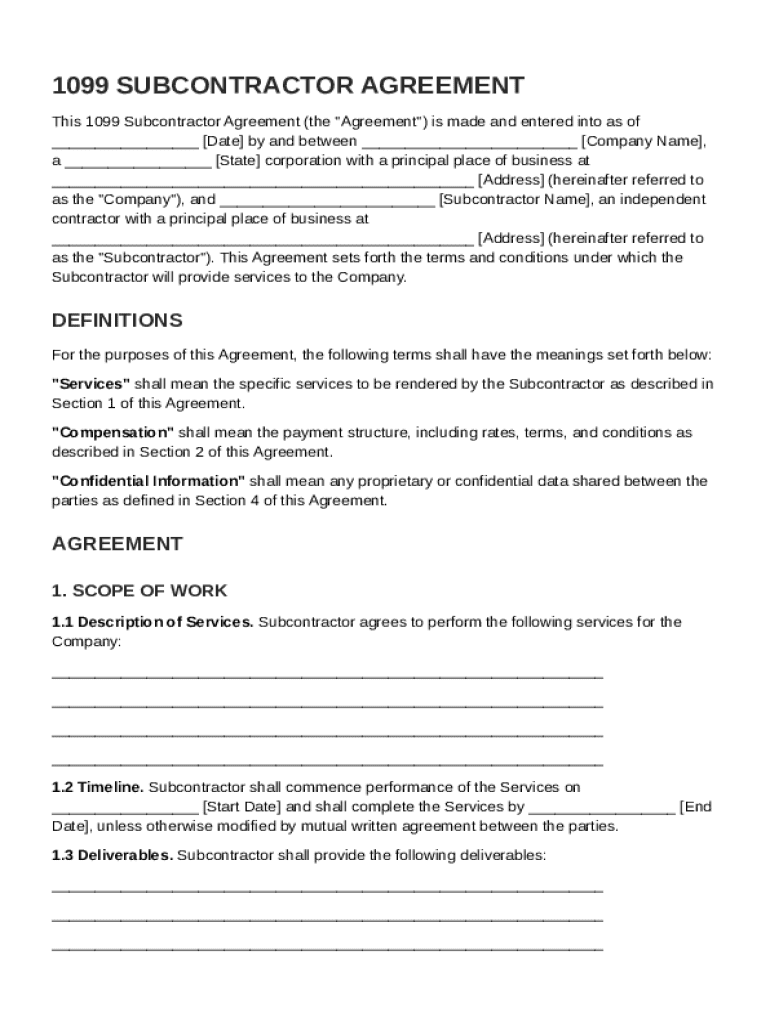
The 1099 Subcontractor Agreement Template is a contractual document that sets forth the terms and conditions under which a subcontractor will provide services to a business. This template is used to outline expectations for both parties, including work scope, payment, and responsibilities, ensuring clarity in transactions with subcontractors classified as 1099 workers. It serves to emphasize the independent nature of the subcontractor's role versus an employee's role, addressing key aspects such as payment terms, work milestones, and deliverables.
Key Elements of the 1099 Subcontractor Agreement Template
The template contains critical components to legally bind the contracting parties, ensuring a clear understanding of terms:
- Scope of Work: Detailed description of the tasks and responsibilities expected from the subcontractor.
- Payment Structure: Establishes the compensation model, including rates, payment schedule, and conditions for payment.
- Independent Contractor Status: Clearly delineates that the subcontractor is not an employee and outlines tax responsibilities.
- Confidentiality Obligations: Outlines how confidential information should be handled and establishes non-disclosure terms.
- Intellectual Property Rights: Specifies ownership of any work products and intellectual property created during the contract term.
- Termination Conditions: Describes circumstances under which the agreement can be terminated by either party.
- Indemnification and Liability: Covers responsibilities for potential damages or losses and liability limitations.
- Governing Law: Identifies the jurisdiction governing the agreement.
How to Use the 1099 Subcontractor Agreement Template
Using the template involves several steps to ensure accuracy and compliance:
- Assessment: Clearly identify the services and deliverables needed from the subcontractor.
- Customization: Modify the template to fit specific project details, payment terms, and any unique conditions relevant to the agreement.
- Consultation: Consider legal advice to ensure that the terms meet both parties' expectations and legal obligations.
- Review: Both parties should review the content carefully to avoid oversights.
- Execution: Once finalized, both parties should sign the agreement. Electronic signatures can be used with platforms like DocHub for a legally binding conclusion.
Important Terms Related to 1099 Subcontractor Agreement Template
Understanding specific legal and operational terminology is essential:
- Contractor: An individual or business entity hired to perform services independently from the contracting company.
- Deliverables: Specific outputs expected from the subcontractor, often described in detail in the agreement.
- Non-disclosure Agreement (NDA): A clause within the agreement to prevent the sharing of proprietary information.
- Force Majeure: A provision that relieves parties from fulfilling contractual obligations due to unforeseen events.
- Work for Hire: A legal term used to define ownership rights over the work produced within the contract's period.
Legal Use of the 1099 Subcontractor Agreement Template
Employing the agreement template legally binds both parties and safeguards against future disputes:
- Independent Contractor Classification: Ensures compliance with IRS 1099 contractor classification guidelines, crucial for tax reporting.
- Basis for Enforcement: Provides a legally enforceable document to hold parties accountable for agreed-upon terms.
- Compliance with Labor Laws: Helps maintain compliance with labor regulations by clearly defining contractor versus employee roles.
Who Typically Uses the 1099 Subcontractor Agreement Template
Several business entities and individuals benefit from using this agreement:
- Small Businesses and Startups: Often engage subcontractors for specific projects without hiring full-time employees.
- Freelancers and Consultants: Require formal contracts to protect their interests and define scope with clients.
- Large Corporations: Utilize subcontractors for specialized services not available internally.
- Non-profit Organizations: When seeking specific expertise without permanent staff appointments.


Examples of Using the 1099 Subcontractor Agreement Template
Practical applications highlight the agreement's versatility:
- Construction Companies: Hiring specialized tradespeople for a duration or specific tasks.
- Marketing Agencies: Engaging independent graphic designers or content creators for campaign work.
- Software Development Firms: Contracting IT consultants for project-specific objectives.
Software Compatibility and Digital vs. Paper Versions
The 1099 Subcontractor Agreement Template is adaptable for digital use, which provides advantages over traditional paper formats:
- DocHub and Similar Platforms: Supports digital editing and electronic signatures, streamlining contract management.
- Google Workspace Integration: Simplifies the import and export processes from platforms such as Google Drive.
- Version Control: Digital formats allow easy updates and sharing among stakeholders.
Always confirm software compatibility with tools like TurboTax or QuickBooks for seamless financial integration and reporting of subcontractor payments and related expenses.