How to complete affidavit of seller's gain 2026

Get Form
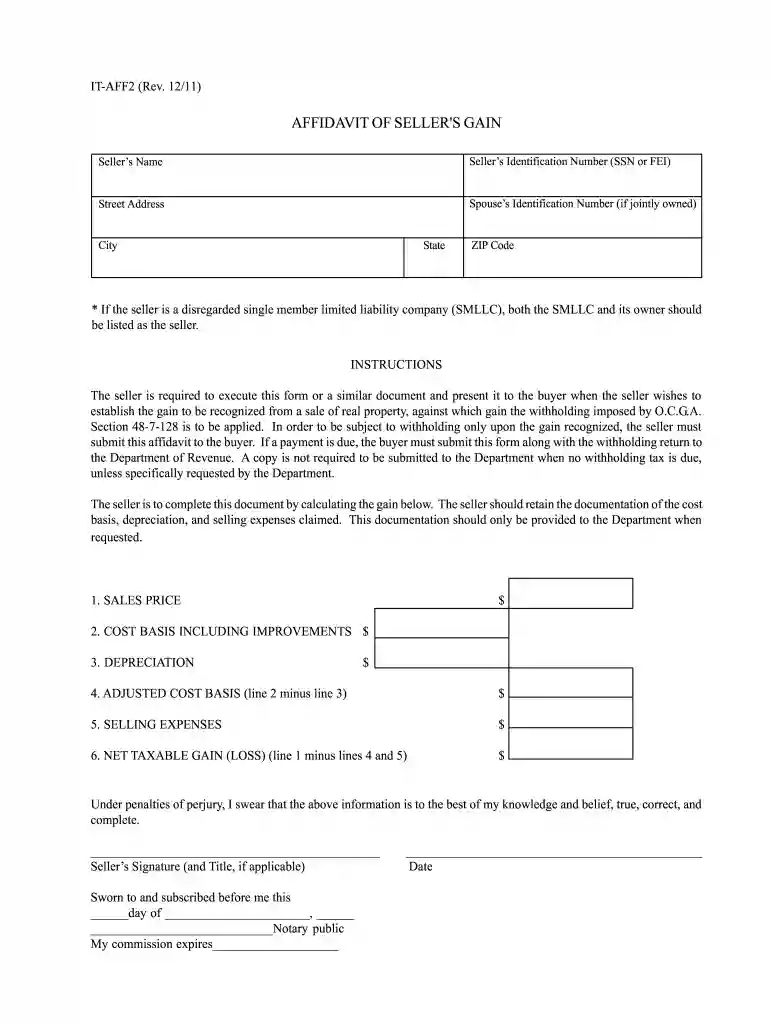
affidavit of seller's gain Preview on Page 1

Here's how it works

01. Edit your affidavit of seller's gain online
Type text, add images, blackout confidential details, add comments, highlights and more.

02. Sign it in a few clicks
Draw your signature, type it, upload its image, or use your mobile device as a signature pad.

03. Share your form with others
Send georgia it aff2 via email, link, or fax. You can also download it, export it or print it out.

How to use or fill out the affidavit of seller's gain with our platform

Form edit decoration
9.5
Ease of Setup
DocHub User Ratings on G2
9.0
Ease of Use
DocHub User Ratings on G2
  1. Click ‘Get Form’ to open it in the editor.
  2. Begin by entering the Seller’s Name and Identification Number (SSN or FEI) in the designated fields. Ensure accuracy as this information is crucial for tax purposes.
  3. Fill in the Street Address, City, State, and ZIP Code of the seller. If applicable, include the Spouse’s Identification Number for jointly owned properties.
  4. In the SALES PRICE section, input the total selling price of the property. This figure is essential for calculating your net taxable gain.
  5. Next, provide your COST BASIS INCLUDING IMPROVEMENTS. This should reflect all costs associated with acquiring and improving the property.
  6. Enter any DEPRECIATION claimed on the property. This will be subtracted from your cost basis to determine your adjusted cost basis.
  7. Calculate your ADJUSTED COST BASIS by subtracting depreciation from your cost basis. Input this value in its respective field.
  8. List any SELLING EXPENSES incurred during the sale process. These expenses can also reduce your taxable gain.
  9. Finally, calculate your NET TAXABLE GAIN (LOSS) by subtracting both adjusted cost basis and selling expenses from sales price. Enter this final amount.
  10. Sign and date the affidavit at the bottom to affirm that all provided information is accurate to the best of your knowledge.

Start using our platform today to complete your affidavit of seller's gain quickly and efficiently!

See more how to complete affidavit of seller's gain versions

We've got more versions of the how to complete affidavit of seller's gain form. Select the right how to complete affidavit of seller's gain version from the list and start editing it straight away!
Versions Form popularity Fillable & printable
2011 4 Satisfied (30 Votes)
be ready to get more

Complete this form in 5 minutes or less

Get form

Got questions?

We have answers to the most popular questions from our customers. If you can't find an answer to your question, please contact us.
Contact us

Of course, electronically drawing your signature is appropriate, but only if you use a tool that complies with industry laws and regulations. Try DocHub, which ensures eSignature validity under ESIGN and UETA requirements. All you need to approve your ga it aff2 electronically is an account with DocHub and an internet connection. When you open your paperwork in our editor, click Sign and select the Draw option.

In addition to a comprehensive toolset for editing PDFs on mobile devices, DocHub allows you to sign your form it aff2 along the way. Open our editor in your web browser, make modifications using DocHub’s toolset, and complete your editing by eSigning the completed form.

If a nonresident works in Georgia, he/she is taxed on all income that is received from an employer, including vacation, holiday, and sick pay, based on regulation 560-7-8-. 01(b)(1), unless he/she falls under the 5% exception of Georgia code section 48-7-1(11)(A). Georgia regulation 560-7-8-.
You can claim exempt if you filed a Georgia income tax return last year and the amount of Line 4 of Form 500EZ or Line 16 of Form 500 was zero, and you expect to file a Georgia tax return this year and will not have a tax liability.
Note: Georgian citizen natural persons (including individual entrepreneurs) are assigned the same 11 digit tax identification number as the identification number that is assigned in the national identity card by registering body (Public registry).

Security and compliance

At DocHub, your data security is our priority. We follow HIPAA, SOC2, GDPR, and other standards, so you can work on your documents with confidence.

Learn more
ccpa2
pci-dss
gdpr-compliance
hipaa
soc-compliance
be ready to get more

Complete this form in 5 minutes or less

Get form

People also ask

To locate your Georgia Withholding Number: Log in to your Department of Revenue Tax Center Account. Your Georgia Withholding Number will be on any filing form sent to you by the Department of Revenue. Call the Department of Revenue Business Services Unit at 877-423-6711, option 1, between the hours of 8:00 AM - 5:00 PM.
To qualify for the capital gains tax exemption, you must have lived in the residence for at least two of the past five years. Live in the house for at least two years. ... See whether you qualify for an exception. ... Keep the receipts for your home improvements. ... Georgia Tax on Capital Gains [Exclusions]
If your small business has employees working in Georgia, you'll need to withhold and pay Georgia income tax on their salaries. This is in addition to having to withhold federal income tax for those same employees. Here are the basic rules on Georgia state income tax withholding for employees.
Driver's License number or Letter ID (Letter IDs can be found on your renewal notice.) All registration fees, taxes, and convenience fees, which must be paid by debit card, credit card, or electronic check.
Georgia residents who sell their primary residence will generally not be required to pay capital gains tax on the first $250,000 of profit generated by the sale. Spouses filing a joint return may exclude the first $500,000 gained from the sale of their home.

Related links