Type text, add images, blackout confidential details, add comments, highlights and more.

02. Sign it in a few clicks
Draw your signature, type it, upload its image, or use your mobile device as a signature pad.

03. Share your form with others
Send guarantors form via email, link, or fax. You can also download it, export it or print it out.

How to use or fill out tenant guarantor form with our platform
Ease of Setup
DocHub User Ratings on G2
Ease of Use
DocHub User Ratings on G2
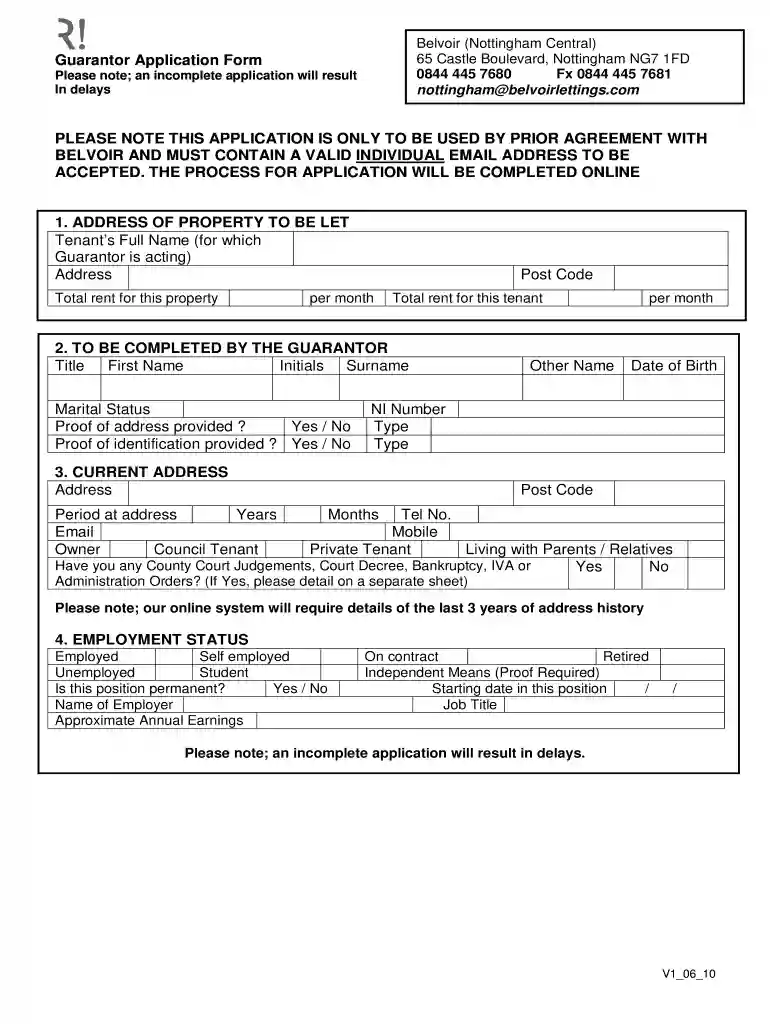
Click ‘Get Form’ to open the tenant guarantor form in the editor.
Begin by entering the address of the property to be let, along with the tenant’s full name and total rent for the property per month.
In the guarantor section, fill in your title, first name, initials, surname, marital status, and provide proof of address and identification. Ensure you include your date of birth and NI number.
Complete your current address details, including how long you've lived there and your email. Indicate if you are a private tenant or living with parents/relatives.
For employment status, select your current job situation (employed, self-employed, etc.), indicate if it is permanent, and provide employer details along with approximate annual earnings.
Finally, review the declaration section carefully. Confirm that all information is accurate before signing and dating the form.
Start filling out your tenant guarantor form online for free today!
4. Failure to pay the account of another customer as guarantor thereof, unless the Company has in writing the guarantee as a condition precedent to.Read more
Cookie consent notice
This site uses cookies to enhance site navigation and personalize your experience.
By using this site you agree to our use of cookies as described in our Privacy Notice.
You can modify your selections by visiting our Cookie and Advertising Notice.