






Definition & Purpose of the Nivano Physicians Authorization Form
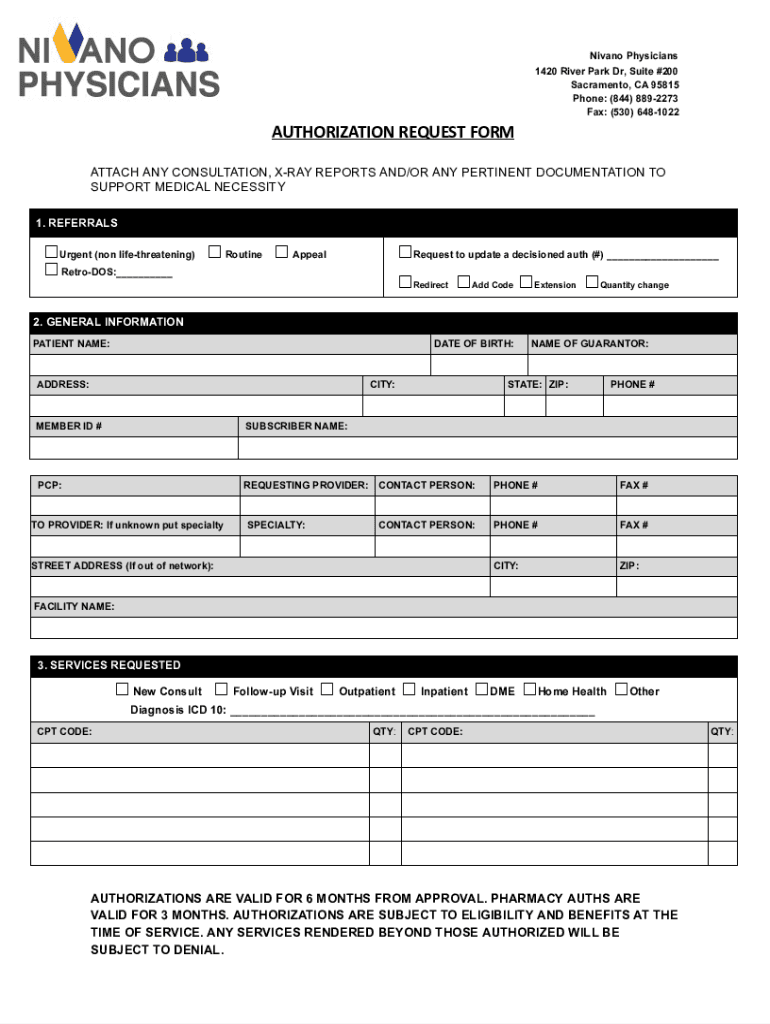
The Nivano Physicians Authorization Form is a medical document designed to facilitate the process of obtaining necessary authorizations for medical services. Typically deployed within healthcare settings, this form outlines the requirement for proper documentation when requesting medical authorizations. It is intended for capturing detailed patient information, specifying service requests, and justifying the medical necessity behind those requests.
Key Components
- Patient Information: Captures personal details such as name, address, and contact information, crucial for processing requests accurately.
- Service Requests: Specifies the medical services or procedures requiring authorization, ensuring clarity for both the provider and the insurer.
- Documentation of Medical Necessity: Details supporting information to justify the requested services, essential for authorization approval.
How to Complete the Nivano Physicians Authorization Form
Filling out the Nivano Physicians Authorization Form requires attention to detail to ensure all necessary fields are accurately completed. Each section should align with medical and procedural guidelines.
- Begin with Patient Information: Enter the patient’s full name, date of birth, and insurance information precisely as listed on their identification documents.
- Detail the Requested Services: Clearly specify the medical services needed, including CPT codes if applicable, to streamline the authorization process.
- Provide Supporting Documentation: Attach or reference necessary medical records or physician notes that validate the necessity of the services.
Best Practices
- Ensure Legibility: Use clear, readable fonts, especially when filling the form digitally.
- Double-Check Details: Small errors can lead to delays; verify all information for accuracy.
Who Typically Uses the Nivano Physicians Authorization Form
This form is predominantly used by medical professionals and administrative staff within healthcare facilities. It ensures that all necessary information is systematically collected to facilitate the authorization of medical services.
- Healthcare Providers: Doctors and specialists seeking approval for treatment plans.
- Administrative Staff: Personnel responsible for managing patient records and insurance details.
- Insurance Personnel: Individuals reviewing authorization requests for compliance and necessity.


Usage Scenarios
- Routine Procedures: For common procedures requiring prior approval from insurers.
- Specialized Treatments: Ensures coverage and authorization for high-cost or specialized medical procedures.
Legal Considerations and Compliance
The use of the Nivano Physicians Authorization Form must comply with healthcare regulations, ensuring patient information is managed with confidentiality and accuracy.
HIPAA Compliance
- Data Protection: Ensure all patient data on the form is secured according to HIPAA standards.
- Confidentiality Agreements: Obtain necessary patient consent before sharing data with insurers.
Authorization Validity
- Time-Sensitive: Authorization approvals may have a validity period, necessitating prompt filing and follow-ups.
Required Documents for Form Submission
A comprehensive submission includes several documents that must accompany the Nivano Physicians Authorization Form to ensure proper evaluation.
- Physician’s Note: Detailed medical notes delineating the reasons for the requested procedures.
- Insurance Information: Valid policy details and pre-existing authorization numbers if applicable.
- Previous Medical Records: Historical health data relevant to the current authorization request.
Common Attachments
- Test Results: Lab or imaging results supporting the necessity of a procedure.
- Treatment Plans: Detailed plans outlining proposed medical interventions and expected outcomes.
State-Specific Rules and Variations
While the Nivano Physicians Authorization Form is broadly utilized, variations exist depending on state-specific regulations and insurance requirements. Understanding these nuances ensures compliance and enhances the likelihood of approval.
Differentiating Factors
- Insurance Requirements: Varying documentation and approval criteria based on state-specific insurance mandates.
- Service Coverage: Differences in what services are covered or require prior authorization in different states.
State Example
- California Specifics: In California, additional documentation might be required for certain chronic treatments, reflecting the state’s health policy framework.