



Here's how it works



How to use or fill out SSA 44 2011 form with our platform

- Click ‘Get Form’ to open the SSA 44 2011 form in the editor.
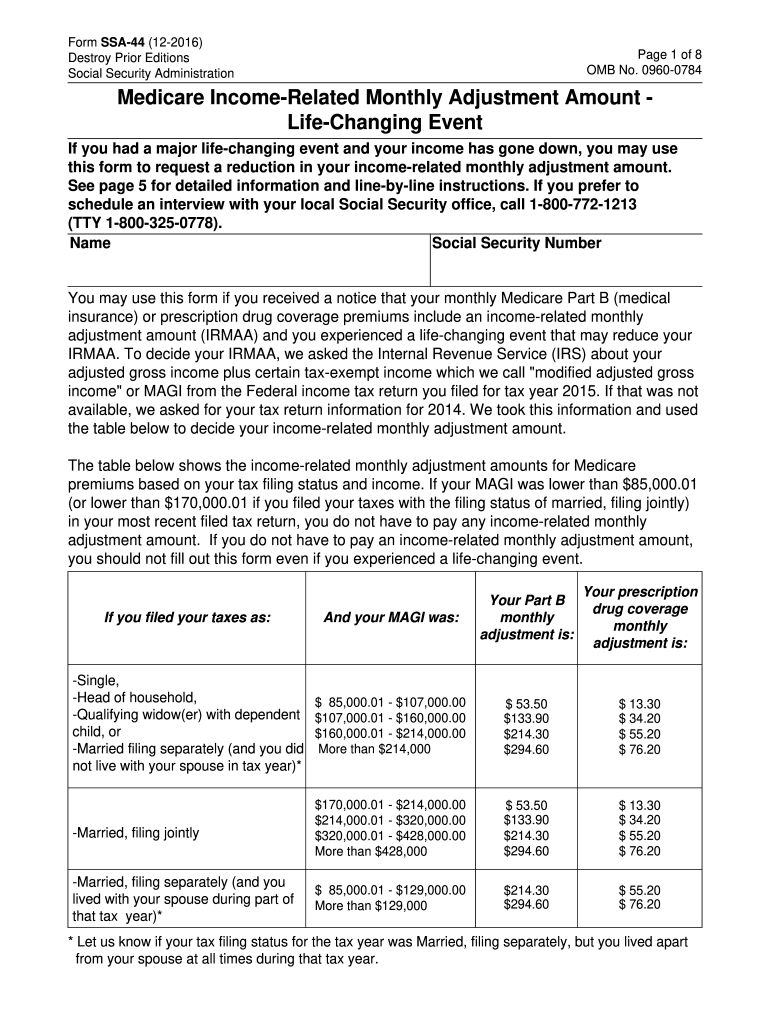
- Begin by filling in your personal information, including your name and Social Security Number at the top of the form.
- In Step 1, check the box corresponding to your life-changing event and enter the date it occurred (mm/dd/yyyy).
- For Step 2, provide details about your adjusted gross income for the tax year affected by the life-changing event. Enter your AGI and tax-exempt interest income.
- If applicable, complete Step 3 by estimating your modified adjusted gross income for next year and selecting your expected tax filing status.
- In Step 4, attach any required documentation that supports your claim regarding MAGI and life-changing events.
- Finally, sign the form in Step 5, providing your phone number and current mailing address for follow-up.
Start using our platform today to easily fill out and submit your SSA 44 form online for free!
It's free
See more ssa 44 2011 form versions
| Versions | Form popularity | Fillable & printable |
|---|---|---|
| 2025 | 4.9 Satisfied (24 Votes) | |
| 2024 | 4.9 Satisfied (42 Votes) | |
| 2024 | 4.8 Satisfied (47 Votes) | |
| 2022 | 4.8 Satisfied (37 Votes) | |
| 2020 | 4.8 Satisfied (40 Votes) | |
| 2019 | 4.1 Satisfied (80 Votes) | |
| 2017 | 4.3 Satisfied (45 Votes) | |
| 2016 | 4.4 Satisfied (69 Votes) | |
| 2013 | 4.4 Satisfied (171 Votes) | |
| 2011 | 4.4 Satisfied (492 Votes) |
Got questions?
Can I type my eSignature on my ssa 44 2011 form?
Yes, a typed name is recognized as a valid electronic signature when you create it on your paperwork using a compliant solution like DocHub. Simply upload your ssa 44 2011 form to our editor, click Sign in the top tool pane → Create your signature → Type your name in the appropriate tab, and decide how it will appear on your document.
How do you fill out ssa 44 2011 form online?
You may get and modify your ssa 44 2011 form online with the help of DocHub. Its straightforward but feature-rich design allows you to start effective work right after you sign up your account. Create your profile and add your document, and then our interface will guide you via our stress-free form completion experience.
Can I mail forms to Social Security?
What qualifies as a life-changing event for Medicare?
How is Irmaa calculated?
Security and compliance
At DocHub, your data security is our priority. We follow HIPAA, SOC2, GDPR, and other standards, so you can work on your documents with confidence.
Learn more