




Here's how it works



How to use or fill out form for reinstatement brokersalesperson in Ontario

- Click ‘Get Form’ to open it in the editor.
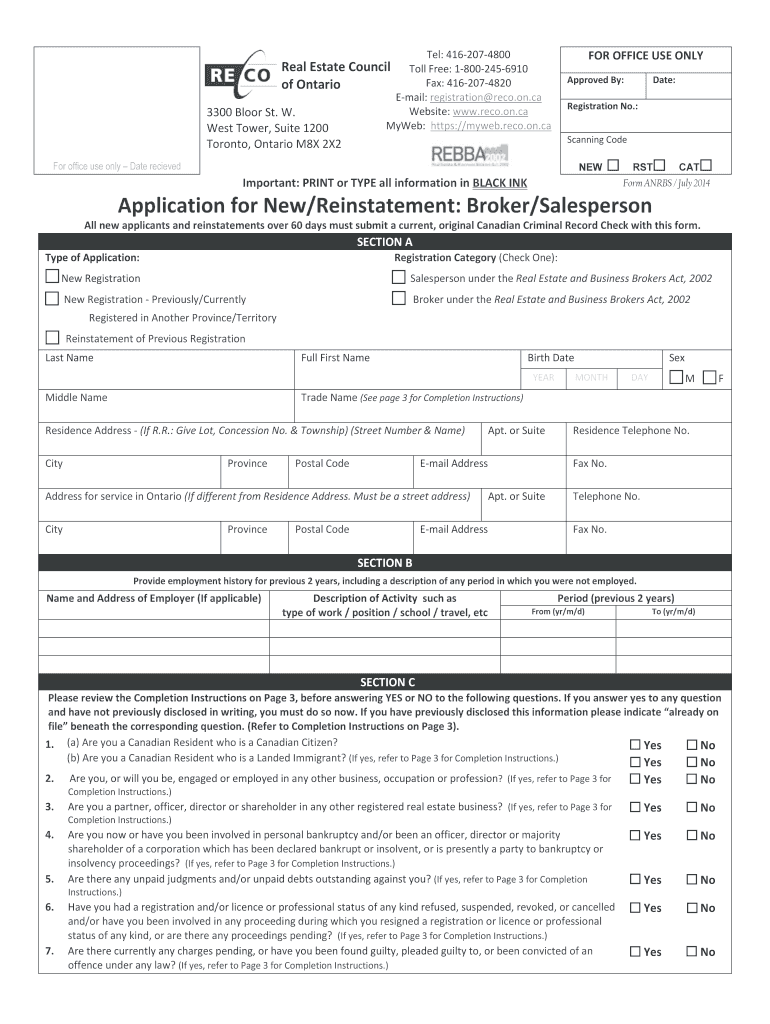
- Begin with SECTION A. Indicate the type of application by checking the appropriate box for either New Registration or Reinstatement. Fill in your last name, first name, middle name, birth date, and sex.
- Provide your residence address and email address. If your service address differs from your residence, include that information as well.
- In SECTION B, detail your employment history for the past two years. Include employer names, job descriptions, and periods of employment.
- SECTION C requires you to answer specific questions regarding residency status and any previous legal issues. Answer truthfully and provide additional documentation if necessary.
- For new registrants only, complete SECTION D regarding educational requirements. Ensure you meet all criteria before submission.
- Finally, review all sections for accuracy and completeness before signing in SECTION G. Submit the form along with any required documents through our platform.
Start using our editor today to streamline your application process for free!
It's free
See more form for reinstatement brokersalesperson in ontario versions
Got questions?
Can I sign my application for new reinstatement broker salesperson form in electronic format?
According to eSignature laws, documents approved digitally have the same validity as traditionally approved ones. You can electronically sign almost any business and private documentation. Four types of paperwork still require wet signatures only - wills and testamentary trusts, court orders and other court forms, state statutes regulating divorce, adoption, or other family law, and notice of cancellation of utility services. If you adhere to the regulations and use a reliable and compliant software solution, like DocHub, you can eSign your application for new reinstatement broker salesperson form without printing it.
How do you complete license reinstatement form on iOS?
You need only a web connection and a web browser to complete your license reinstatement form on an iOS phone. Open the DocHub website and authenticate. Then, add your document or select it from the list in your dashboard. Then use our editing instruments to complete your form and preserve all your modifications. You can also send it to a specified recipient straight away.
Security and compliance
At DocHub, your data security is our priority. We follow HIPAA, SOC2, GDPR, and other standards, so you can work on your documents with confidence.
Learn more




