Type text, add images, blackout confidential details, add comments, highlights and more.
02. Sign it in a few clicks
Draw your signature, type it, upload its image, or use your mobile device as a signature pad.
03. Share your form with others
Send it via email, link, or fax. You can also download it, export it or print it out.
How to use or fill out ct600 form writable version 2008 with our platform
Ease of Setup
DocHub User Ratings on G2
Ease of Use
DocHub User Ratings on G2
Click ‘Get Form’ to open the ct600 form writable version 2008 in the editor.
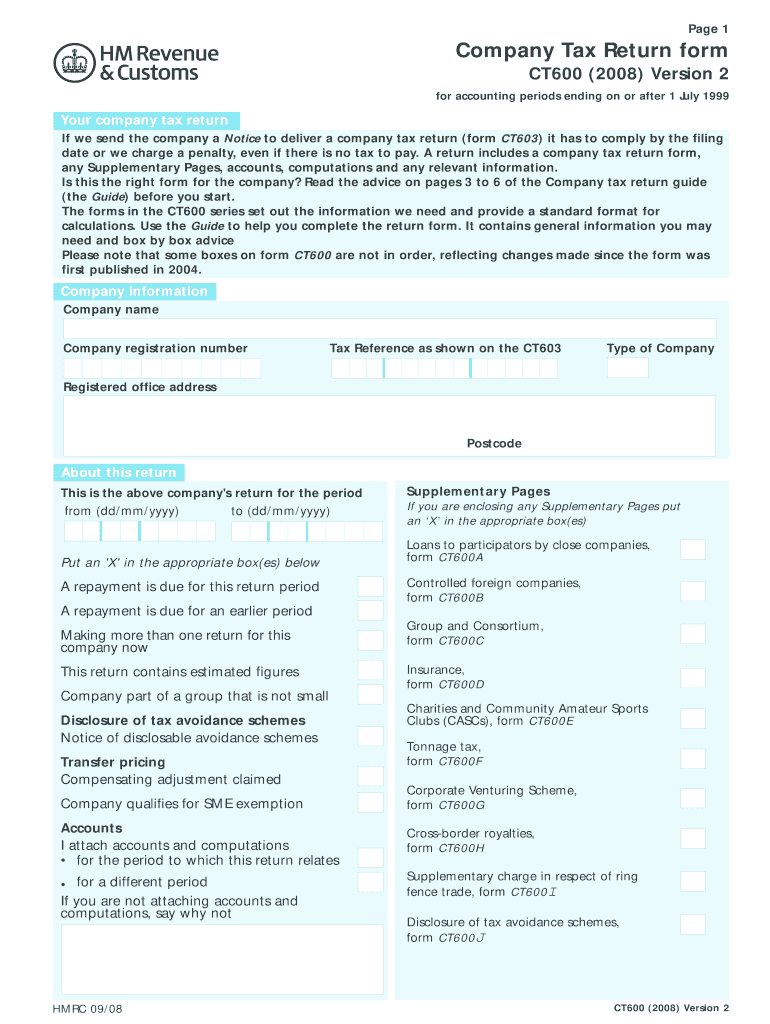
Begin by entering your company information, including the company name, registration number, and tax reference as shown on the CT603. Ensure accuracy to avoid penalties.
In the 'About this return' section, specify the accounting period by filling in the start and end dates. Mark any relevant boxes regarding repayments or supplementary pages.
Proceed to the 'Company tax calculation' section. Fill in your total turnover and income details accurately. Use our platform's features to easily navigate between fields.
Complete the deductions and reliefs section by entering applicable figures for management expenses and capital allowances. Review each entry carefully.
Finally, ensure you sign and date the declaration at the end of the form before submitting it through our platform for a seamless filing experience.
Start using our platform today to fill out your ct600 form quickly and efficiently!
Fill out ct600 form writable version 2008 online It's free
See more ct600 form writable version 2008 versions
We've got more versions of the ct600 form writable version 2008 form. Select the right ct600 form writable version 2008 version from the list and start editing it straight away!
Dec 19, 2009 The proposed development of a new substation requires CLP to submit an application to the Connecticut Siting Council for a Certificate ofRead more
CT600 (Leeds), ? Thus was born the idea, having produced the. Stradale version of the T((, to build a competition version in effect, a road version of aRead more
Cookie consent notice
This site uses cookies to enhance site navigation and personalize your experience.
By using this site you agree to our use of cookies as described in our Privacy Notice.
You can modify your selections by visiting our Cookie and Advertising Notice.