Type text, add images, blackout confidential details, add comments, highlights and more.
02. Sign it in a few clicks
Draw your signature, type it, upload its image, or use your mobile device as a signature pad.
03. Share your form with others
Send fms form 2231 via email, link, or fax. You can also download it, export it or print it out.
How to use or fill out fms 2231 direct deposit form with our platform
Ease of Setup
DocHub User Ratings on G2
Ease of Use
DocHub User Ratings on G2
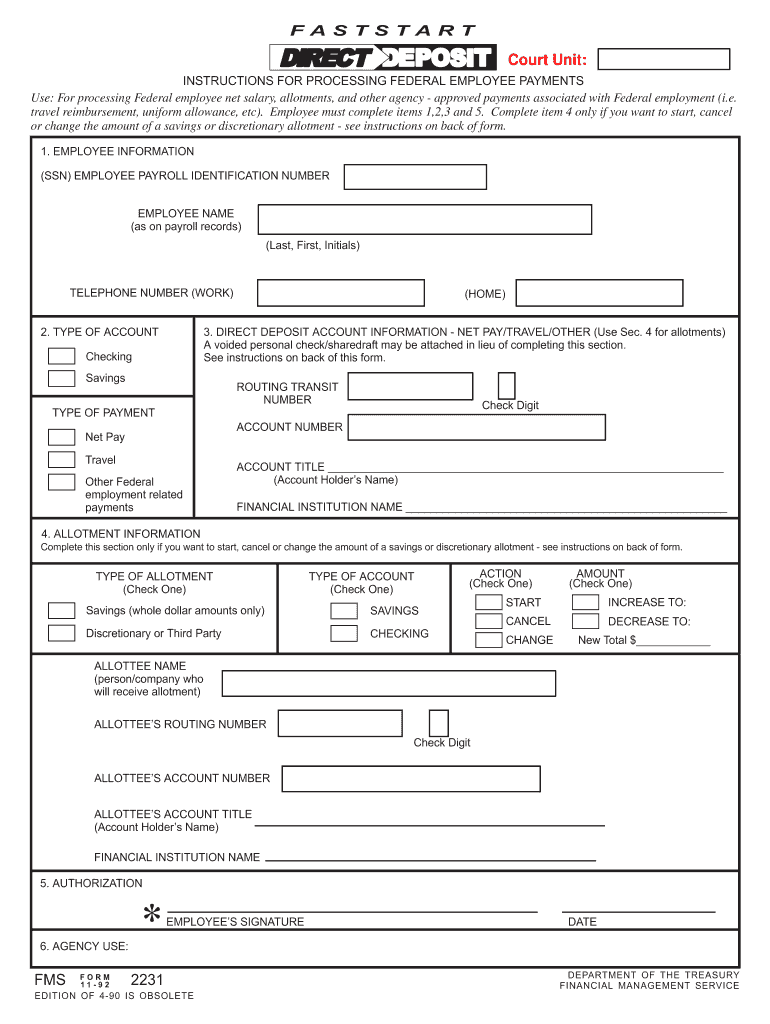
Click ‘Get Form’ to open the fms 2231 direct deposit form in the editor.
Begin by filling out Section 1, 'EMPLOYEE INFORMATION.' Enter your Social Security Number, name as it appears on payroll records, and your work telephone number.
In Section 2, 'TYPE OF ACCOUNT,' indicate whether you are using a checking or savings account by selecting the appropriate option.
Proceed to Section 3, 'DIRECT DEPOSIT ACCOUNT INFORMATION.' Here, provide your routing transit number and account number. You can attach a voided check if preferred.
If applicable, complete Section 4 for allotment information. Specify the type of allotment and action (start, cancel, change) along with the amount.
Finally, sign and date the form in Section 5 to authorize the request before submitting it through our platform.
Start filling out your fms 2231 direct deposit form online for free today!
Fill out fms 2231 direct deposit form online It's free
Fms 2231 direct deposit form printableFms 2231 direct deposit form pdfFms 2231 direct deposit form pdf downloadFms 2231 direct deposit form downloadFMS Form 2231 navyFms 2231 direct deposit form 2022Fms 2231 direct deposit form 2021Fms 2231 fillable
Security and compliance
At DocHub, your data security is our priority. We follow HIPAA, SOC2, GDPR, and other standards, so you can work on your documents with confidence.
INSTRUCTIONS FOR PROCESSING FASTSTART AUTHORIZATION. PURPOSE. You may use this form to provide instructions for processing your net salary. You may also useRead more
DIRECT DEPOSIT ACCOUNT INFORMATION - NET PAY/TRAVEL/OTHER (Use Sec. 4 for FS FORM 2231. DEPARTMENT OF THE TREASURY. BUREAU OF THE FISCAL SERVICE.Read more
Feb 1, 2021 Part III incorporates information by reference to the registrants definitive proxy statement, to be filed with the Securities and ExchangeRead more
Cookie consent notice
This site uses cookies to enhance site navigation and personalize your experience.
By using this site you agree to our use of cookies as described in our Privacy Notice.
You can modify your selections by visiting our Cookie and Advertising Notice.