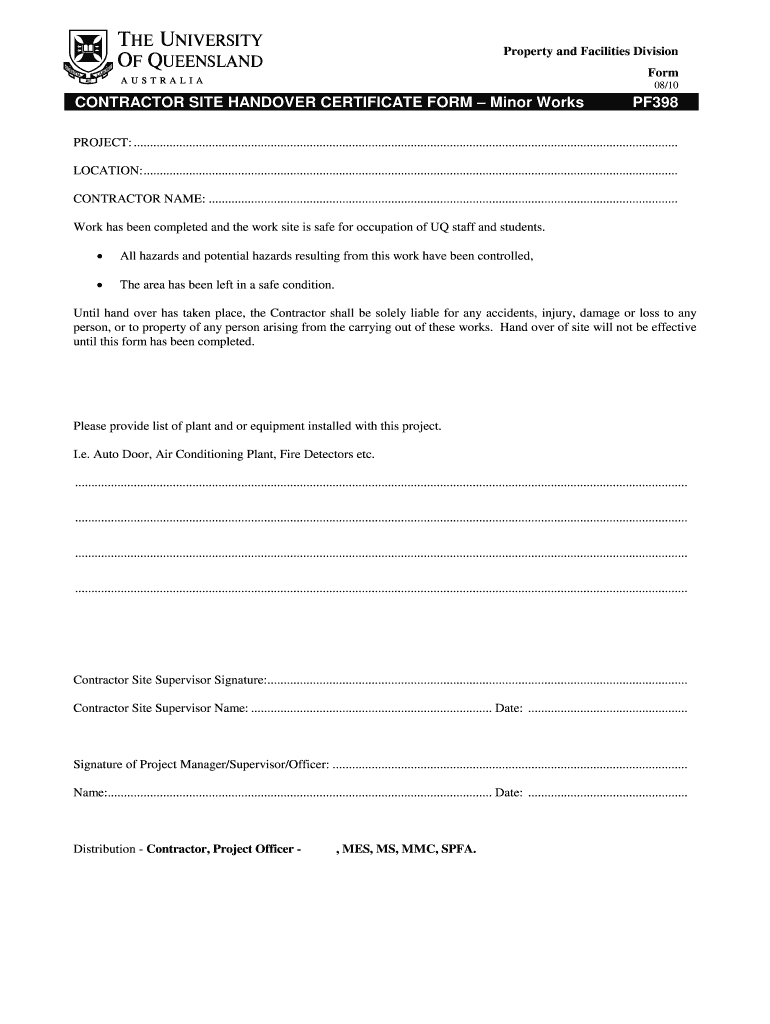







Definition and Meaning of the Handing Over Taking Over Format in MS Word
The handing over taking over format in MS Word is a structured document template used to facilitate the formal transfer of responsibility for a project, asset, or site from one party to another. This document ensures that both parties acknowledge the completion of relevant works and the readiness for the next party to take control.
In legal and business contexts, this format is vital for clarity and accountability. It typically includes:
- Detailed descriptions of the assets or tasks being transferred
- Signatures from both the outgoing and incoming parties, indicating agreement and acceptance of terms
- A checklist of any outstanding issues that need resolution before or after the transition
The design of this template aids in maintaining consistency across various handover situations, whether in real estate, construction, or industrial settings.
Key Elements of the Handing Over Taking Over Format in MS Word
A well-structured handing over taking over document in MS Word contains several critical components that ensure comprehensive coverage of necessary details. The key elements include:
- Identifying Information: Names and contact information of both parties involved, including titles and roles.
- Project or Asset Description: Clear identification of what is being handed over, such as equipment, property, or responsibilities.
- State of Condition: A description of the condition of the items or responsibilities at the time of the handover.
- Outstanding Issues: Any unresolved matters that need to be addressed by either party. This could include items that require maintenance, repairs, or permits.
- Date of Handover: The specific date when the transfer is effective, which is crucial for liability purposes.
- Signatures: Sections for both parties to sign, which legally binds them to the terms agreed upon in the document.
Efficient documentation of these elements ensures that both parties are on the same page and understand their obligations post-handover.
Steps to Complete the Handing Over Taking Over Format in MS Word
Completing the handing over taking over format in MS Word requires a systematic approach to ensure all necessary details are captured. Here are the steps involved:
- Download Template: Obtain the handing over taking over format template in MS Word, which is often available for free download online.
- Fill in Identifying Information: Input the names and roles of both parties in the designated sections of the document.
- Describe the Asset/Project: Clearly outline what is being handed over, including specifications and details about the project or asset.
- Assess Condition: Provide an assessment of the current state of the item(s) or responsibilities being transferred. Include any previous maintenance records if applicable.
- List Outstanding Issues: Enumerate any pending issues or tasks that need attention, ensuring both parties are aware of their responsibilities.
- Set Handover Date: Specify the effective date of the handover.
- Obtain Signatures: Ensure that both parties sign the document, receiving a copy for their records.
By following these steps, users can create a robust and clear handover document that meets legal and practical expectations.
Importance of the Handing Over Taking Over Format in MS Word
Utilizing the handing over taking over format in MS Word holds great importance in various sectors, particularly in ensuring seamless transitions and clear accountability. Key reasons include:
- Legal Protection: The document serves as legal evidence of the transfer of responsibilities, thus protecting both parties from potential disputes.
- Clarity in Responsibilities: By detailing the conditions and expectations, it minimizes misunderstandings about what each party is accountable for after the handover.
- Enhanced Communication: The format fosters transparent communication during transitions, ensuring both parties know what to expect.
- Standard Procedure: Standardizing these transfers can improve efficiency and reliability in managing contracts, projects, or assets.
Each of these factors contributes to making the handing over taking over format an essential tool in professional contexts.
Examples of Using the Handing Over Taking Over Format in MS Word
Real-world applications of the handing over taking over format vary widely, yet they share common goals of clarity and accountability. Here are several contexts in which this format could be utilized:
- Construction Projects: After the completion of a building project, contractors may use this format to formally hand over the site to the property owner, detailing any remaining work or inspections needed.
- Equipment Transfers: In manufacturing, a company may transfer heavy machinery from one facility to another. The format would specify the condition and operational status of the machinery.
- Office Relocations: When moving to a new office, the outgoing tenants might use this document to outline the state of office equipment and any items left behind for the incoming occupants.
- Management Transition: For businesses undergoing changes in management, clarifying responsibilities through this format can ensure a smooth transition, detailing ongoing projects and key contacts.
These examples illustrate the versatility of the handing over taking over format across different industries and scenarios.
Who Typically Uses the Handing Over Taking Over Format in MS Word
Various stakeholders utilize the handing over taking over format to formalize transitions in responsibility. The primary users generally include:
- Contractors and Developers: In construction and development projects to transfer completed works.
- Property Managers: When transferring rental properties between managers or owners, ensuring that they agree on the property's condition.
- Corporate Entities: Businesses that manage assets or projects, aiding in transitions during management changes or office relocations.
- Government Departments: When handling public assets, transitioning responsibilities requires formal documentation according to regulatory standards.
These users benefit from ensuring clarity, legal protection, and continuity in their operations.