Ct tax form 0s 114 2011-2025

Get Form
ct tax form 0s 114 2011 Preview on Page 1

Here's how it works

01. Edit your form online
Type text, add images, blackout confidential details, add comments, highlights and more.
02. Sign it in a few clicks
Draw your signature, type it, upload its image, or use your mobile device as a signature pad.
03. Share your form with others
Send it via email, link, or fax. You can also download it, export it or print it out.

How to use or fill out ct tax form 0s 114 2011 with our platform

Form edit decoration
9.5
Ease of Setup
DocHub User Ratings on G2
9.0
Ease of Use
DocHub User Ratings on G2
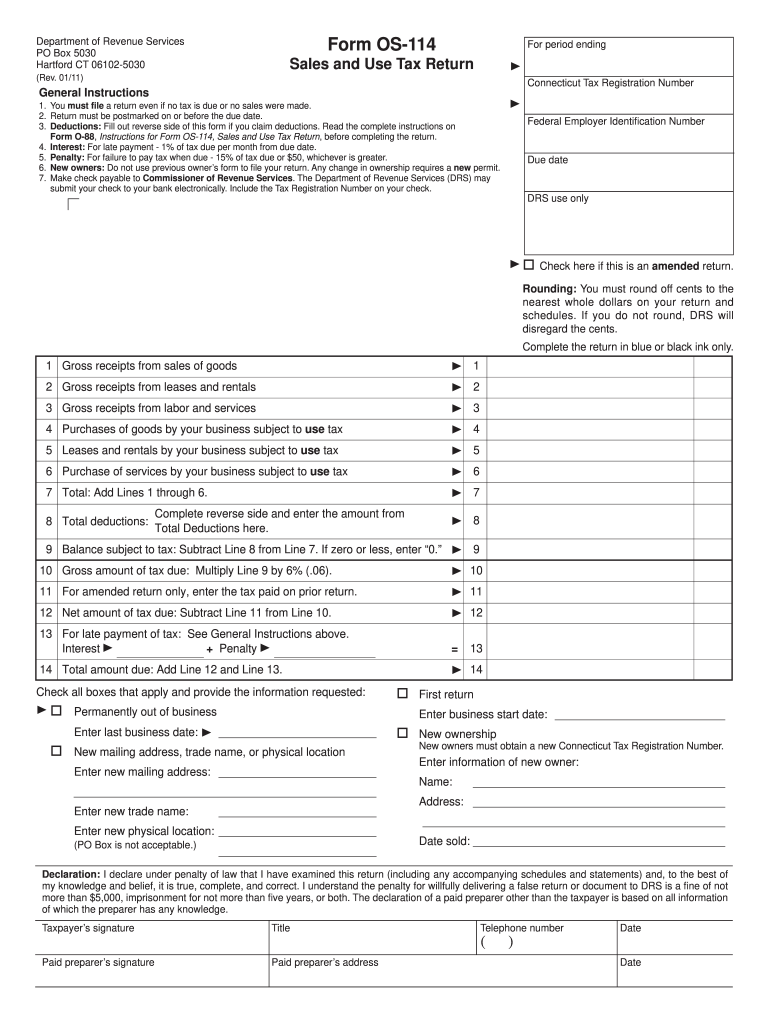
  1. Click ‘Get Form’ to open the ct tax form OS-114 in the editor.
  2. Begin by entering your Connecticut Tax Registration Number and Federal Employer Identification Number at the top of the form.
  3. Fill in the period ending date and check if this is an amended return if applicable.
  4. Complete each line for gross receipts from sales, leases, rentals, and services. Ensure you round off cents to the nearest whole dollar as instructed.
  5. If claiming deductions, complete the reverse side of the form and enter the total deductions on Line 8.
  6. Calculate your balance subject to tax by subtracting Line 8 from Line 7 and multiply by 6% for the gross amount of tax due on Line 10.
  7. Finally, review your entries for accuracy, sign where indicated, and submit your completed form before the due date.

Start using our platform today to easily fill out your ct tax form OS-114 for free!

See more ct tax form 0s 114 2011 versions

We've got more versions of the ct tax form 0s 114 2011 form. Select the right ct tax form 0s 114 2011 version from the list and start editing it straight away!
Versions Form popularity Fillable & printable
2022 4.5 Satisfied (21 Votes)
2021 4.8 Satisfied (216 Votes)
2020 4.3 Satisfied (207 Votes)
2018 4.3 Satisfied (46 Votes)
2017 4.2 Satisfied (68 Votes)
2016 4.2 Satisfied (97 Votes)
2015 4.4 Satisfied (69 Votes)
2015 4.4 Satisfied (1461 Votes)
2013 4.4 Satisfied (46 Votes)
2011 4 Satisfied (45 Votes)
2011 4.4 Satisfied (46 Votes)
be ready to get more

Complete this form in 5 minutes or less

Get form

Got questions?

We have answers to the most popular questions from our customers. If you can't find an answer to your question, please contact us.
Contact us
To obtain your Connecticut Tax Registration Number, log in to your myconneCT account using the logon you created with your registration submission.
HOW TO OBTAIN CONNECTICUT TAX FORMS Connecticut state tax forms can be downloaded at the Department of Revenue Services (DRS) website: .ct.gov/drs/ Connecticut tax forms and publications are available at any DRS offices, during tax filing season.
Form CT-941 is used to reconcile quarterly Connecticut income tax withholding from wages only. Form CT-941 must be filed and paid electronically unless certain conditions are met.
Form CT-1040EZ: All resident taxpayers must use Form CT-1040 to file their Connecticut income tax return.
Form 5500, Annual Return/Report of Employee Benefit Plan.

People also ask

Form CT‑W4P provides your payer with the necessary information to withhold the correct amount of Connecticut income tax from your pension or annuity payment to ensure that you will not be underwithheld or overwithheld.
Form CT-W4P, Withholding Certificate for Pension or Annuity Payments, is for Connecticut resident recipients of pension, annuities and certain other deferred compensation subject to Connecticut income tax.
You can call the CT DRS, Monday - Friday, 8:30 a.m. - 4:30 p.m. at 860-297-5962 to order forms by U.S. mail. Request a U.S. mailed copy of a FEDERAL TAX FORM from the IRS: Click here.

Related links