






Definition & Meaning
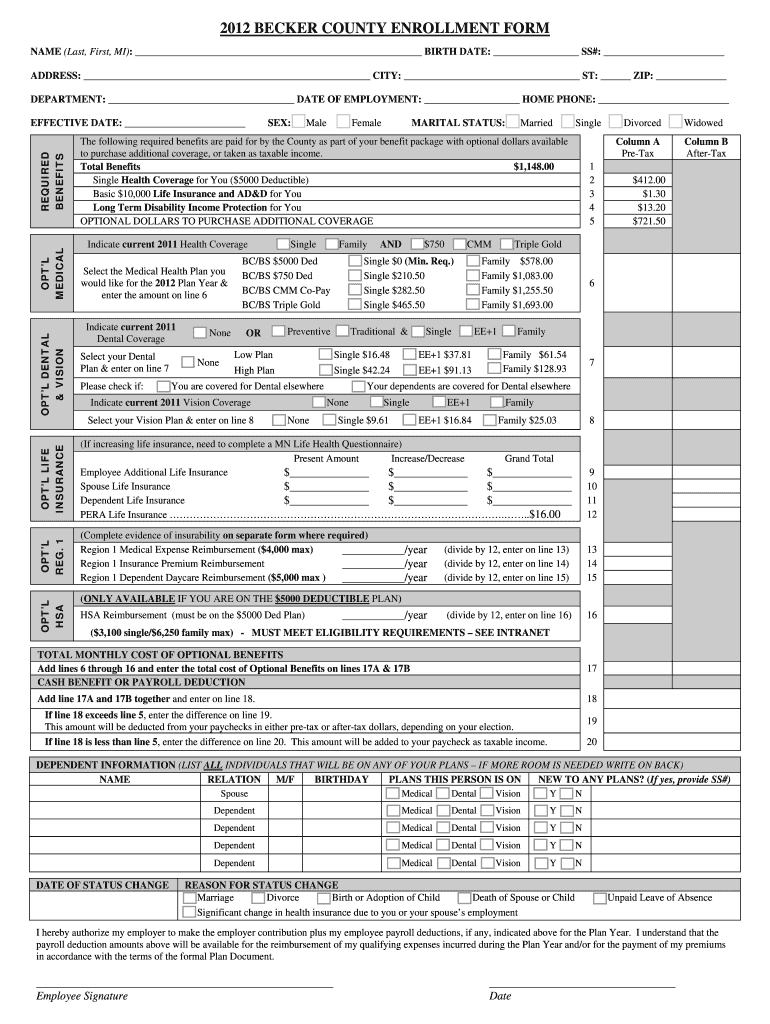
The 2012 Enrollment Form Traditional doc is a comprehensive form used by Becker County employees to enroll in various benefits offered by the county. This document serves as an essential tool for employees who need to outline their personal information, select benefit options such as medical, dental, and vision coverage, and provide details about optional life insurance. The form is designed to ensure that employees' preferences and deductions are accurately recorded for payroll processing and benefit administration. Each section of the document is carefully crafted to guide users through the necessary steps to ensure complete and proper enrollment.
Key Elements of the 2012 Enrollment Form Traditional doc
The enrollment form is composed of several critical sections essential for capturing all necessary information for benefit enrollment:
-
Personal Information: This section includes fields for employee name, contact details, and employment information, ensuring accurate identification of the individual.
-
Benefit Options: Employees can specify their choice of coverage for medical, dental, and vision insurance. Options include various plan levels, allowing customization based on personal or family needs.
-
Optional Life Insurance: Employees may elect additional life insurance coverage. This section outlines the costs and terms associated with the coverage choices.
-
Dependent Information: Employees list dependents, indicating their relationship and any required coverage, ensuring all eligible family members are considered for benefits.
-
Status Change Reasons: This area allows employees to specify reasons for changes or updates to their enrollment, such as marriage or the birth of a child, which can impact benefit selections.
Steps to Complete the 2012 Enrollment Form Traditional doc
Completing the 2012 Enrollment Form requires detailed attention to ensure all required fields are accurate and up to date:
-
Personal Details: Begin by filling out your personal information, including your name, employee ID, and contact information.
-
Select Benefit Options: Choose the desired level of medical, dental, and vision coverage. Carefully review each available plan to determine which best suits your needs.
-
Elect Optional Coverages: If applicable, indicate your choice for optional life insurance coverage, understanding the associated premiums and terms.
-
Provide Dependent Information: List any dependents you wish to cover under your benefits, ensuring all information is correct for each individual.
-
Update upon Status Change: If applicable, indicate any changes in personal status that necessitate updates to your benefits. Ensure this section is filled out to reflect current circumstances.
How to Use the 2012 Enrollment Form Traditional doc
Using the Enrollment Form requires understanding its layout and the categories of information required for accuracy:
-
Review the Entire Document: Familiarize yourself with all sections before entering any data. This will prevent gaps or discrepancies in the final submission.
-
Gather Necessary Documentation: Ensure all supporting documents, such as proof of dependent eligibility or previous insurance policies, are available to provide accurate information.
-
Follow as a Reference Guide: Use the form as a reference for understanding what each benefit option entails, guiding your decisions based on available options and personal needs.
Legal Use of the 2012 Enrollment Form Traditional doc
The form complies with relevant legal requirements to ensure proper administration of employee benefits:
-
ESIGN Act Compliance: Ensure that electronic signatures, if used, meet legal standards for authenticity and enforceability.
-
Confidentiality Standards: Personal and sensitive information provided within the form is subjected to stringent confidentiality and data protection protocols.
Examples of Using the 2012 Enrollment Form Traditional doc
Real-world scenarios highlight the form's application:
-
New Employee Enrollment: John, newly hired at Becker County, uses the form to select his preferred medical and dental coverage during his onboarding process, ensuring he and his dependents are covered from the start.
-
Life Event Adjustment: Lisa, an existing employee, uses the form to update her benefits after the birth of her child. She adds her newborn to her medical coverage, updating the dependent section for accuracy.
Required Documents
Completing the form requires gathering specific documents for verification purposes:
-
Proof of Identity: Valid forms of identification such as a driver’s license or passport.
-
Dependent Verification: Birth certificates or marriage certificates to verify dependent eligibility.
-
Previous Coverage Information: Details from former insurance plans to avoid coverage gaps during transitions.
Form Submission Methods (Online / Mail / In-Person)
There are multiple methods to submit the completed form, allowing flexibility and convenience:
-
Online Submission: Digital copies of the form can be submitted through secure online platforms, ensuring quick processing and confirmation of receipt.
-
Mail: Hard copies can be mailed to the designated department office, with a receipt confirmation recommended for record-keeping.
-
In-Person Submission: Direct delivery to the HR department allows for immediate feedback on form completeness and correctness.
By following these structured guidelines and understanding the specific requirements of the 2012 Enrollment Form Traditional doc, Becker County employees can successfully manage their benefits enrollment with accuracy and confidence.