Definition and Meaning
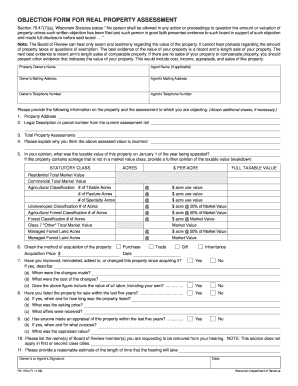
The "UCT-6491 form" serves as a formal communication tool and is used to report changes in business or employment status to the Wisconsin Department of Workforce Development. This form becomes necessary when there are modifications such as updates to the legal name, changes in business addresses, or shifts in business operations. By submitting this form, businesses ensure that their information remains accurate and up-to-date with the state's Unemployment Insurance Division.
How to Obtain the UCT-6491 Form
Acquiring the UCT-6491 form can be done through several channels, ensuring accessibility for all types of users:
- Online Access: Many government websites, especially those related to workforce development or unemployment insurance, may offer downloadable versions of the form.
- In-Person Requests: State workforce development offices or local unemployment insurance offices may provide physical copies upon request.
- Mail Requests: For those preferring traditional methods, a request can be sent via mail to the Wisconsin Department of Workforce Development to obtain a copy of the form.
Steps to Complete the UCT-6491 Form
Filling out the UCT-6491 form requires attention to detail to ensure all necessary information is accurately recorded:
- Enter Basic Information: Include the current legal name and contact details of the business or entity.
- Detail Changes: Clearly outline the specific changes being reported, such as alterations to business operations or staff changes.
- Provide Supporting Information: Attach any necessary documentation that supports the reported changes, like a new business license.
- Review for Accuracy: Double-check all populated fields to ensure completeness and correctness.
- Submit the Form: Choose a submission method, such as mailing it to the appropriate office or submitting it online if available.
Who Typically Uses the UCT-6491 Form
This form is predominantly used by business owners and managers responsible for maintaining compliance with state regulations. It is particularly relevant for:
- Corporations and LLCs: Needing to report changes in business structure.
- Partnerships and Sole Proprietorships: Updating operational aspects or ownership details.
- Human Resources Departments: Managing employment status updates within an organization.


Legal Use of the UCT-6491 Form
This form has legal implications, as it ensures compliance with state mandates. Filing this form correctly:
- Ensures Compliance: Helps businesses align with legal responsibilities for unemployment insurance.
- Prevents Penalties: Proper filing prevents possible penalties associated with non-compliance or misinformation.
- Maintains Transparency: Facilitates open communication with the state regarding operational changes.
Important Terms Related to UCT-6491 Form
Understanding key terminologies associated with the UCT-6491 form enhances clarity and proper application:
- Unemployment Insurance Division: The state body overseeing the form's implementation and enforcement.
- Legal Name Change: Refers to officially altering the business's registered name.
- Business Operation: Encompasses activities that constitute the day-to-day running of a business.
Key Elements of the UCT-6491 Form
The form consists of several essential components that ensure comprehensive reporting:
- Contact Information Section: Captures essential details for subsequent communication and record maintenance.
- Change Description Section: allows for detailed input of the modifications being reported.
- Instructions: Provides guidelines on how to fill the form accurately and whom to contact for assistance.
State-Specific Rules for the UCT-6491 Form
While the UCT-6491 form is standardized for Wisconsin, users should be mindful of specific state-driven rules:
- Compliance Requirements: Unique to Wisconsin's legal framework, ensuring businesses comply with localized regulations.
- State-Specific Fields: Certain fields may require information particular to state regulations that may not be relevant elsewhere.
- Filing Deadlines: Adhering to state-specified deadlines is critical to maintain operational compliance and avoid penalties.
Penalties for Non-Compliance
Failing to submit the UCT-6491 form in a timely and accurate manner can lead to various consequences:
- Fines: Monetary penalties may be imposed for non-compliance.
- Operational Disruptions: Inaccurate filings can lead to delays or issues in maintaining business operations.
- Legal Repercussions: Potential legal action if a lack of compliance results in significant oversight.
Form Submission Methods
The UCT-6491 form can be submitted through multiple avenues, making the process adaptable to different user preferences:
- Online Submission: Fast and efficient, often with prompts to reduce the likelihood of errors.
- Mail: Traditional yet reliable, suitable for those who prefer physical paperwork.
- In-Person: Direct submission at a local office can allow for real-time verification of form completion.