
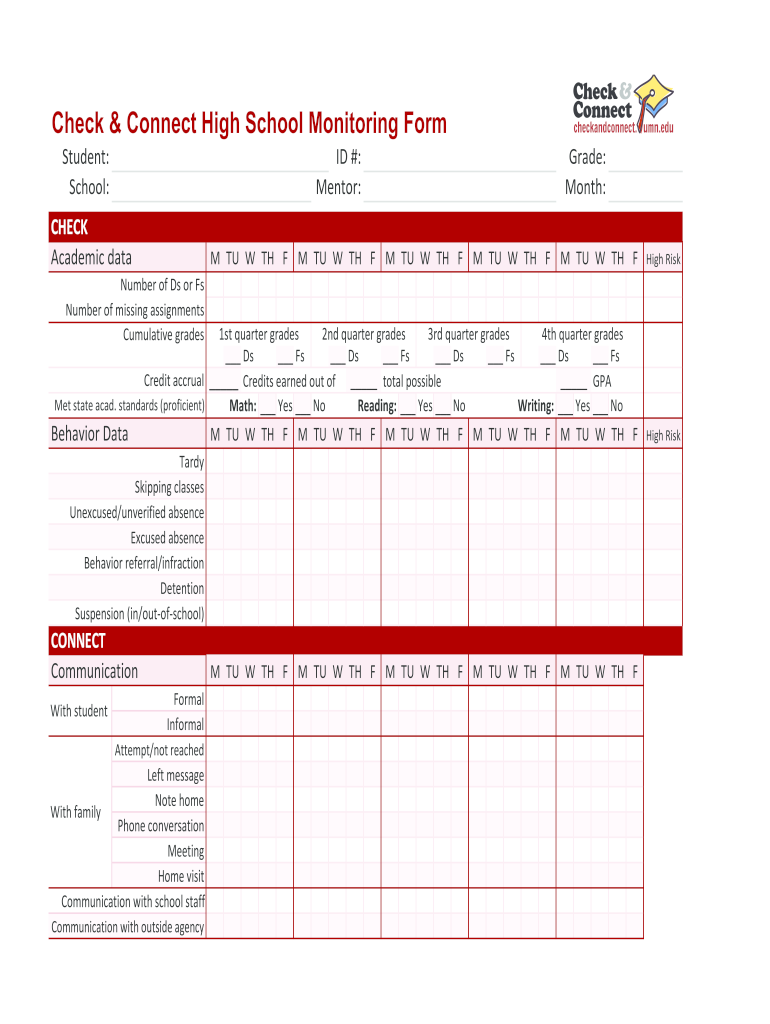







Definition & Importance of Check and Connect Forms
Check and Connect forms are essential tools designed to monitor the academic and behavioral progress of students, especially those at higher risk of disengagement in elementary and secondary school settings. These forms facilitate consistent record-keeping for grades, attendance, and communication efforts aimed at providing support to students. Utilizing these forms allows mentors, teachers, and families to work collaboratively, ensuring that all necessary interventions are documented to promote student success.
Key Features of Check and Connect Forms
- Comprehensive Monitoring: Track vital student information such as attendance records, grades, and behavioral indicators.
- Structured Feedback: Promote systematic discussions among mentors, students, and families about progress and challenges.
- Targeted Interventions: Identify when specific interventions are needed, allowing timely support for students who may be struggling.
Components of the Check and Connect Monitoring Form
Each Check and Connect form typically includes various components structured to cover all critical areas that affect student engagement:
Academic Information Tracking
- Grades Section: Include spaces for recording current grades in various subjects, enabling quick identification of academic performance trends.
- Attendance Logs: Document daily or weekly attendance to highlight patterns that may cause concern or indicate disengagement.
Behavioral Data Collection
- Behavior Assessments: Sections dedicated to noting behavioral observations and concerns, facilitating comprehensive support plans.
- Communication Records: Areas to record interactions between mentors and students, or families, ensuring open communication channels that support accountability.
Steps to Effectively Use Check and Connect Forms
Implementing Check and Connect forms successfully requires a systematic approach. Follow these steps:
- Prepare the Form: Start with a blank PDF version of the Check and Connect form, ensuring all necessary fields are available.
- Document Academic and Attendance Data: Regularly input grades and attendance records into the designated sections to maintain updated logs.
- Record Behavioral Observations: As you interact with the student, document any behavioral notes, comments, or concerns that arise during mentoring sessions.
- Review and Discuss: Schedule regular meetings to discuss the data collected in the form with mentors, educators, and family members to collaboratively determine the best course of action for student support.
- Update as Needed: Continually update the Check and Connect forms as new information becomes available or when significant events occur that impact the student’s engagement.
Who Benefits from Check and Connect Forms
Several parties can significantly benefit from the consistent use of Check and Connect forms:
Educators and Mentors
- Improved Awareness: Access to comprehensive data enables them to tailor interventions more effectively.
- Structured Support: Provides a clear outline of student needs and engagement strategies to foster academic success.
Students
- Empowerment: Offers students a clear view of their own progress and areas needing improvement.
- Engagement: Fosters a sense of responsibility for their academic and behavioral growth through regular check-ins.
Families
- Informed Involvement: Keeps families updated about their child's performance, enabling them to provide the necessary support at home.
- Collaboration: Encourages partnerships between home and school to create a supportive learning environment.
Legal Considerations for Check and Connect Forms
When utilizing Check and Connect forms, it is essential to understand the legal frameworks that govern student data handling in the United States:
Privacy and Confidentiality
- FERPA Compliance: Ensure adherence to the Family Educational Rights and Privacy Act (FERPA), which safeguards student educational records.
- Data Security: Implement practices to protect sensitive information, such as using encrypted digital platforms to store electronic versions of the forms.
Documentation and Record Keeping
- Retention Policies: Be aware of policies regarding how long student records should be maintained and the process for securely disposing of outdated information.
Examples of Effective Use of Check and Connect Forms
Consider these scenarios to demonstrate how Check and Connect forms can be effectively used in real-world settings:
Scenario One: High School Intervention
A high school mentor utilizes the Check and Connect form to regularly document a student’s declining grades in mathematics. Upon noticing the trend, the mentor engages in discussions with the student, leading to the implementation of targeted tutoring sessions. The form helps track improvements and adapt strategies in real time.
Scenario Two: Elementary School Engagement
In an elementary school, a teacher uses the Check and Connect form to log a student's attendance issues. By closely monitoring this data, the teacher helps identify family challenges and coordinates with the school's social worker to provide necessary support, dramatically improving the student's school attendance over the semester.
Conclusion
Check and Connect forms serve as vital resources that foster communication, accountability, and support for students at risk. By understanding their significance, components, and effective usage, educators, mentors, and families can work collaboratively to improve student engagement and outcomes.




