Type text, add images, blackout confidential details, add comments, highlights and more.
02. Sign it in a few clicks
Draw your signature, type it, upload its image, or use your mobile device as a signature pad.
03. Share your form with others
Send it via email, link, or fax. You can also download it, export it or print it out.
How to use or fill out c060 2014-2019 form with our platform
Ease of Setup
DocHub User Ratings on G2
Ease of Use
DocHub User Ratings on G2
Click ‘Get Form’ to open the c060 2014-2019 form in the editor.
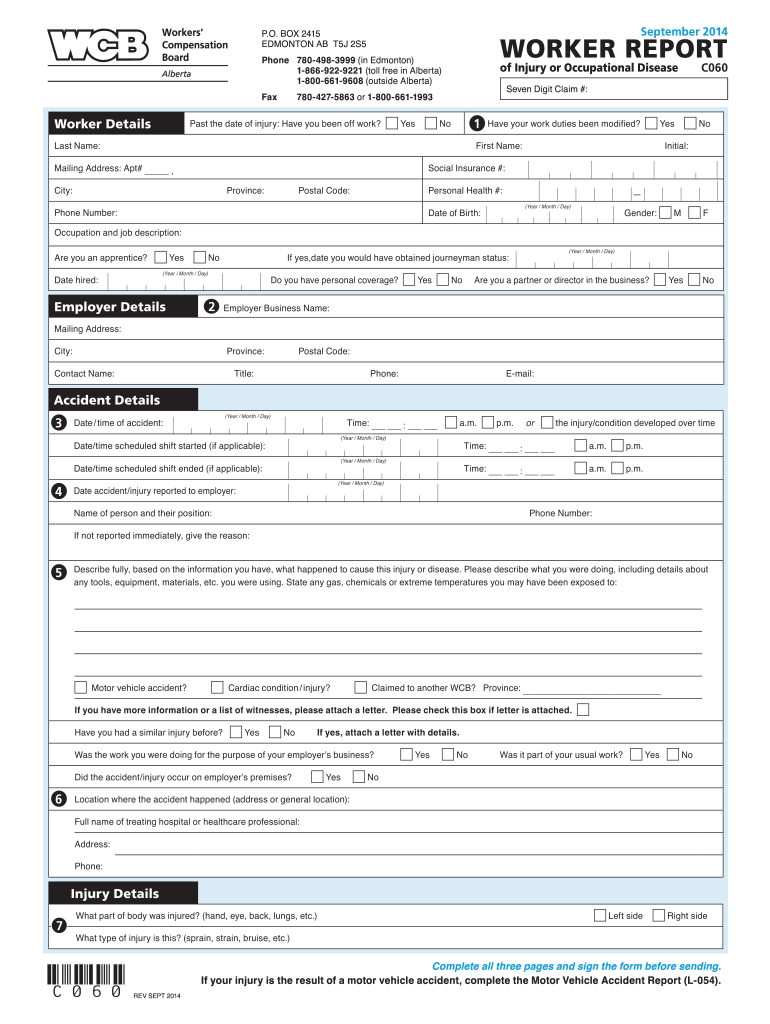
Begin by filling out your personal details in the 'Worker Details' section. Include your last name, first name, mailing address, social insurance number, and date of birth.
In the 'Employer Details' section, provide your employer's business name and contact information. Make sure to indicate if you have personal coverage or if you are a partner/director.
Next, detail the accident in the 'Accident Details' section. Specify the date and time of the accident, as well as any relevant circumstances surrounding it.
Complete the 'Injury Details' section by describing what part of your body was injured and the type of injury sustained.
Fill out the 'Return to Work Details' to indicate your current work status and any modifications made to your duties post-injury.
Finally, review all sections for accuracy before signing and submitting the form through our platform.
Start using our platform today for free to streamline your form completion process!
We've got more versions of the c060 2014-2019 form form. Select the right c060 2014-2019 form version from the list and start editing it straight away!
Use Form 8949 to reconcile amounts that were reported to you and the IRS on Form 1099-B or 1099-S (or substitute statement) with the amounts you report on your return. The subtotals from this form will then be carried over to Schedule D (Form 1040), where gain or loss will be calculated in aggregate.
What is the IRS form for investment income?
If an individual owes the net investment income tax, the individual must file Form 8960 PDF. Form 8960 Instructions PDF provides details on how to figure the amount of investment income subject to the tax.
Where can I get 2019 tax forms?
Get federal tax forms for current and prior years Download them from IRS.gov. Order online and have them delivered by U.S. mail. Order by phone at 1-800-TAX-FORM (1-800-829-3676)
What is the 4952 form for investment income?
Use Form 4952 to figure the amount of investment interest expense you can deduct for 2024 and the amount you can carry forward to future years. Your investment interest expense deduction is limited to your net investment income. For more information, see Pub. 550, Investment Income and Expenses.
How to get a schedule C tax form?
Where can you get Schedule C? You can find and download all versions of Schedule C on the IRS website. You can also use HR Block Online, to access Schedule C and complete your tax return. Or if you work with a tax preparer, they will help you access and complete Schedule C.
Related Searches
C060 2014 2019 form pdfIrs c060 2014 2019 form
Security and compliance
At DocHub, your data security is our priority. We follow HIPAA, SOC2, GDPR, and other standards, so you can work on your documents with confidence.
Capital gains and deductible capital losses are reported on Form 1040, Schedule D, Capital Gains and Losses, and then transferred to line 13 of Form 1040, U.S. Individual Income Tax Return. Capital gains and losses are classified as long-term or short term.
What is the Schedule D tax form?
Use Schedule D (Form 1040) to report the following: The sale or exchange of a capital asset not reported on another form or schedule. Gains from involuntary conversions (other than from casualty or theft) of capital assets not held for business or profit.
At what income level does the 3.8 surtax kick in?
The threshold is $250,000 for joint filers, $125,000 for married filing separately, and $200,000 for all other filers.
Related links
Institutional Self-Evaluation Report
I.A.06 2018-2021 and 2014-2019 Institutional Strategic Plans. I.A.07 student services provide some form of electronic download/submission for forms.Read more
Oct 19, 2022 These submissions may be related to new dosage forms of existing chemical entities or requests for the FDA to review new indications for use.Read more
Cookie consent notice
This site uses cookies to enhance site navigation and personalize your experience.
By using this site you agree to our use of cookies as described in our Privacy Notice.
You can modify your selections by visiting our Cookie and Advertising Notice.