Mary kay tax worksheet 2021-2025

Get Form
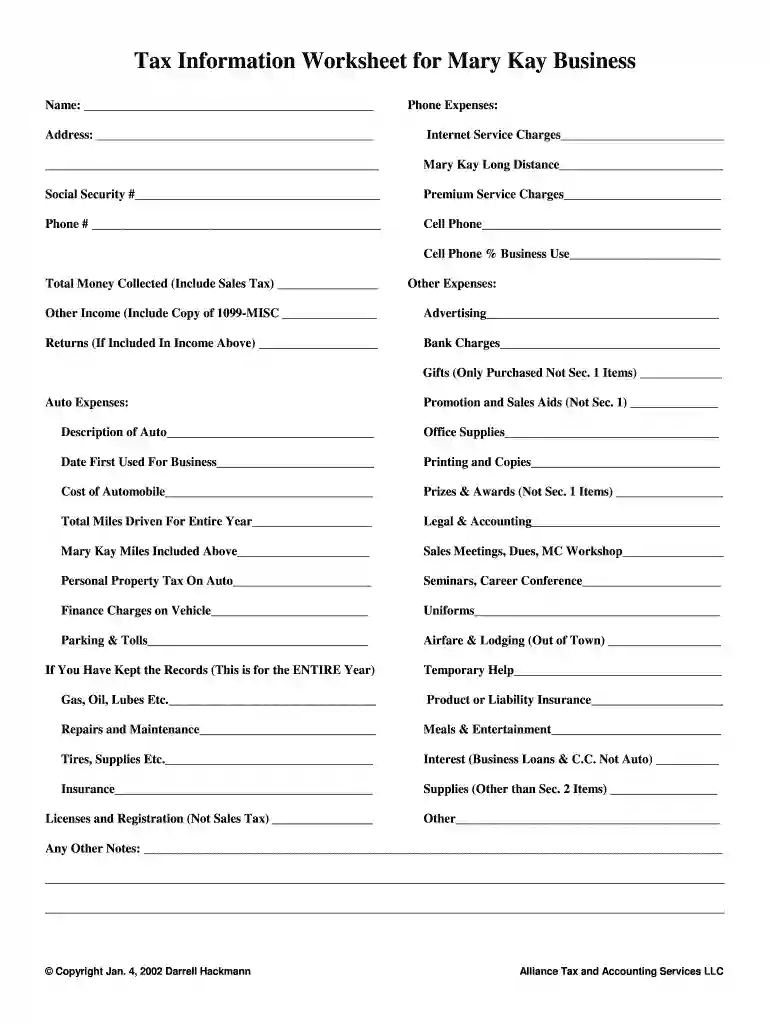
mary kay tax worksheet Preview on Page 1

Here's how it works

01. Edit your mary kay tax worksheet online
Type text, add images, blackout confidential details, add comments, highlights and more.

02. Sign it in a few clicks
Draw your signature, type it, upload its image, or use your mobile device as a signature pad.

03. Share your form with others
Send mary kay tax worksheet 2023 via email, link, or fax. You can also download it, export it or print it out.

How to use or fill out mary kay tax worksheet 2021 with DocHub

Form edit decoration
9.5
Ease of Setup
DocHub User Ratings on G2
9.0
Ease of Use
DocHub User Ratings on G2
  1. Click ‘Get Form’ to open the mary kay tax worksheet 2021 in our platform's editor.
  2. Begin by entering your personal information at the top of the form, including your name, phone number, and address. This ensures that all your details are correctly captured.
  3. In the 'Phone Expenses' section, input your internet service charges and Mary Kay long-distance expenses. Be sure to include any premium service charges as well.
  4. Next, move to 'Total Money Collected' and enter the total amount you received, including sales tax. This is crucial for accurate reporting.
  5. Proceed to 'Other Expenses' where you will list advertising costs, bank charges, and any gifts purchased for business purposes. Ensure you provide a copy of your 1099-MISC if applicable.
  6. For 'Auto Expenses', describe your vehicle and detail all related costs such as maintenance, gas, and insurance. Don't forget to note the total miles driven for business.
  7. Finally, review all sections for accuracy before saving or exporting your completed worksheet directly from our platform.

Start using our platform today to easily fill out your mary kay tax worksheet 2021 for free!

be ready to get more

Complete this form in 5 minutes or less

Get form

Got questions?

We have answers to the most popular questions from our customers. If you can't find an answer to your question, please contact us.
Contact us
If your wholesale purchases totaled more than $5,000 or you received $600 or more in commissions, prizes and awards, or you had any amount of income tax withheld during the tax year, you should also receive a Form 1099-MISC from Mary Kay.
The sales tax, as part of your proceeds, will be deposited directly into your ProPay account. Mary Kay will then deduct the total cost of your order, including applicable sales tax, from your ProPay account. Mary Kay will remit all sales tax collected directly to the taxing jurisdictions.
Tax forms and publications Downloading from IRS Forms Publications page. Picking up copies at an IRS Taxpayer Assistance Center. Going to the IRS Small Business and Self-Employed Tax Center page. Requesting copies by phone 800-TAX-FORM (800-829-3676).
Inheritances, gifts, cash rebates, alimony payments (for divorce decrees finalized after 2018), child support payments, most healthcare benefits, welfare payments, and money that is reimbursed from qualifying adoptions are deemed nontaxable by the IRS.
To pay your taxes as a freelance artist, you need to fill in Schedule C from your form 1040 for tax return. You also have to make sure that you pay your self-employment tax. When doing your taxes, ensure that you report all income you make, even if you do not receive a 1099-MISC.
be ready to get more

Complete this form in 5 minutes or less

Get form

People also ask

Understanding Mary Kay Taxes Direct sales companies, including Mary Kay, do not withhold local, state or federal taxes from commission checks paid out to independent representatives. Instead, it is up to the salesperson to calculate tax liability and submit tax payments to the relevant tax authorities.
Mary Kay cosmetics, as well as all other companies that rely on independent contractors, are required to submit Form 1099-MISC to the IRS when a contractor earns more than $600 over the past calendar year. This means that the IRS will be aware of any money earned by the consultant.

mary kay order form 2022