




01. Edit your church purchase order form online
Type text, add images, blackout confidential details, add comments, highlights and more.

Type text, add images, blackout confidential details, add comments, highlights and more.

Draw your signature, type it, upload its image, or use your mobile device as a signature pad.

Send church requisition form template via email, link, or fax. You can also download it, export it or print it out.
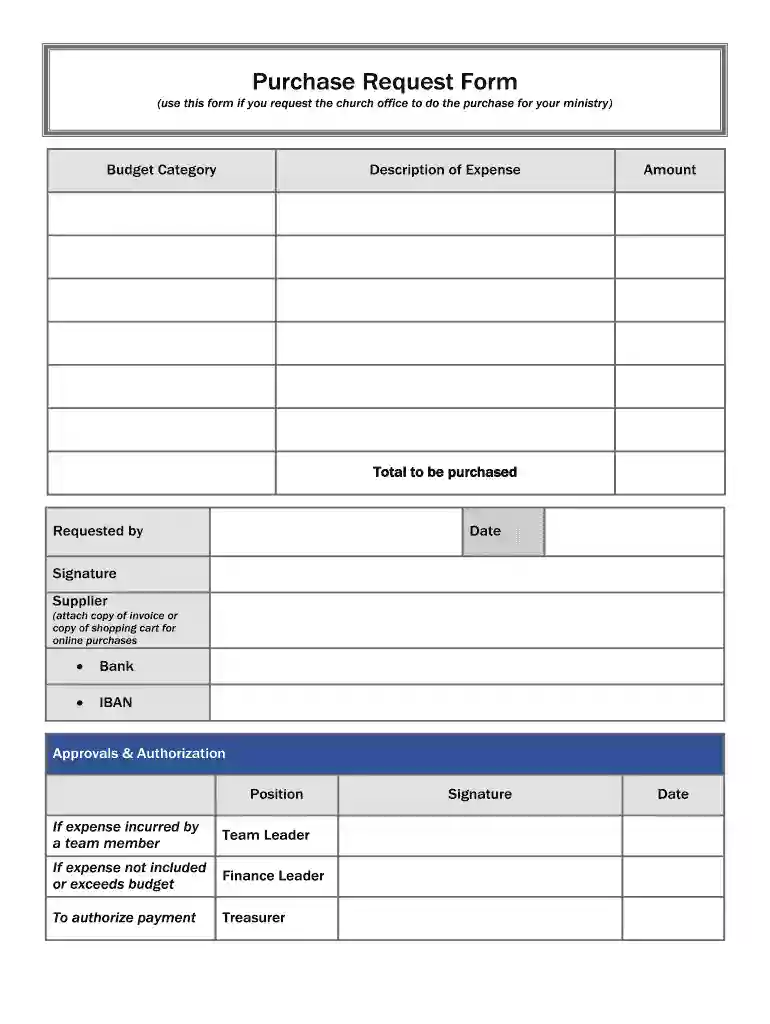
The Purchase Request Form for church ministries is a crucial document that facilitates the approval process for purchasing items or services needed for ministry activities. Understanding its key elements ensures efficiency in documenting expenses and obtaining necessary approvals. Below, the primary components of this form are outlined:
Requester Information
This section identifies the individual or ministry requesting the purchase. It typically includes the requester’s name, position, ministry name, and contact details. Accurate information is vital for accountability and follow-up discussions regarding the request.
Budget Category
The budget category is essential for maintaining financial control within the church. It assigns the expense to a specific budget line (such as operational costs, outreach, or training) and ensures that the request aligns with the allocated ministry budget. Clear categorization helps finance personnel track spending and adhere to budgetary guidelines.
Description of Expense
This section requires a detailed explanation of the intended purchase, including specifics such as the item or service needed, quantity, and any relevant details that justify the purchase. A thorough description supports transparency and assists decision-makers in understanding the necessity of the request.
Amount
Here, the requester must specify the anticipated cost of the item or service. Providing a precise amount is critical for assessing the budget impact. If possible, including quotes or estimates from suppliers can help substantiate the request.
Supplier Information
This section may include the name and contact details of the supplier or vendor from whom the item will be purchased. Including supplier information aids in the procurement process and allows the finance team to confirm pricing or availability when necessary.
Filling out the Purchase Request Form accurately is essential for a swift approval process. The following steps outline how to complete the form effectively:
Gather Necessary Information
Before beginning the form, collect all relevant information, including contact details, budget categories, and supplier information. This preparation streamlines the completion process.
Fill in Requester Information
Start by providing your personal and ministry details. Ensure names are spelled correctly and contact information is current, so there are no delays in communication.
Select Budget Category
Choose the most appropriate budget category from the provided list. If unsure, consult with your ministry leader to ensure alignment with church financial policies.
Detail the Expense Description
Clearly explain the purpose of the purchase. Use concise language to articulate the need for the item or service. Emphasize how it will benefit the ministry or support church activities.
Enter the Estimated Amount
Specify the total cost. If multiple items are requested, itemize them if possible to provide a clearer financial picture.
Complete Supplier Information
Include the name and contact details of the supplier. If there are multiple options, brief comparisons can enhance the decision-making process.
Review the Form
Before submission, double-check all fields for accuracy and completeness. This verification minimizes the risk of errors that could delay the approval.
Submit for Approval
Finally, submit the completed form to the designated approver within the church office or finance team. Ensure to understand the approval chain to anticipate any required follow-up actions.
The Purchase Request Form is primarily utilized by individuals or ministries within a church setting. Key users include:
Ministry Leaders
These individuals often submit purchase requests on behalf of their programs or initiatives, ensuring that necessary resources are available for their activities.
Church Staff
Administrative and financial staff may use this form to request materials needed for operations, including office supplies, equipment, or other essentials.
Volunteers
Frequently, volunteers who manage specific events, outreach programs, or church functions request resources using this form to facilitate their activities.
Recognizing the key users of this form helps ensure that it is appropriately completed and submitted, maintaining an organized procurement process.


Submitting an accurate Purchase Request Form is vital for several reasons:
Financial Accountability
Proper documentation allows for tracking of church expenditures, ensuring adherence to budgetary constraints and promoting transparency.
Streamlined Approval Process
An accurately filled form reduces delays in obtaining approvals. Detailed and clear submissions facilitate faster decision-making by finance teams or ministry leaders.
Enhanced Planning
Comprehensive information aids in budget forecasting and strategic planning, helping ministries align their needs with available resources.
Ensuring the timely and accurate submission of the form is essential for effective ministry operations and overall church management.
When filling out the Purchase Request Form, several common errors can impede the process. Awareness of these pitfalls can help prevent delays:
Inaccurate Information
Incorrect names or contact details may lead to difficulties in communication or follow-up questions from approvers. Ensure all information is verified before submission.
Insufficient Description
Failing to provide a detailed description of the expense can confuse approvers, leading to denials or requests for additional information. Always be thorough in this section.
Missing Budget Category
Omitting the budget category can delay processing, as the finance department struggles to allocate the expense. Always select the appropriate category.
Unclear Amounts
Inaccurate amounts can cause budgeting discrepancies and mistrust among staff. Ensure all estimates are realistic and backed by relevant documentation when possible.
Neglecting Approval Procedures
Not following the correct approval process can lead to unauthorized purchases. Familiarize yourself with the church's policies regarding purchase requests to ensure compliance.
Understanding these common mistakes helps users navigate the form with accuracy and confidence, promoting smooth processing.
While the standard Purchase Request Form serves as a fundamental tool, variations may exist based on specific ministry needs or church policies. Some potential adaptations include:
Emergency Purchase Request Form
This variant may expedite approvals for urgent purchases necessary for ministry operations, such as unexpected equipment failure or immediate outreach needs.
Recurring Purchase Request Form
For regularly occurring expenses (like subscriptions or supplies), a specific form may streamline the approval process for ongoing commitments, reducing repetitive workload.
Event-Specific Purchase Request Form
This variation can be tailored for one-time events, enabling ministries to request multiple types of supplies in an organized manner specific to the occasion.
Understanding how these variations function within the context of church operations can enhance the efficiency and usability of the purchasing process.
We've got more versions of the church purchase order form form. Select the right church purchase order form version from the list and start editing it straight away!
| Versions | Form popularity | Fillable & printable |
|---|---|---|
| 2014 | 4.4 Satisfied (47 Votes) |
At DocHub, your data security is our priority. We follow HIPAA, SOC2, GDPR, and other standards, so you can work on your documents with confidence.
Stoning is still a current form of capital punishment in certain areas of the world ... If the motor goes out in your computer you can ask General Motors to ...
Created, written, and directed by Tom Tykwer, Achim von Borries, and Hendrik Handloegten, it is based on novels by German author Volker Kutscher. Babylon Berlin.
In special education, we could be forced to cut almost $600 million, which would require States and districts to cover the cost of approximately 7,200 ...


