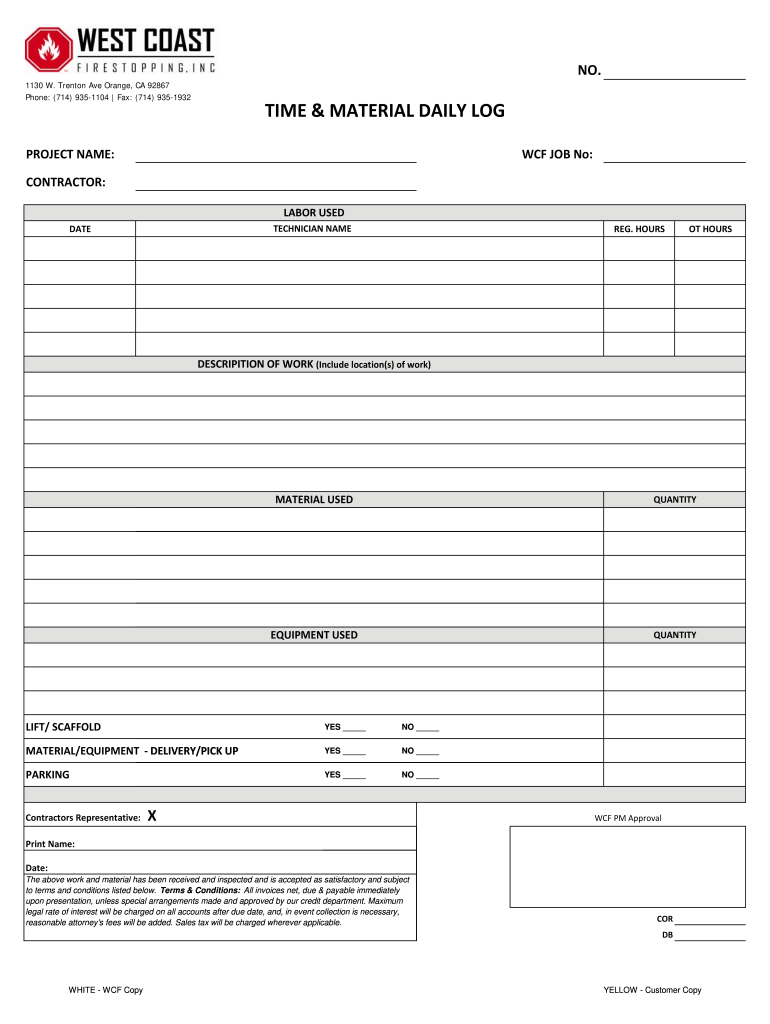







Definition & Meaning of the Time Material Daily Log Form
The time material daily log form is an essential document used primarily in construction and project management industries. It serves as a record-keeping tool for tracking labor hours, materials, and equipment used on a project each day. This structured log facilitates accurate billing and project management by detailing the work performed, the individuals involved, and any materials utilized.
- Components of the Form:
- Contractor Information: Includes the name, contact information, and project identifier.
- Labor Hours: A detailed account of the hours worked by each technician or subcontractor.
- Descriptions of Work: An overview of the tasks completed, ensuring clarity and transparency in work deliverables.
- Material and Equipment Details: A listing of materials used and any equipment operated, which is crucial for inventory management and cost estimation.
Understanding this form’s structure ensures accurate information capture, which is vital for financial audits and project reviews.
How to Use the Time Material Daily Log Form
Using the time material daily log form integrates several critical steps to ensure thorough and correct documentation. To maximize its utility, one should follow a systematic approach, which results in easy data retrieval and effective project monitoring.
- Preparation: Collect relevant information beforehand, such as hourly labor rates, material prices, and specific work descriptions planned for the day.
- Daily Entries: Fill out the form at the end of each workday. Ensure that entries are concise yet detailed enough to provide a comprehensive view of the day's activities.
- Signatures: Obtain necessary signatures from supervisors or project leads to verify the accuracy of the logged entries.
- Storage and Access: Store the completed log securely, whether digitally or in hard copy, to ensure accessibility for future analysis or audits.
Following this structured approach promotes accuracy and enhances accountability among project members.
Key Elements of the Time Material Daily Log Form
Certain key elements define the effectiveness and usability of the time material daily log form. Identifying these components helps users maintain comprehensive and actionable logs.
- Contact Information: Documentation of contractor, job location, and key personnel involved.
- Work Descriptions: Accurate descriptions of tasks performed are crucial for clarity and future reference.
- Hours Worked: Detailed accounts of labor hours help in billing and payroll processing.
- Material Usage: Recording the type and quantity of materials consumed keeps track of project expenses.
The integration of these elements ensures that the form serves not just as a record but as a tool for analysis and improvement throughout the project's lifecycle.
Steps to Complete the Time Material Daily Log Form
Completing the time material daily log form can be streamlined through a series of straightforward steps designed to ensure thoroughness and accuracy.
- Gather Information: Collect all necessary data prior to filling out the form.
- Fill in Header Details: Include basic project information, such as the project name, date, and team members involved.
- Document Labor: Log each technician’s name, hours worked, and work description.
- Record Material and Equipment: List every material used, including quantities and costs, along with any equipment utilized.
- Review for Accuracy: Cross-check entries for correctness before signing off on the log to prevent discrepancies.
This structured method fosters precision and keeps teams accountable, paving the way for effective project management.
Who Typically Uses the Time Material Daily Log Form
The time material daily log form is commonly utilized by a diverse range of professionals associated with project-based industries. Identifying these users can clarify its application and relevancy.
- Construction Managers: Responsible for overseeing day-to-day operations on-site, ensuring all logged hours and materials align with project timelines.
- Contractors and Subcontractors: Individuals who need to account for labor costs and materials used for accurate billing and project management.
- Project Engineers: They utilize logged data to assess project progress and resource allocation efficiently.
- Site Supervisors: Responsible for ensuring accuracy in daily logs, as these documents are often critical in evaluating productivity and resource use.
Each usage scenario highlights the importance of the log form in managing costs and ensuring projects stay on track.


Legal Use of the Time Material Daily Log Form
Understanding the legal implications of the time material daily log form is essential for compliance and protection under the law. This form holds considerable weight in the legal context of project management.
- Contractual Obligations: The entries in the log can serve as evidence in disputes regarding project timelines, costs, and deliverables.
- Regulatory Compliance: Different states may have specific regulations regarding record-keeping in construction, requiring adherence to be legally compliant.
- Record for Auditing: In case of disputes over payments or project details, logs act as essential documentation to resolve issues swiftly.
The awareness of these legal aspects ensures that all entries are taken seriously and maintained with due diligence.