




Here's how it works



How to use or fill out hypnosis client intake form with our platform

- Click ‘Get Form’ to open the hypnosis client intake form in the editor.
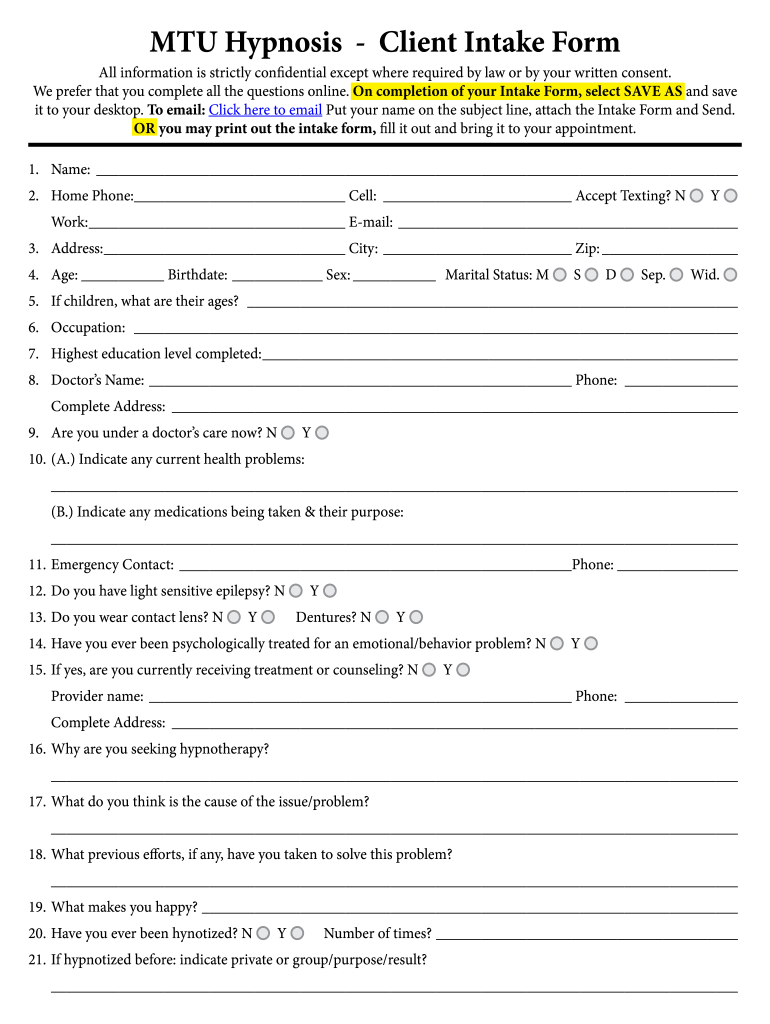
- Begin by entering your personal information in the designated fields, including your name, phone numbers, and email address. Ensure accuracy for effective communication.
- Fill out your address, age, birthdate, sex, and marital status. This information helps us understand your background better.
- Indicate if you have children and their ages. Provide details about your occupation and highest education level completed.
- Complete the health-related questions thoroughly. Include your doctor’s name and any current health problems or medications you're taking.
- Describe why you are seeking hypnotherapy and any previous experiences with hypnosis. This section is crucial for tailoring your sessions.
- Finally, review all entries for accuracy before saving the form to your desktop or emailing it directly from our platform.
Start filling out your hypnosis client intake form today for free using our platform!
It's free
Got questions?
Is it secure to sign my hypnotherapy consultation electronically?
You should use only reliable software solutions with strong data protection compliance to approve your paperwork electronically. DocHub is just the type of editor you need! It stores data on Amazon Web Servers and complies with all necessary security requirements and eSignature laws, so it’s a trustworthy way to electronically sign your hypnotherapy consultation or other forms using this tool.
Can I sign my clinical hypnotherapy consultation while I edit it?
When you edit your clinical hypnotherapy consultation with DocHub, you will not need to look for other applications or services to eSign it. An electronic signature is part of DocHub’s extensive editing toolset, which enables you to implement changes in your form without switching between websites. Simply complete your form, double-check the correctness of the information and put your electronic signature at the end to make it submission-ready in minutes.
What should be on a client intake form?
What is a new client intake?
What is an example of an intake?
Security and compliance
At DocHub, your data security is our priority. We follow HIPAA, SOC2, GDPR, and other standards, so you can work on your documents with confidence.
Learn more


